Simplifying Dynamic Web Development with Django and HTMX: Utilizing Forms and Serializers
In the previous post, we explored how HTMX transmits data to the server.
Read the previous post : Simplifying Dynamic Web Development with Django and HTMX (Part 4): Understanding Payload Transmission
While traditional JavaScript's fetch() often involves constructing and sending JSON payloads directly, we confirmed that HTMX operates more like collecting values from the DOM and sending them as form-data.
This naturally leads to a question:
"What is the most natural way to validate this HTMX-received data within Django?"
Initially, many might think of DRF Serializer. Indeed, Serializers are powerful validation tools and can be used even without JSON. However, when used with HTMX, it can sometimes feel a bit forced.
Why is that?
The reason is simple:
HTMX's fundamental flow aligns more closely with the world of HTML forms, and Django already has Form specifically designed for that very purpose.
In this post, we will outline how Django Form and DRF Serializer can each be utilized in handling HTMX requests, and which approach offers a more natural and practical choice.
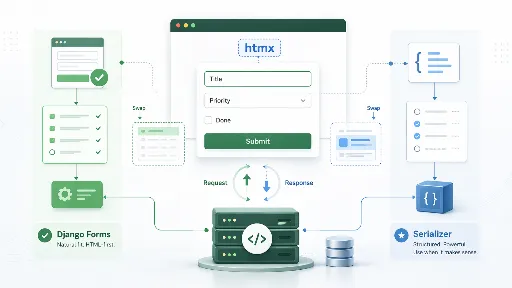
The Data Sent by HTMX is Fundamentally "Form Data"
As we explored in the previous part, HTMX primarily collects values from HTML elements and transmits them to the server. This involves sending input values within a <form>, including specific elements with hx-include, or attaching additional values using hx-vals.
In essence, HTMX's core philosophy leans towards:
- Not assembling JavaScript objects directly
- Gathering values from HTML elements
- Sending requests to the server
- Better suited for HTML fragment responses than JSON
This flow is more crucial than it might seem. Because this structure almost perfectly matches the typical Django Form processing flow.
Django Form is also designed with the following premises:
- The user inputs data into an HTML form
- The server receives
request.POST - The Form validates the data
- If there are errors, it re-renders
- If there are no issues, it saves and responds with the result
At this point, it begins to feel like HTMX and Django Form are a perfect match, like Cinderella and her glass slipper.
Therefore, we might conclude:
Django Form is the validation tool that aligns most naturally with HTMX, more so than DRF Serializer.
Why Django Forms are a Better Fit
DRF Serializer is, of course, an excellent tool. However, considering its original design context, Serializer is a tool more geared towards data serialization and API input validation.
In contrast, Django Form was built from the ground up for:
- Processing HTML form inputs
- Server-side validation
- Displaying error messages
- Retaining input values
- Re-rendering templates
This means it's much more natural when paired with a method like HTMX, which involves "receiving and swapping out parts of HTML".
Let's consider an example. A user submits a comment form.
- What if validation fails?
- The entered content should be preserved
- It should indicate which fields have issues
- The form with errors needs to be partially re-rendered
Django Form excels at this kind of UX.
Of course, Serializer also provides errors and can perform validation. But the subsequent step of "reconstructing the entire HTML form UX" is much smoother with Forms.
Therefore, when considering compatibility with HTMX, it's correct to view Form as the default choice.
The Most Natural Combination: HTMX + Django Form
First, let's look at a basic example. Here's a simple to-do registration form.
Form Definition
from django import forms

class TodoForm(forms.Form):
    title = forms.CharField(max_length=100, label="Title")
    priority = forms.IntegerField(min_value=1, max_value=5, label="Priority")
Now, in the view, you can simply pass request.POST to the Form for validation.
View Processing
from django.shortcuts import render
from django.http import HttpResponse

def todo_create(request):
    if request.method == "POST":
        form = TodoForm(request.POST)
        if form.is_valid():
            title = form.cleaned_data["title"]
            priority = form.cleaned_data["priority"]

            # Perform save logic
            # Todo.objects.create(title=title, priority=priority)

            return render(request, "todos/partials/todo_item.html", {
                "title": title,
                "priority": priority,
            })

        return render(request, "todos/partials/todo_form.html", {
            "form": form,
        }, status=400)

    form = TodoForm()
    return render(request, "todos/partials/todo_form.html", {
        "form": form,
    })
The key points here are very clear:
- Receive values sent by HTMX via
request.POST - The Form performs validation
- On success, return an HTML partial
- On failure, re-render the Form containing errors
This flow is idiomatic to Django, characteristic of HTMX, and above all, easy to maintain.
Naturally Re-displaying Errors in the Template
This is where Django Form particularly shines.
Upon validation failure, the Form object already contains the following information:
- Values entered by the user
- Field-specific error messages
- Non-field errors
- Status indicating which fields are invalid
Therefore, the partial template can simply render this information as is.
todo_form.html
<form hx-post="{% url 'todo_create' %}" hx-target="#todo-form-wrap" hx-swap="outerHTML">
    {% csrf_token %}

    {% if form.non_field_errors %}
        <div class="error-box">
            {{ form.non_field_errors }}
        </div>
    {% endif %}

    <div>
        <label for="{{ form.title.id_for_label }}">Title</label>
        {{ form.title }}
        {% if form.title.errors %}
            <div class="field-error">{{ form.title.errors }}</div>
        {% endif %}
    </div>

    <div>
        <label for="{{ form.priority.id_for_label }}">Priority</label>
        {{ form.priority }}
        {% if form.priority.errors %}
            <div class="field-error">{{ form.priority.errors }}</div>
        {% endif %}
    </div>

    <button type="submit">Submit</button>
</form>
This example is very simple, yet it effectively demonstrates the synergy between HTMX and Django Form.
- On failure, the entire form can be re-rendered
- User-entered values are preserved
- Error messages are naturally displayed next to their respective fields
With the traditional fetch() + JSON + manual DOM manipulation approach, implementing this flow would have required a considerable amount of JavaScript. However, the HTMX and Django Form combination allows for much simpler handling using only server-side code and templates.
So, Are Serializers Unnecessary?
Saying "Serializers are unnecessary" might be an overstatement. Perhaps it's better to express it as: "Serializers are not necessarily the default choice".
Indeed, DRF Serializers remain quite appealing in the following situations:
- If DRF is already extensively used throughout the project
- If you want to reuse the same validation logic for both APIs and server-rendered screens
- If the input validation logic is complex and already well-structured within a Serializer
- If there are plans to expose the same functionality to mobile apps or external APIs later on
In other words, the question isn't "Can Serializers be used with HTMX?", but rather,
"Is it truly advantageous for the overall architecture to bring in a Serializer here?"
Serializers Can Also Be Used
For example, let's say you already have a Serializer like the one below:
from rest_framework import serializers

class TodoSerializer(serializers.Serializer):
    title = serializers.CharField(max_length=100)
    priority = serializers.IntegerField(min_value=1, max_value=5)
In this case, it can certainly be used with HTMX requests.
from django.shortcuts import render

def todo_create_with_serializer(request):
    if request.method == "POST":
        serializer = TodoSerializer(data=request.POST)

        if serializer.is_valid():
            title = serializer.validated_data["title"]
            priority = serializer.validated_data["priority"]

            return render(request, "todos/partials/todo_item.html", {
                "title": title,
                "priority": priority,
            })

        return render(request, "todos/partials/todo_form_serializer.html", {
            "errors": serializer.errors,
            "data": request.POST,
        }, status=400)
As you can see, there are no technical issues whatsoever.
This is because a Serializer is not a tool exclusively for receiving JSON.
However, a subtle difference emerges here.
When using a Form:
- Input value retention
- Field-by-field rendering
- Error binding
- Seamless connection with templates
These aspects flow naturally.
On the other hand, when using a Serializer:
- You have to manually unpack
serializer.errorsto fit the template structure - Existing input values must be passed separately
- The developer needs to pay more attention to the connection with HTML form re-rendering
In other words, while it can be used, it generally involves more manual work.
This is precisely why Serializers might feel somewhat forced when used with HTMX.
Conclusion
In the previous part, we examined how HTMX sends data. In this part, we summarized the most natural way to validate that data within Django.
- HTMX inherently pairs well with form-data
- Django Form is a tool specifically designed for this flow
- Therefore, in terms of compatibility with HTMX, Form is the most natural choice
- DRF Serializer can be used, but it's more akin to a strategic option
Personally, I believe that to effectively leverage HTMX, it's necessary to regain not only the "sense of treating AJAX in an HTML-like manner" but also the "sense of utilizing Django Forms and form tags".
Related Posts
- Simplifying Dynamic Web Development with Django and HTMX (Part 1)
- Simplifying Dynamic Web Development with Django and HTMX - Ajax (Part 2)
- Simplifying Dynamic Web Development with Django and HTMX (Part 3): Integrating with Django
- Simplifying Dynamic Web Development with Django and HTMX (Part 4): Understanding Payload Transmission
- Simplifying Dynamic Web Development with Django and HTMX: Leveraging Forms and Serializers
- Simplifying Dynamic Web Development with Django and HTMX: Mastering Triggers

There are no comments.