Simplifying Dynamic Web Development with Django and HTMX (Part 4): How to Handle Payloads?
When sending POST requests using fetch for Ajax in traditional JavaScript, you typically assemble the payload directly using JSON.stringify().
It generally looks like this:
fetch("/api/todos/", {
  method: "POST",
  headers: {
    "Content-Type": "application/json",
    "X-CSRFToken": csrftoken
  },
  body: JSON.stringify({
    title: "장보기",
    done: false,
    priority: 3
  })
})
But what about HTMX? How exactly does hx-post send data to the server? Many examples only demonstrate very simple functionalities, making it surprisingly difficult to find practical examples for constructing and sending complex payloads.
In this post, we'll thoroughly explore HTMX's data transmission methods and how to handle them on the server-side.
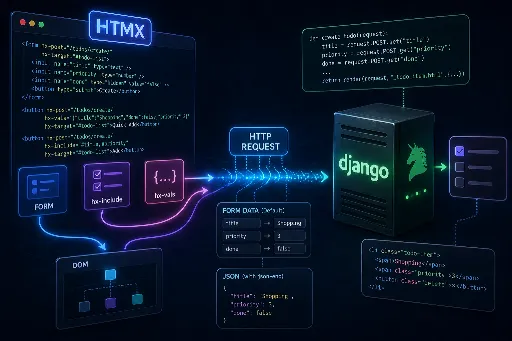
HTMX Data Transmission Methods
The approach to payloads with fetch and data transmission with hx-post are quite distinct.
With fetch, developers directly create objects and convert them to JSON for the request body. In contrast, HTMX primarily collects values from the DOM for transmission.
HTMX's philosophy isn't about "directly assembling JS objects," but rather "gathering values from HTML elements to construct request parameters." It typically uses the following three methods for this purpose.
1) Sending Values Based on Forms
This is the most HTML-native approach and integrates well with Django.
<form hx-post="/todos/create/" hx-target="#todo-list">
    <input type="text" name="title" placeholder="제목">
    <input type="number" name="priority" value="3">
    <input type="hidden" name="done" value="false">
    <button type="submit">등록</button>
</form>
In this scenario, HTMX collects the input values within the form and sends them with the request. The default encoding is URL-encoded form data, just like a standard form submission.
In a Django view, you can receive them as usual:
def create_todo(request):
    title = request.POST.get("title")
    priority = request.POST.get("priority")
    done = request.POST.get("done")
2) Including Values from Other Elements Without a Form: hx-include
This is used when you want to attach hx-post to a single button and selectively send input values located elsewhere.
<input type="text" id="title" name="title" placeholder="제목">
<input type="number" id="priority" name="priority" value="3">

<button hx-post="/todos/create/"
        hx-include="#title, #priority"
        hx-target="#todo-list">
    등록
</button>
hx-include includes the values of the specified elements in the request. This allows you to achieve a payload-like result without wrapping everything in a <form>, which is very useful when there are fewer input fields.
3) Adding Hidden or Computed Values: hx-vals
This feature is the closest to the concept of directly constructing part of the payload object in fetch.
<button hx-post="/todos/create/"
        hx-vals='{"title": "장보기", "done": false, "priority": 3}'
        hx-target="#todo-list">
    빠른 등록
</button>
hx-vals adds additional parameters to the request. While it defaults to JSON-like syntax as shown above, you can also send dynamic JavaScript computed values by prefixing with js:.
<input type="text" id="title" placeholder="제목">

<button hx-post="/todos/create/"
        hx-vals='js:{title: document.querySelector("#title").value, done: false, priority: 3}'
        hx-target="#todo-list">
    등록
</button>
In this case, Django still reads these values from request.POST. This is because hx-vals is about "defining values using JSON-like syntax," not about making the request body itself JSON.
Important Note: hx-vals Is Not the Same as "JSON Payload"
This is often the most confusing aspect when first encountering HTMX.
<button hx-post="/my-url/" hx-vals='{"a":1, "b":2}'>
This code does not mean "sending a JSON object as the body"; rather, it's closer to adding a=1&b=2 to the request parameters. This means the server should still process it as form data.
What if You Really Need to Send a JSON Body?
If you absolutely need to use an application/json format, similar to fetch(... JSON.stringify(payload)), then HTMX's json-enc extension is required.
Configure it as follows, according to the official documentation:
<script src="https://unpkg.com/htmx.org@1.9.12/dist/ext/json-enc.js"></script>

<button hx-post="/api/todos/"
        hx-ext="json-enc"
        hx-vals='{"title": "장보기", "done": false, "priority": 3}'
        hx-target="#result">
    JSON으로 전송
</button>
Now, this becomes the familiar JSON payload method. In this case, the Django view will find request.POST empty, so you'll need to read request.body directly.
import json

def create_todo_api(request):
    data = json.loads(request.body)
    title = data.get("title")
    # ... 로직 처리 ...
    return JsonResponse({"ok": True})
HTMX and DRF Have Philosophical Gaps, But Don't Necessarily Need to Merge
While you can send JSON using an extension, the question remains whether this aligns with the HTMX philosophy. This is where the two philosophies of "data-centric (DRF)" and "hypermedia-centric (HTMX)" diverge.
If you've decided to properly leverage HTMX, I believe it's worth stepping away from a data-centric mindset for a moment. Sending values via <form>, hx-include, and hx-vals, and having the server receive them via request.POST to return HTML snippets instead of JSON—that's where HTMX truly shines.
But What If You Don't Want to Give Up DRF Serializers?
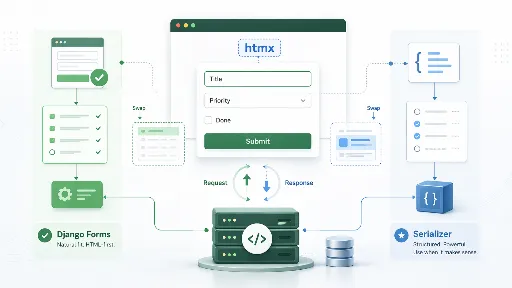
DRF's serializers are incredibly powerful. Should you abandon this convenient validation tool and resort to tedious request.POST.get() calls just because you're using HTMX?
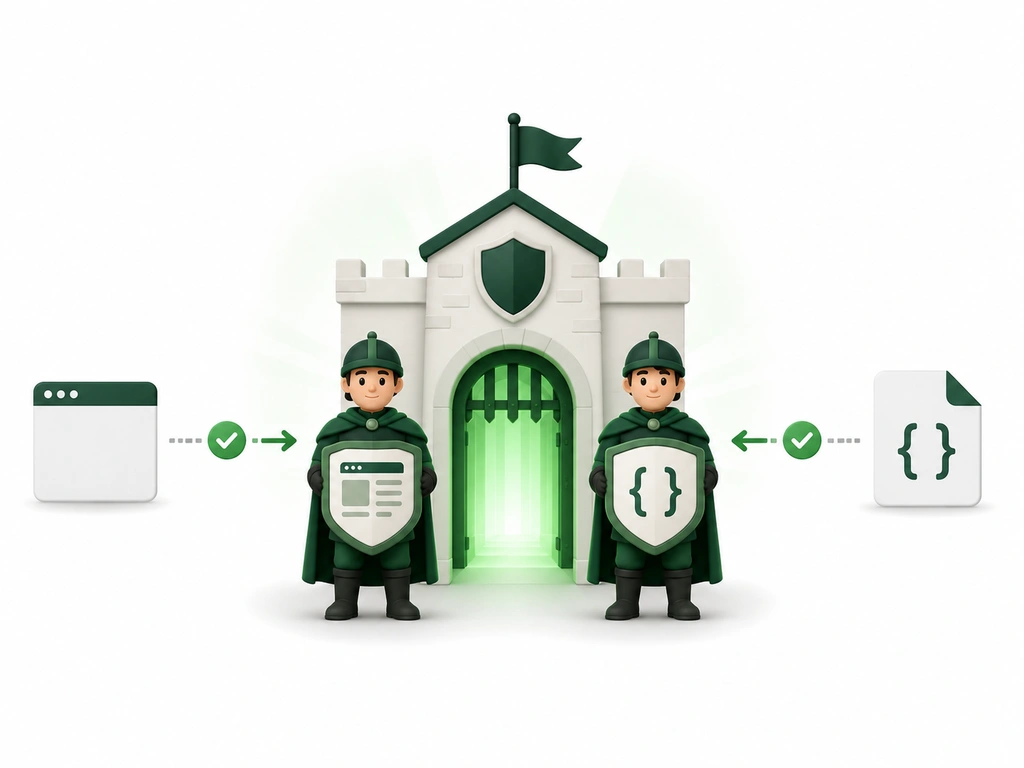
Fortunately, DRF serializers are excellent at validating not only JSON but also form data. Since this topic could get lengthy, we'll delve into "The Coexistence of HTMX and DRF Serializers" in the next part.
Conclusion
To summarize today's content:
- HTMX primarily collects values from the DOM. Its approach differs from
fetch, where you manually construct payload objects. - Three transmission methods:
<form>for sending everything,hx-includefor selecting specific values, andhx-valsfor adding custom values. - The default is form data. Be aware that
hx-valsuses JSON syntax, but it doesn't send an actual JSON body. - If JSON is essential, use the
json-encextension. However, remember that HTMX's true strength lies in exchanging HTML fragments.
In the next session, we'll return with methods to integrate the convenience of DRF into HTMX!
Related Posts
- Simplifying Dynamic Web Development with Django and HTMX (Part 1)
- Simplifying Dynamic Web Development with Django and HTMX - Ajax (Part 2)
- Simplifying Dynamic Web Development with Django and HTMX (Part 3): Integrating with Django
- Simplifying Dynamic Web Development with Django and HTMX (Part 4): Understanding Payload Transmission
- Simplifying Dynamic Web Development with Django and HTMX: Leveraging Forms and Serializers
- Simplifying Dynamic Web Development with Django and HTMX: Mastering Triggers

There are no comments.