Is the Linux /usr Directory an Abbreviation for User?
The butterfly effect created by a hardware incident 50 years ago
When you use Linux or Unix systems, you’ve probably wondered at least once.
"What on earth does
/usrstand for?"
At first glance it looks like it’s just User minus the e.
If that were the case, why not just call it /user? Why insist on /usr?
- Is it because typing is a hassle?
- Was there a character limit?
- Yet directories like
/boot,/home,/procare all four letters long.
If it really meant “user”, we would have written /user. The ambiguous choice of /usr hides a history we don’t know.
Today we’ll unravel the 50‑year‑old, bittersweet hardware story that ties into this /usr directory—something every developer will nod to and say, “Ah… that explains it.”
1. The Bottom Line: Today’s /usr is NOT “User”

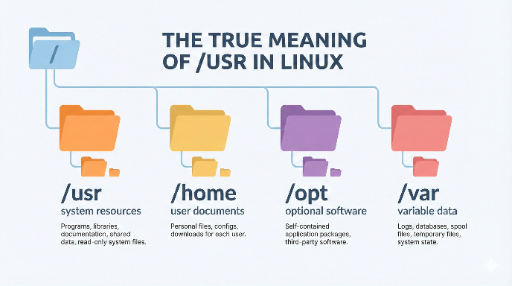
In the current Linux Filesystem Hierarchy Standard (FHS), /usr is defined as:
A global area for read‑only programs, libraries, and shared data
That’s why the structure looks like this:
/usr/bin– most user‑level executables/usr/sbin– system‑administration executables/usr/lib*– libraries used by those executables/usr/share– architecture‑independent data such as manuals, icons, and locales
It’s far from “personal user files.” Home directories (~/…), documents, photos, etc., all live under /home.
So, from a modern perspective, we can define /usr in one line:
/usr= “Not a User, but the OS and apps’ shared system‑resource warehouse.”
That leaves one question:
“Wasn’t
usroriginally an abbreviation for user?”
That’s where the fun begins. Its origin was indeed “user.” But over the past 50 years, its usage flipped completely.
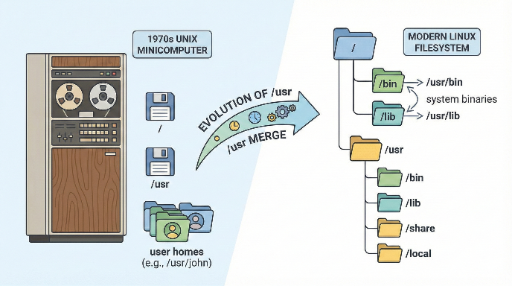
2. Early Unix: /usr/username Was the Home Directory
Let’s rewind to the early 1970s.
At that time, a Unix system’s home directories weren’t /home/alice as we know them today. They were directly under /usr, e.g., /usr/alice.
So back then, /usr truly meant:
“A directory for user‑related things.”
The machines were PDP‑11s, and disks were unimaginably small—just a few dozen kilobytes or megabytes. The structure made sense:
- Root disk (
/) – a tight space holding only the core OS files - Second disk (
/usr) – a relatively generous space where user home directories lived
This layout was rational. The problem? Unix (and its developers) grew too fast.
3. “Disk Full” → Move System Files into /usr
Unix kept expanding, adding new commands and features. The catch was that the root disk (/) capacity stayed the same.
One day the reality hit:
“There’s no more room on
/for programs…”
Developers made a pragmatic choice:
“The second disk (
/usr) is spacious, so let’s move non‑essential programs there.”
Thus, what began as a user home directory slowly became a dumping ground for programs, libraries, and data.
The result is the structure we know today:
/bin– essential boot commands (originally on the root disk)/usr/bin– the rest of the commands (migrated to the second disk)/libvs./usr/libfollows a similar logic
In short:
The original user house,
/usr, became a system‑file storage simply because it had spare space.
It’s a classic “disk‑space‑driven hack.”
Later, as Unix evolved:
- Home directories moved to more intuitive places like
/home /usrsettled firmly as the shared program/library area
The irony is clear:
- Name:
usr(user) - Content: system and app files
The owner moved out, but the house is now full of system files.
4. “Unix System Resources”? That’s a Later Coinage
This paradox persisted long enough that someone coined a new meaning:
“Let’s call
/usran abbreviation for Unix System Resources.”
You may have seen documents that say “/usr = Unix System Resources.” The key point is:
This is a backronym—a later, retroactive interpretation, not the original intent.
Early Unix documents and testimonies show:
/usrwas originally user- It housed
/usr/usernamehome directories - Disk‑space constraints pushed everything else into
/usr
Over time, people simplified the narrative:
“Now that
/usrholds system resources, let’s call it Unix System Resources.”
That’s a classic backronym: an acronym that’s retrofitted to fit an existing word.
5. From 50‑Year‑Old Structure to Today: The Usr Merge
You might wonder:
“If disks are now plenty, why keep
/binand/usr/binseparate?”
Modern Linux distributions (Ubuntu, Fedora, Debian, etc.) are actively cleaning up this historical legacy—the /usr merge (UsrMerge).
Try running this on a recent distro:
$ ls -l /
lrwxrwxrwx 1 root root    7  ...  bin  -> usr/bin
lrwxrwxrwx 1 root root    7  ...  sbin -> usr/sbin
lrwxrwxrwx 1 root root    7  ...  lib  -> usr/lib
Most systems will look like this.
/binis a symbolic link to/usr/bin/sbinand/libare similar
So the current real structure is:
“Most programs and libraries live entirely under
/usr.”
Why merge? Several reasons:
- Simplifies package management and porting
- Makes container/ISO images easier to treat as a single system image
- No longer necessary to maintain the old split due to modern hardware limits
The fascinating part is that all of this traces back to a 1970s decision to cram programs into /usr because disks were tiny.
6. How Should We Think About /usr Today?
When working with a Linux system, keep this in mind:
“
/usris the shared area for programs, libraries, and shared data.”
Conversely:
- Personal files / settings →
/home/your_account - Frequently changing data (logs, cache, DBs) →
/var - Apps installed outside the distro’s package manager → usually under
/optor/usr/local(Ask Ubuntu)
So:
/usr= OS and app world/home= User’s personal world
This distinction reduces confusion.
In Closing: The Story Behind a Directory Name
Inside /usr lies:
- The pragmatic concerns of early Unix developers facing disk‑space limits
- The “let’s do this now, tidy up later” mindset
- The decades‑long standardization and cleanup effort (UsrMerge)
Rather than simply memorizing:
- “
/usr= Unix System Resources” - “
/usris not a user directory”
Understanding this background gives you a richer perspective when you see /usr/bin or /usr/lib in the terminal.
“Ah, that’s the result of a 50‑year‑old disk‑space hack.”
Even a single directory in a black terminal holds the legacy of hardware limits and developer compromises—quite fascinating, isn’t it?

There are no comments.