/usr Isn't 'User'? Unveiling the True Identity of This Linux Directory
When you're new to Linux, it's easy to mistakenly assume, "Ah, /usr must be the user folder!" But more often than not, attempts to save your own files there are met with permission denied errors.
To put it simply, in modern Linux, /usr is not a 'user's home' but rather a 'repository for shared system resources.'
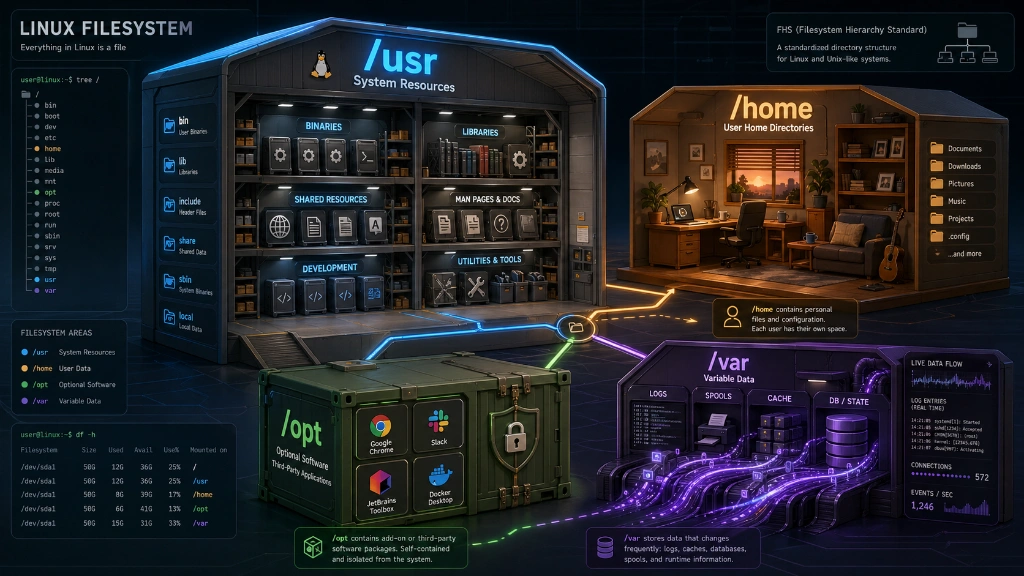
1. /usr: The Misconception of its Name and its True Meaning
In the early days of Unix, /usr indeed used to contain user home directories. However, as systems grew, roles became separated. Today, it's more appropriate to interpret /usr as an abbreviation for Unix System Resources. While its origin might have been user, it no longer functionally carries that meaning.
-
Nature: A collection point for read-only data and programs essential for system operation.
-
Core Role: Most executables, libraries, and shared data added after OS installation reside here.
2. A Look Inside /usr (Key Summary)
Inside /usr, you'll find a structure that resembles a complete, small Linux system.
| Directory | Key Contents | Notes |
|---|---|---|
/usr/bin |
Executables for general users | e.g., python, curl, git |
/usr/sbin |
Executables for system administrators | e.g., network configuration, daemon management |
/usr/lib |
Libraries required for program execution | .so files, similar to Windows .dlls |
/usr/share |
Architecture-independent shared data | e.g., manuals (man), icons, fonts |
/usr/local |
Programs installed directly by users | Takes precedence when installed via source compilation, etc. |
💡 Note: What's the difference between
/binand/usr/bin?Historically,
/bincontained only the minimal tools essential for booting. However, recent distributions (such as Ubuntu, Fedora, etc.) tend to simplify management by consolidating them, creating a symbolic link from/binto/usr/bin. The relationship between/sbinand/usr/sbinis similar.
3. Comparing Four Often-Confused Directories
Here's a clear distinction of the roles of four directories that often cause confusion.
-
/home(Personal Space): This is where user's personal documents and configuration files (like~/.bashrc) are located. Even if you reinstall the OS, your data remains safe as long as this directory is preserved. -
/usr(System Resources): This is the repository for shared programs managed by package managers (e.g., apt, dnf). -
/opt(External Applications): This is the space for third-party applications like Google Chrome or Discord that are installed "as a whole" and don't follow the system's package management. -
/var(Variable Data): This directory accumulates data that continuously changes during system operation, such as log files and database files.
4. Practical Guide: Where Should I Put My Files?
The location for your files varies depending on the situation. Just by following these rules, you'll be recognized as someone who 'understands Linux'.
-
Simple scripts for personal use:
~/bin(create abinfolder under your home directory) or~/.local/bin -
Programs you've created for system-wide use:
/usr/local/bin(a safe, shared space that avoids conflicts with package managers) -
Large commercial software downloaded from external sources:
/opt/application_name -
Places you should never touch:
/usr/bin(This directory is managed by the system package manager; directly adding or deleting files here can lead to package corruption.)
4-Line Summary
-
/usris NOT a user data folder. -
It is a repository for programs and resources shared by the system.
-
Keep your personal files in
/home, and directly installed shared applications in/usr/localor/opt. (The author prefers to store application images in/opt.) -
For personal scripts, creating and managing them in the
~/.local/bindirectory provides a good sense of organization.
Has this clarified some of your questions about the /usr directory? As a Linux enthusiast, I hope this article helps many of you better understand Linux and fall in love with the charm of the Linux OS.





There are no comments.