Turning Python Scripts into "Commands"
You're probably familiar with adding a shebang like #!/usr/bin/env python3 to the first line of your Python scripts in Linux. However, many people seem to skip it. They might think, "It just saves me the trouble of typing python3 every time, and that's not a big deal."
Frankly, if you describe it as a "feature that saves a bit of typing," it doesn't sound very exciting. But what if I told you this:
"The art of making your Python code behave like a native Linux command."
Now that sounds intriguing, doesn't it?
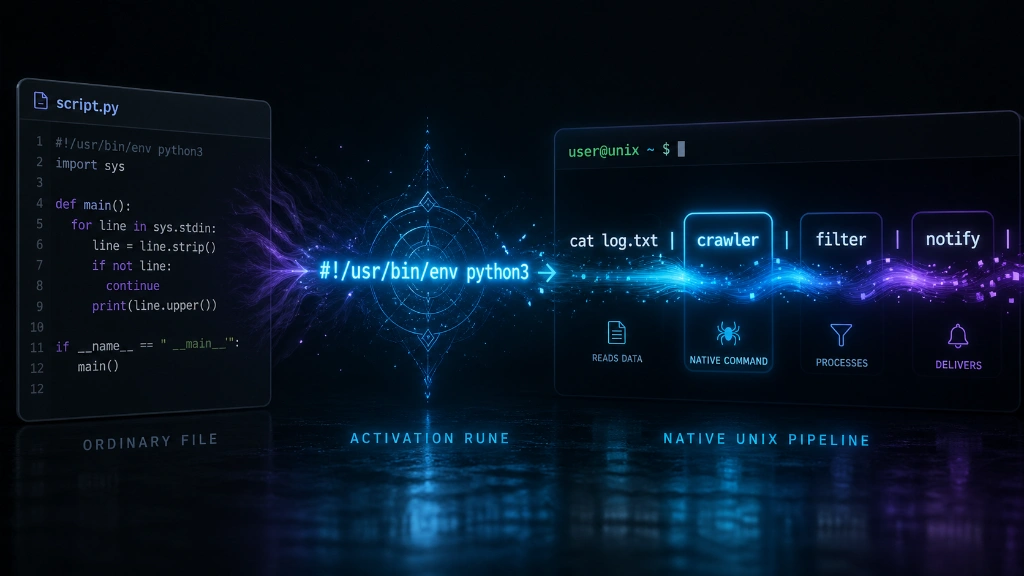
The Moment Your Python Script Becomes a 'Tool'
This single line:
#!/usr/bin/env python3
If you've merely understood this as "telling the system where Python is," then until now, you've just been executing code. But from the moment you truly leverage it, you're 👉 adding a new tool to your system.
The difference is more significant than you might think.
1. Breaking Free from the .py Shackles
We habitually write:
python3 crawler.py
This essentially feels like:
"Hey, this is a Python file... could you please run it with Python?"
It's quite passive, isn't it?
However, once you add a shebang and grant execute permissions with chmod +x, the file extension becomes unnecessary.
./crawler
The tone completely shifts.
Focusing on Functionality Over Language
crawler
backup
log-cleaner
notify
Now, it no longer matters whether these files are:
-
Python
-
C
-
Go
In other words, you stop focusing on how the tool was implemented and instead concentrate on the script's functionality itself. This psychological shift is quite noticeable once you experience it firsthand.
Your code is no longer:
-
script.py -
but a native Linux command
It feels as if your code stands proudly alongside ls, grep, and awk.
This is the first thrill.
2. Seamless Integration into Pipelines
Personally, I believe the true power of Linux lies in the pipe |. Among its countless advantages, the existence of pipes is truly paramount.
Connecting commands 👉 to create a single flow
If you were to construct this beautiful pipeline with scripts lacking a shebang, it would look like this:
cat access.log | python3 parser.py | python3 filter.py
Something... breaks the flow.
-
"Oh, this is Python."
-
"And another interpreter."
You're constantly aware of it.
However, a script equipped with a shebang would look like this:
cat access.log | parser | filter | notifier
Or
ps aux | my-filter | sort | uniq
Doesn't the feeling change?
The flow remains uninterrupted
-
Receive input
-
Process it
-
Pass it on
It feels like a seamless continuation.
To put it a bit dramatically, it feels less like a "Python script" and more like a filter adhering to the Unix philosophy. Your code seems to shift its allegiance, moving from the world of Python into the world of Linux.
3. Easily Creating Your Own Linux Commands with Python
Of course, for simple automation tasks in Linux, Bash scripts are often the first thing that comes to mind. They allow you to wield system commands as if they were extensions of yourself, without the need for separate package installations (imports).
But let's be honest with ourselves. When conditional statements get complex and you start dealing with data structures, Bash code can quickly turn into an "unreadable enigma" later on. Haven't you felt frustrated reopening a script for maintenance months later, even if it seemed perfectly clear when you wrote it?
This is where Python's true value shines.
-
Readability Triumphs: That sense of relief when you open a file for maintenance months later. Python graciously explains what you were thinking in the past.
-
Powerful Package Ecosystem: Complex API calls or data processing can be handled in just a few lines using Python's advanced packages. While you're wrestling with Bash, you could have already finished your implementation in Python and be enjoying a cup of coffee.
Ultimately, the strategy is to "write the logic with Python's productivity and execute it with the simplicity of native Linux commands."
Remove the .py extension, grant execute permissions with chmod +x, and then subtly place that file somewhere in your PATH. Then, watch your code run when you type just one word, like deploy, into your terminal.
A unique sense of satisfaction will wash over you. You won't just feel like you've written code, but rather that you've created a 'new command of your own' that permanently resides on your system.
Conclusion
The shebang is not a trivial piece of syntax.
#!/usr/bin/env python3
I'd argue it's not just an execution path, but a declaration that transforms a simple script into a command.
Now, dear readers, try adding a shebang to your Python code and typing your script's name directly into the terminal. The feeling you get at your fingertips is the essence of this technique.
Read More




There are no comments.