Scheduling Tasks on Linux: A Comparison of cron and systemd timers
In Linux system administration, when a task runs is as important as what the task does. The traditional choice is cron, while many modern distributions favor systemd timers.
This article compares the two and outlines when each is most appropriate.
1. Why Compare cron and systemd timers?
Most Linux servers have similar requirements:
- Run a backup at 3 a.m. every day
- Execute a health‑check script every five minutes
- Compress and clean logs every Sunday
- Perform a one‑time initialization job one minute after boot
Historically, all of these were handled by cron. Today, with systemd as the default init system, systemd timer unit has become a powerful alternative.
2. Basics of cron
2.1 What is cron?
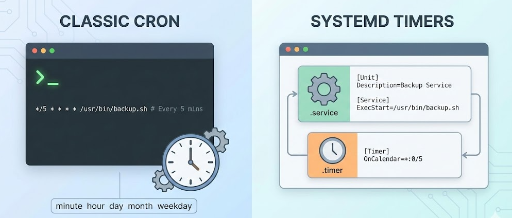
cron is an old Unix/Linux scheduler that runs commands at specified times or intervals, configured mainly through crontab files.
2.2 Where cron is configured
- System‑wide:
/etc/crontab,/etc/cron.d/ - Per‑user: edited with
crontab -e
For example, to run a backup script at 3 a.m. daily:
0 3 * * * /usr/local/bin/backup.sh
The fields mean:
minute hour day month weekday command
0     3   *    *    *      /usr/local/bin/backup.sh
2.3 Advantages of cron
- Mature and battle‑tested
- Consistent across most Unix/Linux systems
- Simple syntax with plenty of examples
- Works on pre‑systemd systems
2.4 Limitations of cron
- Detached from service management—hard to tell which service a job is tied to
- Logging is scattered (syslog, mail, etc.)
- Weak dependency handling – no built‑in way to require other services
- Relative timing (e.g., “5 minutes after boot”) is awkward
3. Basics of systemd timers
3.1 What is a systemd timer?
A systemd timer is a unit that triggers another systemd service based on conditions such as time or elapsed time after boot.
You typically define a pair:
myjob.service– defines the actual workmyjob.timer– defines when to run it
3.2 Example: daily backup with systemd timer
(1) Service unit: /etc/systemd/system/backup.service
[Unit]
Description=Daily backup job

[Service]
Type=oneshot
ExecStart=/usr/local/bin/backup.sh
(2) Timer unit: /etc/systemd/system/backup.timer
[Unit]
Description=Run daily backup at 3:00

[Timer]
OnCalendar=*-*-* 03:00:00
Persistent=true

[Install]
WantedBy=timers.target
Enable it:
sudo systemctl daemon-reload
sudo systemctl enable --now backup.timer
3.3 Advantages of systemd timers
- Explicitly linked to a service – clear ownership
- Easy log access via
journalctl -u backup.service - Flexible triggers:
OnCalendar=– cron‑like expressionsOnBootSec=– X seconds after bootOnUnitActiveSec=/OnUnitInactiveSec=– relative to last run- Dependency handling – e.g.,
After=network-online.target - Integrated with the systemd ecosystem (
systemctl list-timers,systemctl status, etc.)
3.4 Disadvantages of systemd timers
- Steeper learning curve than cron (two files per job)
- Requires a systemd environment – not available on very old or non‑systemd systems
- May feel overkill for simple one‑liner tasks
4. Feature comparison
| Feature | cron | systemd timer |
|---|---|---|
| Configuration location | /etc/crontab, crontab -e |
/etc/systemd/system/*.service & *.timer |
| Target | Any command/script | systemd service |
| Time syntax | 5‑field cron expression | OnCalendar, OnBootSec, etc. |
| Relative timing (after boot) | Limited, requires tricks | Directly supported via OnBootSec |
| Failure/retry handling | Manual | Service unit options |
| Logging | Syslog, mail | journalctl -u <service> |
| Dependencies (network, filesystem) | None | After=, Requires= |
| System integration | Low | High (systemd) |
| Portability | High | Depends on systemd |
5. Illustrative examples
5.1 Daily 3 a.m. backup: cron vs timer
cron
0 3 * * * /usr/local/bin/backup.sh
systemd timer
# backup.service
[Unit]
Description=Daily backup job

[Service]
Type=oneshot
ExecStart=/usr/local/bin/backup.sh
# backup.timer
[Unit]
Description=Run daily backup at 3:00

[Timer]
OnCalendar=*-*-* 03:00:00
Persistent=true

[Install]
WantedBy=timers.target
5.2 One‑time job 5 minutes after boot
With cron you’d need a workaround (e.g., @reboot + sleep). With systemd timer it’s straightforward:
# init-job.service
[Unit]
Description=Run custom init job after boot

[Service]
Type=oneshot
ExecStart=/usr/local/bin/init-job.sh
# init-job.timer
[Unit]
Description=Run init job 5 minutes after boot

[Timer]
OnBootSec=5min
AccuracySec=1min

[Install]
WantedBy=timers.target
After boot, the service runs once.
6. When to choose which
6.1 Stick with cron if:
- You already have many stable cron jobs and don’t need systemd integration
- The server is small with only a handful of simple tasks
- You must support non‑systemd environments (some containers, BSD, very old OSes)
6.2 Prefer systemd timers if:
- Your services are already managed by systemd
- You want unified logging and status via
journalctl - You need relative timing (after boot, after last run)
- Dependencies on other services (network, database) are required
- Consistent observability across CI/CD or production workloads is important
7. Migrating existing cron jobs to systemd timers
- List current cron jobs
*
crontab -l* Inspect/etc/crontaband/etc/cron.d/* - Split each job into a service + timer * Service: what to run * Timer: when to run
- Convert time expressions
*
0 3 * * *→OnCalendar=*-*-* 03:00:00**/5 * * * *→OnCalendar=*:0/5 - Test manually
*
systemctl start myjob.service*systemctl start myjob.timerandsystemctl list-timers - Disable the old cron entry once the timer is stable
8. Conclusion: coexistence is possible
In short:
cronremains a simple, portable schedulersystemd timersoffers service‑centric management, observability, and flexible triggers for modern Linux environments
There isn’t a single “right” choice. For new, service‑bound tasks, systemd timers are usually preferable, while existing cron jobs can stay as they are unless you need tighter integration.



There are no comments.