🐳 When Docker Network Merging is a Hassle and You Need to Communicate Urgently via Host Ports
Typically, the standard way for containers to communicate is by creating a shared bridge network and calling services by their names (e.g., http://app-b:8080). However, in real-world scenarios, unavoidable situations can arise that make following the standard difficult.
Use This Method in These Tricky Situations
- When communicating with services directly installed on the host: For example, when your DB or Redis is installed directly on the host OS, not in a container, making network merging impossible.
- When you're hesitant to modify network settings of third-party containers: You might fear causing issues by forcing your container into a complex network setup that you don't manage.
- When you need to 'temporarily' verify connectivity during local development: When network design can wait, and your immediate priority is to check if requests reach a service exposed on a host port.
In such cases, host.docker.internal is a useful cheat code.
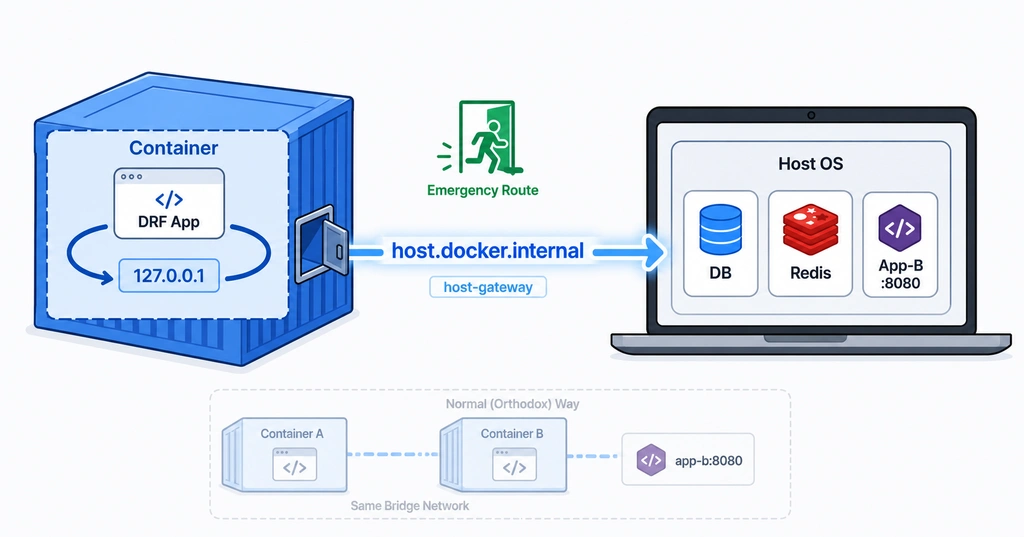
Solution: host.docker.internal, the "Window to the World Outside Your Container"
Inside a container, shouting 127.0.0.1 will only point back to itself (the container). By using the special domain host.docker.internal, you can bypass the container's isolation and resolve to the host machine's IP address.
Python (DRF) Code Example:
# Use 'host.docker.internal' instead of 'localhost' to access host ports.
# If App-B is bound to port 8080 on the host, call it like this:
NEXTCLOUD_URL = "http://host.docker.internal:8080"

response = requests.get(NEXTCLOUD_URL)
⚠️ Linux Users Require Manual Configuration
While Docker Desktop (Mac/Windows) provides this out of the box, on a pure Linux server, Docker does not automatically resolve this domain. You must explicitly declare that "this domain refers to the host IP" during build or runtime.
Docker Compose Configuration Example:
services:
  drf-app:
    image: my-drf-app-image
    extra_hosts:
      # Declare that host.docker.internal will access the host gateway
      - "host.docker.internal:host-gateway"
It's Not Always the Right Answer
To reiterate, this method is close to a last resort.
- Best practice: Create a shared bridge network and communicate using container names (most secure).
- Reasons to use this method: When you need to access processes running directly on the host, or in an 'isolated' environment where network structures simply cannot be merged.
Consider this 'emergency exit' method, which I noted down last year, as a hidden card to be played only when standard approaches are blocked!




There are no comments.