Effortlessly Implement Robust Asynchronous Communication with the Server
HTMX enables the implementation of powerful asynchronous features in server-centric web development frameworks like Django, all without the complexities of JavaScript. In this installment, we will explore the internal workings of how HTMX handles Ajax requests and how it communicates with actual Django views through concrete examples.
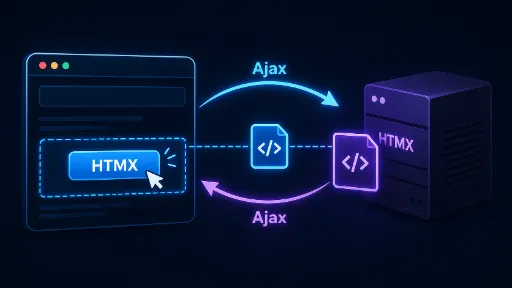
The Essence of HTMX: HTML is the Message
Traditional Ajax communication (e.g., axios, fetch) involves receiving JSON data from the server, which JavaScript then interprets to re-render the screen. However, HTMX adheres to the 'Hypermedia as the Engine of Application State (HATEOAS)' principle. This means the server sends ready-made HTML fragments instead of data (JSON), and HTMX simply 'swaps' them into the specified location.
4 Steps of HTMX Ajax Communication
- Event Trigger: The user interacts with an HTML element (e.g., a button).
- Ajax Request: HTMX invokes the browser's
fetchAPI to send a request to the server. - HTML Response: After processing the logic, the server returns only the necessary HTML fragment, not the entire page.
- DOM Swap: HTMX immediately inserts the received HTML into the element specified by
hx-target.
Practical Example: Implementing a "Like" Button
Beyond just changing a number, let's explore how HTML fragments are exchanged between the server and client.
1. Frontend (Template)
This approach involves sending a request with hx-post and replacing the entire #like-section with the response from the server.
<div id="like-section">
    <button hx-post="/like/"
            hx-target="#like-section"
            hx-swap="outerHTML">
        ❤️ 좋아요 ({{ likes_count }})
    </button>
</div>
When hx-target and hx-swap are explicitly defined within the HTML tags, as in this example, you can immediately understand "what changes where when this button is clicked" without having to search through JavaScript files when rereading the code later. Personally, while it might be slightly inconvenient to delve into the backend's View function to understand the code, the presence of hx- attributes directly within the HTML tag, as shown above, suggests it might be superior in terms of Locality of Behavior compared to inline JavaScript.
2. Backend (Django View)
The crucial point here is that we use render instead of JsonResponse.
from django.shortcuts import render

def like_post(request):
    # 좋아요 로직 처리 (예: DB 업데이트)
    new_count = 10

    # 전체 페이지가 아닌, 버튼 부분만 포함된 작은 템플릿 조각을 반환합니다.
    return render(request, 'partials/_like_button.html', {
        'likes_count': new_count
    })
3. Partial Template for Response
This is the 'HTML fragment' that the server will deliver to the client. Since hx-swap="outerHTML" is configured, this content will replace the entire existing #like-section.
<!-- partials/_like_button.html -->
<div id="like-section">
    <button hx-post="/like/"
            hx-target="#like-section"
            hx-swap="outerHTML"
            class="btn-liked">
        ❤️ 좋아요 ({{ likes_count }})
    </button>
</div>
Why this approach? (Understanding the Principle)
In the traditional approach, after receiving JsonResponse({'likes': 10}), you would have to write JavaScript code like document.getElementById('count').innerText = data.likes.
However, the HTMX approach offers: 1. Prevents Logic Fragmentation: The server (Django template) manages the definition of "how the screen should change when a like button is pressed." 2. Data-View Synchronization: Since the HTML sent from the server is directly injected into the display, errors that occur when processing data on the client side are eliminated.
Concluding This Part
Using HTMX is not merely about reducing code; it's a return to leveraging the web's intrinsic capability of 'Hypermedia (HTML)' to its fullest. This allows developers to escape the complexities of JavaScript state management and focus more on server-side logic.
Read Related Posts :
- Simplifying Dynamic Web Development with Django and HTMX (Part 1)
- Simplifying Dynamic Web Development with Django and HTMX - Ajax (Part 2)
- Simplifying Dynamic Web Development with Django and HTMX (Part 3): Integrating with Django
- Simplifying Dynamic Web Development with Django and HTMX (Part 4): Understanding Payload Transmission
- Simplifying Dynamic Web Development with Django and HTMX: Leveraging Forms and Serializers
- Simplifying Dynamic Web Development with Django and HTMX: Mastering Triggers