👻 Linux's Invisible Helpers: Daemons and Units
When operating a Linux system, you'll encounter countless 'daemons' running silently in the background. We manage them using a tool called systemd. What's the relationship between these two, and why do they have such distinctive names? Just as there's philosophy in a single line of code, the structure of a Linux system embodies clear design intentions.
1. Why 'Daemon'? : The Clever Entities in the Background
The name 'daemon' originates from Greek mythology, referring to 'Daemons', benevolent supernatural beings who invisibly assisted between gods and humans. Later, influenced by physicist Maxwell's hypothesis of 'Maxwell’s Demon', MIT developers in 1963 adopted this name for "programs that operate autonomously in the background without user intervention, making their own decisions and performing tasks."
- Essence: Daemons do not interact directly with users. Even if you close the terminal, they reside in memory, waiting for network requests or monitoring system status—they are, in essence, 'background processes'.
2. Is systemd also a Daemon? : "The Master Daemon that Manages Daemons"
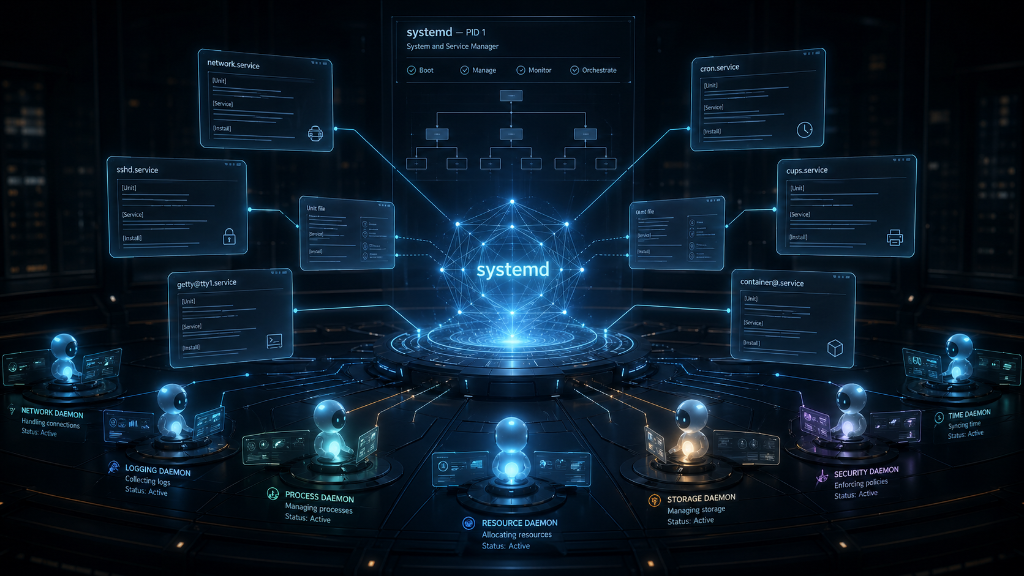
Yes, it is. The 'd' at the end of its name is the clue. systemd is the first process (PID 1) executed after the Linux kernel boots, acting as the 'master daemon' that orchestrates and manages all other daemons.
Before systemd, Linux systems managed daemons in a disorganized manner. systemd emerged to bring order to this chaos, standardizing the management of all system elements. The standard specification introduced here is the 'Unit'.
3. Units: The 'Standard Work Instructions' that Drive Daemons
If a daemon is the 'entity' that performs actual work, then a Unit is the 'work instruction' detailing how to manage that entity. The systemd master daemon reads these instructions (Units) we create and, according to their content, activates or deactivates individual daemons.
- Clarity of Intent: Without the Unit specification, developers would write daemon execution code in disparate ways. However, thanks to the standard instruction set provided by Units (e.g.,
.servicefiles), we can precisely and robustly define "in what environment, in what order, and how to restart if a problem occurs." - Flexible Extensibility: Units are not solely for daemons (Services). They treat all Linux elements, such as 'timers' for scheduled tasks and 'mounts' for connecting devices, using the same 'work instruction' format. This allows the entire system to be extended with a consistent logic.
4. Relationship at a Glance
| Category | Daemon | systemd Unit |
|---|---|---|
| Identity | An actual process running in memory | A specification file recording system configurations |
| Role | Performs actual functions in the background | Defines daemon execution conditions and behavior |
| Analogy | A worker silently performing tasks on-site | The work instructions that the worker follows |
To summarize:
Thesystemdmaster daemon reads Units (work instructions) to direct numerous daemons (workers) to operate precisely according to defined rules.
5. The Diverse Nature of Workers: Properly Distinguishing 'Daemons' and 'Service Units'
When we commonly say "start a service," the 'worker' (daemon) running in the background isn't limited to a single form. Any program, regardless of the language it's written in or its specific form, can become a daemon as long as it operates in the background.
Various Forms of Workers:
-
Script Daemons: If you register Python code you've written, such as Django or FastAPI applications, as a Unit, it becomes a Python daemon running via the
python3interpreter. -
Binary Daemons: Programs like Nginx or
sshd, pre-compiled in languages such as C or Go, are daemons that exist as executable files themselves. -
Shell Script Daemons: Even a simple
.shfile, if running in a continuous loop in the background, can serve as an effective worker (daemon).
Service Units are the 'Connecting Link':
Strictly speaking, sshd or your Python script itself is not a 'service'. They are merely daemons (workers). The .service file (Unit) that we create in the /etc/systemd/system/ directory, or that is automatically registered when a package is installed, is the work instruction that formally registers that worker as a component of the system.
Conclusion
A daemon refers to the state of a "program working in the background," while a service Unit is the standardized specification that allows systemd, the master, to control that daemon. It's thanks to these instructions that systemd can issue commands in the same way, regardless of whether the worker is a Python script or a binary.
What do you think? I've been using Linux as my primary OS for about 4-5 years, and even though I thought I understood the concepts of daemons and units, explaining them to someone else was always challenging. Perhaps I thought I knew, but hadn't fully grasped them. Now, having finally defined and organized them in my own words, my mind feels much clearer.
Writing is indeed enjoyable. Even if it takes time, writing helps organize my thoughts.