Unifying Team Docker Environments with Global Daemon Settings
Whether you’re running Docker locally or on a server, you’ll often find yourself copying the same options into every docker-compose.yml.
- Setting DNS to
1.1.1.1,8.8.8.8 - Fixing the log driver to
json-filewithmax-size=10m - Configuring proxy, insecure registries, default network ranges, and more
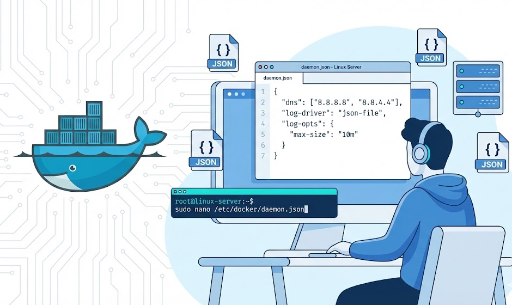
These are host‑wide defaults rather than per‑container settings, and they’re best managed through Docker’s global daemon configuration (daemon.json).
Below we’ll cover:
- Which file to edit
- Where to place it
- How to write it
- When it’s useful for developers and teams
1. Two Ways to Configure the Docker Daemon

The Docker daemon (dockerd) can be configured in two primary ways:
- JSON configuration file (
daemon.json) – recommended - CLI flags passed when starting
dockerd
You can mix the two, but duplicate options will cause the daemon to fail. For example, specifying --log-driver on the command line and in daemon.json will trigger a startup error.
For consistency across teams and servers, it’s best to:
“Collect as many options as possible in
daemon.jsonand keep CLI flags to a minimum.”
2. Where daemon.json Lives
| Environment | Default Path | Notes |
|---|---|---|
| Linux (standard install) | /etc/docker/daemon.json |
Most common case |
| Linux (snap‑installed Docker) | /var/snap/docker/current/config/daemon.json |
Ubuntu snap package |
| Windows Server / Docker Engine | C:\ProgramData\Docker\config\daemon.json |
May require admin rights |
| Docker Desktop (Mac / Windows) | ~/.docker/daemon.json |
Internal path used by the Desktop UI |
The file may not exist by default, so create it if necessary. For team or server standards, the Linux /etc/docker/daemon.json is the typical reference.
3. Typical Workflow: “Create File → Restart Daemon”
On Linux, the most common workflow is:
- Create or edit
daemon.jsonjson { "dns": ["1.1.1.1", "8.8.8.8"], "log-driver": "json-file", "log-opts": { "max-size": "10m", "max-file": "3" } } - Validate the configuration
bash sudo dockerd --validate --config-file=/etc/docker/daemon.json # Should output "configuration OK" - Restart Docker
bash
   sudo systemctl restart docker
From now on, any new container inherits these defaults unless overridden.
4. Example 1 – Global DNS Settings
4.1 Why Global DNS?
If containers frequently complain about “cannot resolve external APIs” or “internal domains not resolving,” it’s usually because they rely on the host’s DNS configuration.
Instead of adding dns: to every docker-compose.yml, set it once in the daemon.
4.2 Configuration Example (daemon.json)
{
  "dns": ["1.1.1.1", "8.8.8.8"]
}
If you already have a daemon.json, just add the "dns": [...] entry inside the root object.
⚠️ DNS changes affect
/etc/resolv.confinside containers and only apply to containers started after the change.
4.3 Who Benefits?
- Developers behind a corporate proxy or internal DNS
- Platform teams enforcing a specific DNS across multi‑cloud environments
- Individuals switching between multiple VPNs while developing locally
5. Example 2 – Global Logging Driver & Options
Containers log to /var/lib/docker/containers/... by default using the json-file driver. Setting this globally lets you control:
- Log format
- Log location
- Rotation policy
5.1 Default json-file with Rotation
{
  "log-driver": "json-file",
  "log-opts": {
    "max-size": "10m",
    "max-file": "5"
  }
}
This keeps each container’s log file under 10 MB and retains up to five files.
5.2 Central Log Collectors (Fluentd, journald, etc.)
Platform or infra teams often ship logs to a central system. For Fluentd:
{
  "log-driver": "fluentd",
  "log-opts": {
    "fluentd-address": "localhost:24224",
    "tag": "{{.Name}}"
  }
}
With journald:
{
  "log-driver": "journald",
  "log-opts": {
    "tag": "{{.Name}}"
  }
}
journald is handy on systemd‑based Linux, letting you query logs with journalctl.
5.3 Interaction with Compose / docker run
- Global
log-driver/log-optsact as defaults. - Individual containers can override via
logging:in Compose or--log-driver/--log-opton the CLI.
A common strategy: set defaults in daemon.json and only override for special services.
6. Example 3 – Proxy, Insecure Registries, and Other Network Settings
6.1 Proxy Configuration
If your organization requires a corporate proxy, set it once in the daemon:
{
  "proxies": {
    "http-proxy": "http://proxy.example.com:3128",
    "https-proxy": "http://proxy.example.com:3128",
    "no-proxy": "localhost,127.0.0.1,.corp.example.com"
  }
}
Docker will use these proxies for image pulls and builds.
6.2 Insecure Registries
For TLS‑less registries (e.g., internal dev registries):
{
  "insecure-registries": ["my-registry.local:5000"]
}
Use this only in trusted internal environments.
7. Example 4 – Default Network Ranges, Storage Drivers, and More
7.1 Custom Bridge Network Range
To avoid IP conflicts with VPNs or corporate networks:
{
  "default-address-pools": [
    {"base": "10.20.0.0/16", "size": 24}
  ]
}
Docker will allocate 10.20.x.0/24 for new bridge networks.
7.2 Enforcing a Storage Driver
If your team standardizes on overlay2:
{
  "storage-driver": "overlay2"
}
Check the OS and kernel support before enforcing.
8. Who Finds This Especially Useful?
8.1 Individual Developers
- Reuse the same Docker options across side projects
- Handle frequent VPN or proxy changes
- Simplify local log and disk management
8.2 Small/Medium Teams
- Avoid “works on my machine” issues caused by differing local Docker settings
- Align CI and local environments
- Enforce corporate DNS, proxy, and registry policies
8.3 Platform/DevOps/SRE
- Manage logs, storage, and networking consistently across many nodes
- Standardize host‑level policies for security and compliance
9. Debugging Tips
- Avoid duplicate flags – check the systemd unit (
/lib/systemd/system/docker.service) for existing--log-driveror other flags. - Docker Desktop – the UI edits
~/.docker/daemon.json. Keep either the UI or the file, not both.
Summary
- Global defaults live in
daemon.json. - Typical paths:
- Linux:
/etc/docker/daemon.json - Windows:
C:\ProgramData\Docker\config\daemon.json - Docker Desktop:
~/.docker/daemon.json - Common global settings:
- DNS:
"dns": ["1.1.1.1", "8.8.8.8"] - Log driver:
"log-driver": "json-file"withlog-opts - Proxy, insecure registries, default network ranges, storage drivers
- Global settings reduce repetitive configuration, improve consistency, and lower the risk of environment drift.
If you’re still sprinkling the same options across docker-compose.yml files, it might be time to lift them into daemon.json.



There are no comments.