Summary of this post:
1.shm_sizeallocates temporary space using RAM.
2. Whenipc: hostis used,shm_sizebecomes irrelevant, and the container utilizes 50% of the host's resources.
3. While many AI model configurations often set bothipc: hostandshm_size, it's generally better for readability to configure only one.
4. For AI workloads, a minimum of 8G to 16G of shared memory is recommended; adjust settings according to your specific environment.
🐳 Essential Configuration for AI/Data Workloads: Mastering Docker Shared Memory (shm_size and ipc)
If you've encountered cryptic errors like OSError: No space left on device during AI or large-scale data processing tasks, it's often due to insufficient shared memory (shm_size) settings within your Docker containers.
This post will clarify why shared memory is critical in containerized environments and how to correctly configure shm_size and ipc: host options.
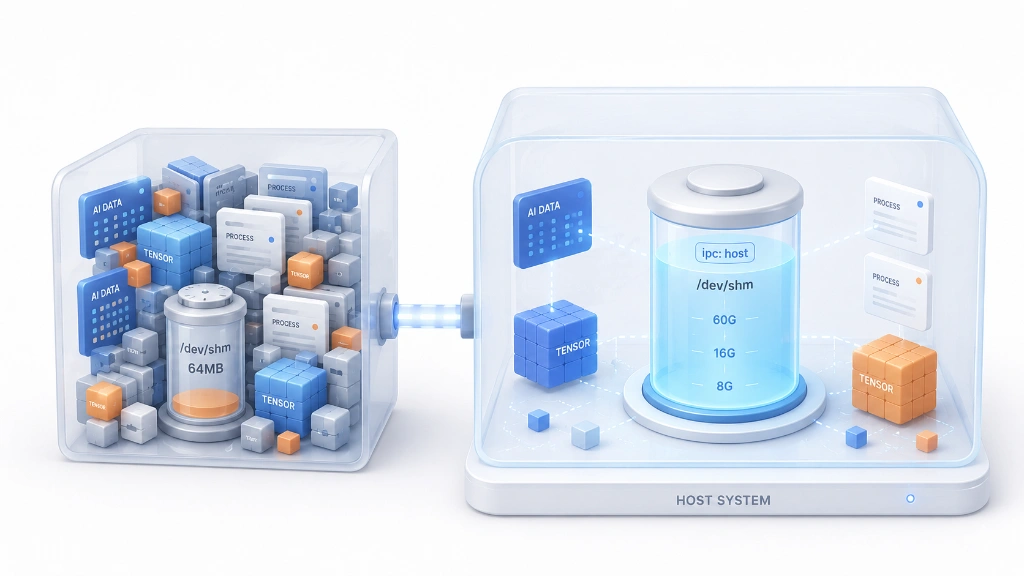
1. The Role and Importance of shm_size
Role: Determining Container's Shared Memory Size
shm_size is an option that sets the maximum size for the /dev/shm (POSIX shared memory) filesystem inside a container.
- The Docker default is a very small 64MB.
- Important:
/dev/shmis atmpfs(temporary file system) that uses host RAM, and it is unrelated to VRAM (GPU memory).
Why is it important?
AI/data processing tasks heavily rely on this shared memory for exchanging large amounts of data between processes.
- PyTorch DataLoader: When
num_workers > 0is set, tensors/batches are passed between worker processes via shared memory. Insufficient space here will trigger anOSError: No space left on device. - TensorRT Engine Build/Serving: Large intermediate artifacts or IPC buffers utilize significant shared memory. A lack of space can lead to engine build failures or segmentation faults.
- Multiprocessing and IPC Communication: Essential for sharing large arrays/buffers between processes in tools like NCCL, OpenCV, and NumPy.
2. ipc Settings: Scope of Shared Memory Isolation
The IPC (Inter-Process Communication) namespace is a Docker option that determines the isolation scope for a container's inter-process communication space (shared memory, semaphores, etc.).
| ipc Setting | Behavior | /dev/shm Size Determination |
|---|---|---|
| Default (Omitted) | Uses the container's own IPC namespace (isolated) | Size specified by shm_size (default 64MB) |
ipc: host |
Container shares the host's IPC namespace | Host's /dev/shm size (typically half of RAM) |
ipc: container:<ID> |
Shares IPC with a specified container | Follows the settings of the target container |
3. How shm_size and ipc: host Work Together (Example Analysis)
It's common to see both shm_size: "16g" and ipc: host set together in AI/LLM workloads. Let's examine which setting actually applies through a practical example.
Test: Verification when using ipc: host
We configured shm_size and ipc: host together as shown below.
shm_size: "16g"
ipc: host
Then, we entered the container and checked the /dev/shm size.
~$df -h /dev/shm
Filesystem      Size  Used Avail Use% Mounted on
tmpfs            60G  8.3M   60G   1% /dev/shm
Observation: Instead of the 16GB set for shm_size, the host's /dev/shm size of 60GB is displayed.
Conclusion:
ipc: hostoverridesshm_size.
Why this result?
- When
ipc: hostis applied: The container directly uses the host's IPC namespace. shm_size: "16g"is ignored: This option is only relevant when using a container's own IPC namespace.- Origin of 60G: A host Linux system typically configures
/dev/shmto be half of its total RAM. Therefore, in the example above, the container sees 60G, which is half of the host's 120G RAM.
To reiterate:
When
ipc: hostis configured, the container directly uses the host's shared memory space, rendering theshm_sizesetting ineffective.
4. Choose Your Memory Management Strategy Based on Environment and Purpose
Prioritizing Stability vs. Container-Specific Isolation
1. Prioritize Stability: Keep ipc: host
This is the most straightforward approach. It directly leverages the host's ample RAM resources. This method is suitable for single-user/single-project environments where multiple containers sharing resources is not an issue. While 50% of the host's RAM is the maximum, only the actual usage consumes RAM, so if memory pressure isn't a concern, leaving it as is can be convenient.
- Configuration: Keep only
ipc: host(Althoughshm_sizeoften appears alongside it in many examples, it's redundant, so feel free to remove it). - Result: Uses the host's generous
/dev/shmsize (e.g., 60G).
2. Enforce Container-Specific Limits: Remove ipc: host
Use this approach in multi-tenant environments or when you need to prevent a specific container from excessively consuming RAM.
- Configuration: Remove
ipc: host+ explicitly setshm_size: "8g"or"16g". - Result: A dedicated 16GB
/dev/shmis created for the container. - Advantage: When multiple containers are running, this allows for clear limits on each container's shared memory usage, protecting host RAM and enabling better isolation.
Note: How to Adjust Host Shared Memory Size (When using ipc:host)
If you want to change the host's /dev/shm size itself while using ipc: host, you need to modify the tmpfs settings.
- Temporarily change size (resets on reboot):
sudo mount -o remount,size=16G /dev/shm
This applies immediately to all processes/containers.
- Permanently change size (modify
/etc/fstab):
# Add/modify the following line in /etc/fstab
tmpfs /dev/shm tmpfs defaults,size=16G 0 0
Save the file and reboot, or apply immediately with the remount command above.


There are no comments.