Understanding Pillow’s open(), verify(), and load() from a Security Perspective
Uploading an image isn’t just about receiving a picture file; it’s about passing external input through a decoder (parser). That means the three Pillow methods are more about when you call them (i.e., when you open an attack surface) than their individual functionalities.
open() is not a “pixel‑loading” function
Image.open() works lazily. It opens the file, identifies the format, and may leave the file handle open, but it does not necessarily read pixel data. In security and operations, the safest use of open() is straightforward:
- Use
open()to fetch lightweight metadata such as format, width, and height. - Apply policy checks: allowed formats, maximum resolution or pixel count, and upload size limits.
- Proceed to the next stage (verification/decompression) only if the file passes.
In short, treat open() as a tool for extracting information before decoding.
What verify() guarantees (and what it doesn’t)
Pillow’s verify() attempts to detect corruption without decoding the image data. If it finds an issue, it raises an exception, and you must reopen the file to continue using the image.
Security take‑aways:
- Benefit: Quickly filter out obviously corrupted files without the heavy cost of decoding.
- Limitation: Passing
verify()does not mean the file is safe; problems may surface only whenload()is called.
load() is dangerous if called indiscriminately during validation
load() actually performs decompression and loads pixel data into memory. This is a direct DoS vector: a small file on disk can decompress to a huge in‑memory representation.
Pillow mitigates the decompression‑spring risk with warnings, exceptions, and default thresholds (e.g., ~128 Mpx). Django follows the same logic, using verify() instead of load() in its image‑upload validation. The source code even comments that “load() can bring the entire image into memory and become a DoS vector”.
When using Django/DRF: calling verify() again may be redundant
Django’s ImageField validation internally performs Image.open() + verify(). DRF’s serializers.ImageField delegates to Django’s implementation. Therefore:
- Calling
verify()again in a DRF serializer’svalidate()method is usually redundant. - If you need custom business or additional security checks, consider receiving the file via
FileFieldand building your own validation pipeline. This makes the cost and responsibility explicit.
How to ensure uploaded files are safe
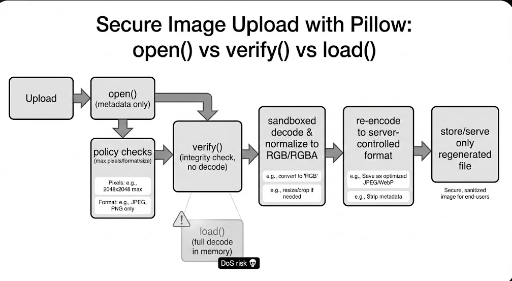
The practical approach is:
- Do not use the raw upload. Let the server decode and re‑save the file.
- Use
open()to read low‑cost metadata and apply first‑stage policy checks. - Use
verify()to drop obviously corrupted files. - In a controlled environment, decode the image and normalize it to a standard pixel format (RGB/RGBA).
- Re‑encode the image in a server‑chosen format and store that file.
- Serve only the server‑generated file.
This strategy gives the server full control over the final output, stripping away unwanted metadata or odd structures. Re‑encoding still involves load(), so enforce pixel‑count/memory limits and run the process in a worker or isolated environment.
Summary
open()– Identification + low‑cost metadata extraction (pixels may not be loaded).verify()– First‑pass corruption filter (no decoding; reopen if needed).load()– Decoding and memory allocation; avoid excessive use during validation.- Practical safety – Trust only the server‑re‑encoded output, with proper limits and isolation.