Ensuring Server‑to‑Server Integrity with HMAC Signatures in Django/DRF
When two servers talk to each other, how can you be sure that the request you received is really the one you sent, and that it hasn’t been altered in transit? This post walks through how to use HMAC‑based authentication in a Django/DRF environment to guarantee the integrity and trustworthiness of inter‑service requests.
In particular, we’ll cover:
- What the technique is meant to solve
- Which attacks it can prevent
- Why it’s unsuitable for client‑server communication (its limitations)
- How to implement it in a real Django/DRF project using
hmac_mixin.pyand class‑based views (CBVs)
What is HMAC‑Signature Authentication?

HMAC (Hash‑based Message Authentication Code) is a way to create a signature from a shared secret key and a message.
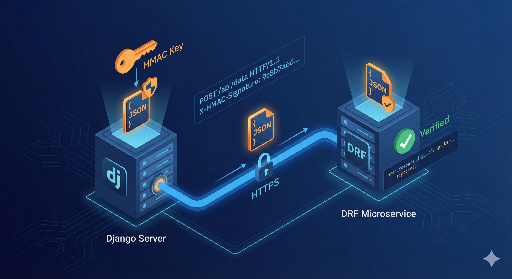
- Two servers (A and B) share the same secret key.
- Server A wants to POST to server B: * It concatenates the request body and a timestamp, then signs that string with HMAC. * The resulting signature is sent in an HTTP header.
- Server B recomputes the signature using the same key and compares it: * If the signatures match, the request is authentic and untampered. * If they differ, the request was altered or forged.
Thus HMAC provides integrity (no tampering) and authentication (only the holder of the secret key can produce a valid signature).
Prerequisite: the secret key must be shared securely only between servers.
What Problems Does HMAC Solve?
1. Preventing Body Tampering
If an attacker intercepts traffic, they could change the body to transfer funds to a different account or modify parameters. The receiver recomputes the HMAC; any change—even a single character—breaks the signature, so the request is rejected.
2. Blocking Server Spoofing
An attacker can’t forge a valid signature without the secret key. If the key is unknown, the receiver will detect the mismatch and reject the request, ensuring that only legitimate servers can communicate.
3. Defending Against Replay Attacks
By including a timestamp (or a nonce) in the signed payload, the receiver can reject requests that are too old or that reuse a nonce. This prevents an attacker from simply replaying a previously captured request.
Note: HMAC is an additional layer on top of HTTPS/TLS; it does not replace transport‑layer security.
Why HMAC Is Not for Client‑Server Communication
- Secret Key Exposure – Client code (mobile apps, SPAs, desktop apps) inevitably contains the key in the binary or JavaScript. An attacker can reverse‑engineer the app and extract the key, allowing them to forge requests.
- No Encryption – HMAC only verifies integrity and authenticity; it does not encrypt the body. Sensitive data must still be protected by TLS.
Therefore, HMAC is best suited for server‑to‑server or backend‑to‑backend communication where the secret key can be kept confidential.
When to Use HMAC‑Based Server‑to‑Server Auth? (Scenarios)
1. Django App → Separate DRF Auth Server
A common pattern is to have a dedicated authentication/registration service built with DRF. The main Django app posts login or token‑issuance requests to this service, signing each request with HMAC.
2. Django App → AI Inference Server (DRF/FastAPI)
The Django app handles the web front‑end while heavy AI inference runs on a separate server. The app posts inference requests to the AI server, signing them with HMAC to ensure only legitimate requests consume GPU resources.
Practical Pattern in Django/DRF: hmac_mixin.py + CBV
A clean project structure looks like this:
- Place
hmac_mixin.pyat the root of the project (or app). - Extract the common HMAC signing logic and POST helper into a mixin.
- In any CBV that needs to send signed requests, simply inherit from the mixin.
1. hmac_mixin.py – Common Signing & POST
# hmac_mixin.py
import hmac
import hashlib
import json
import time

import requests
from django.conf import settings


class HMACRequestMixin:
    HMAC_SECRET_KEY = settings.HMAC_SECRET_KEY.encode("utf-8")
    HMAC_HEADER_NAME = "X-HMAC-Signature"
    HMAC_TIMESTAMP_HEADER = "X-HMAC-Timestamp"
    HMAC_ALGORITHM = hashlib.sha256

    def build_hmac_signature(self, body: bytes, timestamp: str) -> str:
        message = timestamp.encode("utf-8") + b"." + body
        return hmac.new(self.HMAC_SECRET_KEY, message, self.HMAC_ALGORITHM).hexdigest()

    def post_with_hmac(self, url: str, payload: dict, timeout: int = 5):
        body = json.dumps(payload, sort_keys=True, separators=(",", ":")).encode("utf-8")
        timestamp = str(int(time.time()))
        signature = self.build_hmac_signature(body, timestamp)

        headers = {
            "Content-Type": "application/json",
            self.HMAC_HEADER_NAME: signature,
            self.HMAC_TIMESTAMP_HEADER: timestamp,
        }

        response = requests.post(url, data=body, headers=headers, timeout=timeout)
        response.raise_for_status()
        return response
2. Sending View Example
# views.py
from django.conf import settings
from django.http import JsonResponse
from django.views import View

from .hmac_mixin import HMACRequestMixin


class AIInferenceRequestView(HMACRequestMixin, View):
    def post(self, request, *args, **kwargs):
        data = json.loads(request.body.decode("utf-8"))
        payload = {
            "text": data.get("text", ""),
            "user_id": request.user.id if request.user.is_authenticated else None,
        }

        url = settings.AI_SERVER_URL

        try:
            ai_response = self.post_with_hmac(url, payload)
        except requests.RequestException as e:
            return JsonResponse({"detail": "AI server error", "error": str(e)}, status=502)

        return JsonResponse(ai_response.json(), status=ai_response.status_code)
This pattern keeps view code concise and reusable.
Receiving Side: Custom DRF Authentication
On the DRF server, create a custom authentication class that verifies the HMAC signature.
# authentication.py
import hmac
import hashlib
import time

from django.conf import settings
from rest_framework.authentication import BaseAuthentication
from rest_framework.exceptions import AuthenticationFailed


class HMACSignatureAuthentication(BaseAuthentication):
    SECRET_KEY = settings.HMAC_SECRET_KEY.encode("utf-8")
    HMAC_HEADER_NAME = "X-HMAC-Signature"
    HMAC_TIMESTAMP_HEADER = "X-HMAC-Timestamp"
    ALGORITHM = hashlib.sha256
    MAX_SKEW_SECONDS = 60

    def _build_signature(self, body: bytes, timestamp: str) -> str:
        message = timestamp.encode("utf-8") + b"." + body
        return hmac.new(self.SECRET_KEY, message, self.ALGORITHM).hexdigest()

    def authenticate(self, request):
        signature = request.headers.get(self.HMAC_HEADER_NAME)
        timestamp = request.headers.get(self.HMAC_TIMESTAMP_HEADER)

        if not signature or not timestamp:
            raise AuthenticationFailed("Missing HMAC headers")

        try:
            ts = int(timestamp)
        except ValueError:
            raise AuthenticationFailed("Invalid timestamp")

        now = int(time.time())
        if abs(now - ts) > self.MAX_SKEW_SECONDS:
            raise AuthenticationFailed("Request timestamp too old")

        expected_signature = self._build_signature(request.body, timestamp)

        if not hmac.compare_digest(signature, expected_signature):
            raise AuthenticationFailed("Invalid HMAC signature")

        return (None, None)
Applying to a DRF View
# views.py (DRF side)
from rest_framework.views import APIView
from rest_framework.response import Response
from rest_framework.permissions import AllowAny

from .authentication import HMACSignatureAuthentication


class AIInferenceView(APIView):
    authentication_classes = [HMACSignatureAuthentication]
    permission_classes = [AllowAny]

    def post(self, request, *args, **kwargs):
        input_text = request.data.get("text", "")
        result = {"answer": f"AI result for: {input_text}"}
        return Response(result)
With this setup:
- The sender (Django) uses
HMACRequestMixinto sign requests. - The receiver (DRF) uses
HMACSignatureAuthenticationto validate them.
Summary
- HMAC signatures give you integrity and authentication for server‑to‑server calls using a shared secret key.
- They protect against body tampering, server spoofing, and replay attacks (when combined with timestamps or nonces).
- They are not suitable for client‑server scenarios because the key can’t be hidden in client code.
- In Django/DRF projects, a mixin (
hmac_mixin.py) and a custom DRF authentication class provide a clean, reusable pattern for secure inter‑service communication.




There are no comments.