Leveraging Django’s django.db.models.F for Powerful ORM Operations
When working with Django, you often want to perform complex calculations without writing raw SQL. The django.db.models.F object is the tool that makes this possible.
In this post we’ll explore what an F expression is, when and how to use it, and walk through several practical examples.
1. What is an F Expression?

An F expression is an expression that references a database field’s value. Instead of pulling the value into Python, it lets the database read the field and use it in comparisons or calculations.
from django.db.models import F
Key Points - An
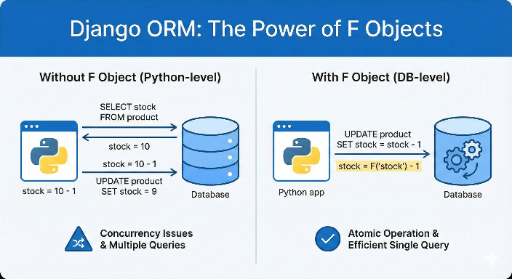
Fobject is not a Python object; it is translated into an SQL expression. - UsingFlets the database perform the operation in a single query, which is faster than fetching the value into Python and then updating.
2. Why Do We Need F Expressions?
2‑1. Avoiding Concurrency Issues
Imagine two users buying the same product at the same time:
product.stock -= 1
product.save()
If both users read the same stock value, the first update will reduce it by one, and the second will reduce it again, resulting in a double decrement.
With an F expression, the database handles the decrement atomically:
Product.objects.filter(id=product_id).update(stock=F('stock') - 1)
2‑2. Complex Filtering
F expressions allow you to compare fields directly:
# Get products where price is greater than discount_price
Product.objects.filter(price__gt=F('discount_price'))
2‑3. Bulk Updates
You can update many rows with a single query:
# Increase all product prices by 10%
Product.objects.update(price=F('price') * 1.10)
3. How to Use F Expressions
3‑1. Basic Usage
from django.db.models import F

# Compare fields
qs = Book.objects.filter(pages__gt=F('chapters'))

# Perform arithmetic
qs = Book.objects.update(pages=F('pages') + 10)
3‑2. Combining F with Q
Q objects let you build complex conditions:
from django.db.models import Q

qs = Book.objects.filter(
    Q(pages__gt=F('chapters')) | Q(pages__lt=F('pages') * 2)
)
3‑3. Using F with annotate
annotate can create virtual fields:
from django.db.models import F, Value, FloatField

qs = Book.objects.annotate(
    ratio=F('pages') / F('chapters')
).filter(ratio__gt=5)
Note: Some database backends may not support all operations (e.g., SQLite may not support multiplication with
F). Test before deploying.
4. Real‑World Examples
4‑1. Inventory Management
# Decrement stock by one and deactivate if stock reaches zero
Product.objects.filter(id=product_id, stock__gt=0).update(
    stock=F('stock') - 1,
    is_active=Case(
        When(stock=1, then=Value(False)),
        default=Value(True),
        output_field=BooleanField()
    )
)
4‑2. Calculating Discount Rate
# Find products with a discount of at least 20%
Product.objects.annotate(
    discount_rate=F('discount_price') / F('price')
).filter(discount_rate__gte=0.2)
4‑3. Bulk Price Increase
# Raise prices of all electronics by 15%
Product.objects.filter(category='electronics').update(
    price=F('price') * 1.15
)
5. Tips for Using F Expressions
| Situation | Recommended Approach |
|---|---|
| Concurrency | update() + F |
| Field Comparison | filter(field__gt=F('other_field')) |
| Virtual Field | annotate(new_field=F('field1') + F('field2')) |
| Conditional Update | Case + When + F |
Tip: Since
Fexpressions are translated directly to SQL, profiling the query plan can help you understand performance.
6. Wrap‑Up
django.db.models.F expressions let you perform database‑level calculations, comparisons, and bulk updates efficiently. They help:
- Resolve race conditions
- Simplify complex filtering
- Execute large‑scale updates in a single query
If you want to take your Django ORM skills to the next level, start using F expressions today.
Further Reading - Django docs: F expressions - Sample code: GitHub Gist
Happy coding! 🚀


There are no comments.