Relearning Django from Scratch: A Roadmap Starting with HTTP
As the year wraps up, it’s natural to look back on the past twelve months. For me, one question always resurfaces: “Did I really learn Django properly?”
I’ve been working with Django and Django REST Framework (DRF) for several years, tackling projects of varying scale. I can now say with confidence:
“I understand how things work, and I feel more comfortable than before.”
There’s still a lot I don’t know, but I can now tell my past self—and anyone just starting with Django—that learning in this order will make the journey smoother.
This article is a personal guide on how to start over with Django. It reads like a year‑end reflection, yet it remains a timeless reference for Django learning.
1. Django is, at its core, an HTTP framework

It may sound obvious, but beginners often forget this fundamental fact.
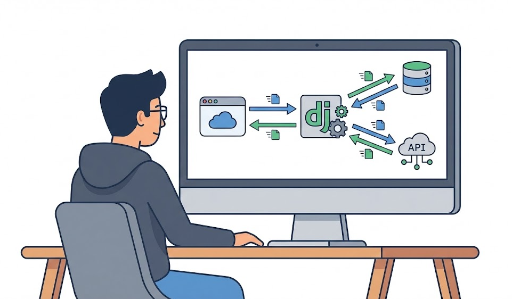
Whether you’re rendering a UI or returning a JSON API, Django’s essence is receiving an HTTP request and returning an HTTP response.
- A client (browser, app, or another server) sends an HTTP request.
- Django processes that request.
- Django returns an HTTP response (HTML, JSON, file, error, etc.).
Typical Django components:
- URLConf
- View (FBV/CBV)
- Template
- ORM
- Middleware
- Authentication / Permission
- DRF’s Serializer, ViewSet, Router…
All of these are simply tools for handling an HTTP request properly. If you lose this perspective, the framework can feel like a black box.
“I just use it like this… but I don’t really understand why it works.”
If this mindset persists, you’ll find yourself being pulled in by the framework’s abstractions.
2. Understand why you do things before diving into flashy features
When you first learn Django, you’ll notice features such as:
- Login/registration, social login
- Permissions and authorization
- Caching
- Asynchronous tasks (Celery, etc.)
- Various middleware and settings
These are useful, but if you tackle them too early, you’ll run into questions like:
“Why do we do it this way?”
Without an answer, you’ll build code that feels fragile, you’ll struggle to refactor, and you’ll fall into a “copy‑paste and move on” mindset.
So the first thing I’d tell my past self and anyone starting out is:
“Before you add features, understand the web’s mechanics and the flow of HTTP.”
3. Understanding the HTTP flow clarifies what sits around Django
To truly master Django, you can’t ignore the basics of the HTTP protocol. At a minimum, you should experiment with:
- The structure of a request: URL, method (GET/POST/PUT/DELETE…), headers, query string, body
- How a response is determined: status code, headers, body (JSON/HTML, etc.)
- What browsers cache and what servers need to care about
A simple example: send a request from the terminal.
curl -X GET "http://localhost:8000/articles/1/" -H "Accept: application/json"
This single request contains the core of HTTP:
- Target URL (
/articles/1/) - Method (
GET) - Header (
Accept: application/json) - Desired response format (JSON)
Once you internalize this flow, you’ll start seeing the bigger picture:
- Why nginx proxies certain paths to Django
- The role of WSGI servers like gunicorn or uWSGI
- Where Django ends and other layers begin
At this point, Django stops feeling like a mysterious black box. You’ll see that its conveniences are just side‑effects of a deeper understanding of HTTP.
4. Keep the first project simple and start with FBV
When starting out, I recommend the following approach:
Begin with a deliberately simple project using Function‑Based Views (FBV).
Aim for these conditions:
- Minimal authentication/authorization
- No complex admin or settings
- Simple models (e.g., posts and comments)
- Focus on the flow rather than a “beautiful architecture”
For example, a basic article list/detail using FBV:
# views.py
from django.http import JsonResponse
from .models import Article

def article_detail(request, pk):
    article = Article.objects.get(pk=pk)
    data = {
        "id": article.id,
        "title": article.title,
        "content": article.content,
    }
    return JsonResponse(data)
This single view encapsulates Django’s core flow:
- Receive the
requestobject. - Query the database via the ORM.
- Build a Python dictionary.
- Wrap it in an HTTP JSON response.
By stepping through each line, you’ll see:
- How URLConf connects to the view.
- What information the
requestholds. - The SQL generated by the ORM.
- How the response is serialized to JSON.
Mastering the Django ORM at this stage becomes a powerful asset for any future project.
5. Move quickly to CBV and DRF
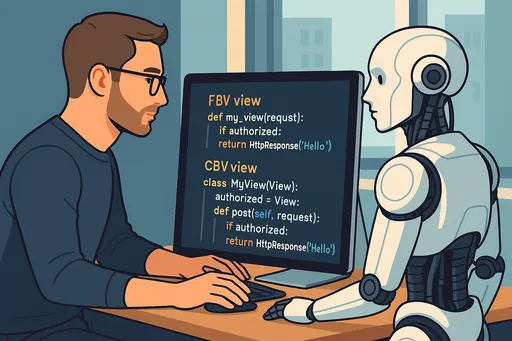
Once you’ve internalized the FBV flow, it’s time to embrace Class‑Based Views (CBV) and DRF. That’s where Django’s real power and DRF’s convenience shine.
CBV and DRF offer:
- Reusable patterns that reduce repetition
- Consistent structure across a project
- Clear separation of responsibilities
- Extensible design that ties URLs, serializers, viewsets, and permissions together
For instance, the same article view in DRF:
# views.py (DRF)
from rest_framework.viewsets import ReadOnlyModelViewSet
from .models import Article
from .serializers import ArticleSerializer

class ArticleViewSet(ReadOnlyModelViewSet):
    queryset = Article.objects.all()
    serializer_class = ArticleSerializer
Registering a router:
# urls.py
from rest_framework.routers import DefaultRouter
from .views import ArticleViewSet

router = DefaultRouter()
router.register(r'articles', ArticleViewSet, basename='article')

urlpatterns = router.urls
Now endpoints like /articles/ and /articles/{id}/ work automatically.
If you already understand the HTTP flow, the “magic” of CBV/DRF simply becomes a well‑abstracted version of the same process.
“It’s still the same HTTP request/response cycle, just wrapped in reusable classes.”
Treating CBV/DRF as a set of memorized syntax can be confusing. Instead, view them as tools that encapsulate the HTTP logic you already know.
When something feels unclear, dive into Django’s source code to see how the abstractions are implemented.
6. A concise learning sequence
Here’s a practical order I’d recommend for anyone starting or restarting with Django:
- Understand web and HTTP fundamentals
- Browser‑server request/response flow
- HTTP methods, status codes, headers, cookies, sessions
- Send a request with
curlor Postman - Learn Django basics with FBV - URLConf → View → Template → ORM - Build a small project without authentication - Implement CRUD with the ORM
- Explore the ORM and Admin - Model design, relationships, query optimization - Use the admin to manage data and become comfortable with the schema
- Transition to CBV - Re‑implement CRUD with generic views - Learn mixins and inheritance for pattern abstraction
- Build an API with DRF - Serializer, ViewSet, Router, Permission, Authentication - Re‑design the earlier features using DRF
- Add advanced features - Authentication/authorization, throttling, pagination, filtering - Caching, asynchronous tasks, deployment, scaling
The key is to be able to explain why you’re doing each step. It’s not just “you must do this”; it’s “this makes sense because of how HTTP and the web work.”
7. Final thought: Don’t memorize the framework, understand the web
To wrap up, I want to leave this message for my past self and for anyone beginning with Django:
Don’t memorize the framework; understand how the web works.
Django is a great tool to aid that understanding. If you keep this perspective:
- New Django versions won’t surprise you.
- Switching to Flask, FastAPI, Node, Spring, or any other stack will feel natural.
- You’ll always have a consistent set of questions:
- How does this system handle HTTP?
- Which layer is responsible for what?
- What abstraction hides the underlying request/response pattern?
With that foundation, you’ll grow into a web developer who isn’t tied to a single framework but can thrive in any environment.



There are no comments.