NumPy Indexing & Slicing: Mastering Tensor Manipulation
1. Why is Indexing/Slicing So Crucial?

When working with deep learning, you’ll frequently manipulate tensors.
- Grab only the first few samples from a batch
- Select a specific channel (R/G/B) from an image
- Slice out a subset of time‑steps from a sequence
- Extract only the desired class from labels
All of these operations boil down to indexing and slicing.
Because PyTorch’s tensor indexing/slicing syntax is almost identical to NumPy’s, mastering NumPy first makes writing deep‑learning code a lot smoother.
2. Basic Indexing: Getting Started with 1‑D Arrays
2.1 Indexing a 1‑D Array
import numpy as np

x = np.array([10, 20, 30, 40, 50])

print(x[0])  # 10
print(x[1])  # 20
print(x[4])  # 50
- Indices start at 0
x[i]returns the i‑th element
2.2 Negative Indexing
When you want to count from the end, use negative indices.
print(x[-1])  # 50 (last element)
print(x[-2])  # 40
PyTorch behaves the same way.
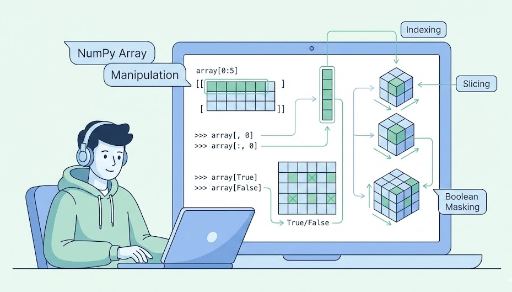
3. Slicing Basics: start:stop:step
Slicing uses the form x[start:stop:step].
x = np.array([10, 20, 30, 40, 50])

print(x[1:4])    # [20 30 40], 1 ≤ i < 4
print(x[:3])     # [10 20 30], from start up to 3
print(x[2:])     # [30 40 50], from 2 to the end
print(x[:])      # a copy of the whole array
Adding a step lets you skip elements.
print(x[0:5:2])  # [10 30 50], indices 0,2,4
print(x[::2])    # [10 30 50], same as above
In deep learning, this is handy for selecting every other time‑step or sampling at regular intervals.
4. Indexing 2‑D and Higher Arrays: Rows and Columns
A 2‑D array is essentially a matrix or batch, so the concepts start to feel very “deep‑learning‑ish.”
import numpy as np

X = np.array([[1, 2, 3],
              [4, 5, 6],
              [7, 8, 9]])  # shape: (3, 3)
4.1 Single‑Row/Column Indexing
print(X[0])      # first row: [1 2 3]
print(X[1])      # second row: [4 5 6]

print(X[0, 0])   # element at row 0, col 0: 1
print(X[1, 2])   # element at row 1, col 2: 6
X[i]→ the i‑th row (1‑D array)X[i, j]→ the scalar at row i, column j
4.2 Row Slicing
print(X[0:2])    # rows 0 and 1
# [[1 2 3]
#  [4 5 6]]

print(X[1:])     # rows 1 to the end
# [[4 5 6]
#  [7 8 9]]
This pattern is common when you want to cut off the first or last few samples in a batch.
4.3 Column Slicing
print(X[:, 0])   # all rows, column 0 → [1 4 7]
print(X[:, 1])   # all rows, column 1 → [2 5 8]
:means “all indices along that dimension”X[:, 0]means “every row, but only column 0”
In deep learning:
- For an array of shape
(batch_size, feature_dim), you can pull out a single feature withX[:, k].
5. 3‑D and Higher: Batch × Channel × Height × Width
Let’s look at image data.
# Assume (batch, height, width)
images = np.random.randn(32, 28, 28)  # 32 images of 28×28
5.1 Selecting a Single Sample
img0 = images[0]        # first image, shape: (28, 28)
img_last = images[-1]   # last image
5.2 Using a Subset of the Batch
first_8 = images[:8] # first 8 images, shape: (8, 28, 28)
5.3 Cropping a Region of Each Image
# Center 20×20 crop
crop = images[:, 4:24, 4:24]  # shape: (32, 20, 20)
In PyTorch you’d do something similar:
# images_torch: (32, 1, 28, 28)
center_crop = images_torch[:, :, 4:24, 4:24]
The indexing/slicing logic carries over almost verbatim.
6. Slicing Usually Returns a View
A key point:
A slice is typically a view of the original array, not a copy. It’s a window into the data.
x = np.array([10, 20, 30, 40, 50])
y = x[1:4]   # view

print(y)     # [20 30 40]
y[0] = 999

print(y)     # [999  30  40]
print(x)     # [ 10 999  30  40  50]  ← original changed!
This means:
- It saves memory and is fast
- But accidental modifications can corrupt the original data
If you need a separate array, use copy().
x = np.array([10, 20, 30, 40, 50])
y = x[1:4].copy()

y[0] = 999
print(x)  # [10 20 30 40 50], original stays intact
PyTorch has a similar concept, so keeping the “view vs copy” intuition helps debugging.
7. Boolean Indexing: Selecting Elements by Condition
Boolean indexing lets you pick elements that satisfy a condition.
import numpy as np

x = np.array([1, -2, 3, 0, -5, 6])

mask = x > 0
print(mask)      # [ True False  True False False  True]

pos = x[mask]
print(pos)       # [1 3 6]
x > 0produces a boolean arrayx[mask]selects only theTruepositions
Example with a 2‑D array:
X = np.array([[1, 2, 3],
              [4, 5, 6],
              [-1, -2, -3]])

pos = X[X > 0]
print(pos)  # [1 2 3 4 5 6]
Common deep‑learning patterns:
- Extract samples that meet a label condition
- Apply a mask when computing loss to average only over selected values
PyTorch behaves the same way:
import torch

x = torch.tensor([1, -2, 3, 0, -5, 6])
mask = x > 0
pos = x[mask]
8. Integer Array / List Indexing (Fancy Indexing)
You can also index with an array or list of integers to grab multiple positions at once.
x = np.array([10, 20, 30, 40, 50])

idx = [0, 2, 4]
print(x[idx])  # [10 30 50]
This works in 2‑D arrays too.
X = np.array([[1, 2],
              [3, 4],
              [5, 6]])  # shape: (3, 2)

rows = [0, 2]
print(X[rows])
# [[1 2]
#  [5 6]]
In deep learning you might:
- Randomly shuffle indices to sample a batch
- Gather specific labels or predictions for statistics
PyTorch supports the same style.
9. Common Indexing Patterns
Here are some patterns you’ll see often in deep‑learning code:
import numpy as np

# (batch, feature)
X = np.random.randn(32, 10)

# 1) First 8 samples
X_head = X[:8]              # (8, 10)

# 2) Specific feature (e.g., column 3)
f3 = X[:, 3]                # (32,)

# 3) Even‑indexed samples
X_even = X[::2]             # (16, 10)

# 4) Samples with label 1
labels = np.random.randint(0, 3, size=(32,))
mask = labels == 1
X_cls1 = X[mask]            # only samples where label == 1

# 5) Shuffle and split into train/val
indices = np.random.permutation(len(X))
train_idx = indices[:24]
val_idx = indices[24:]

X_train = X[train_idx]
X_val = X[val_idx]
These patterns translate almost directly to PyTorch tensors. Mastering NumPy indexing gives you the freedom to slice, shuffle, and mask tensor data with ease.
10. Wrap‑Up
To recap what we covered:
- Indexing:
x[i],x[i, j], negative indices - Slicing:
start:stop:step,:, multi‑dimensional indexing (X[:, 0],X[:8],X[:, 4:8]) - Slices are usually views, so changes affect the original unless you
copy() - Boolean indexing: filter by condition (
x[x > 0],X[labels == 1]) - Integer array indexing: grab arbitrary positions (
x[[0,2,4]])
With these tools in your toolkit, you can effortlessly perform batch slicing, channel selection, masking, and sample shuffling on PyTorch tensors.


There are no comments.