NumPy ndarray Basics for Deep Learning Beginners: array, dtype, shape, reshape, astype
1. Why Start with ndarray?

When you dive into deep learning, you’ll repeatedly see code like this:
- Inspecting the
shapeof an input tensor - Using
reshapeto prepare batches - Converting data to
float32for GPU computation
All of these operations are built on the foundation of NumPy’s ndarray.
- PyTorch’s
Tensoris essentially a structure that closely mirrors NumPy’sndarray. - Inputs, weights, and outputs in deep learning models are all multidimensional arrays (tensors).
Therefore, mastering ndarray is equivalent to learning the core syntax of tensor operations.
2. What Is an ndarray?
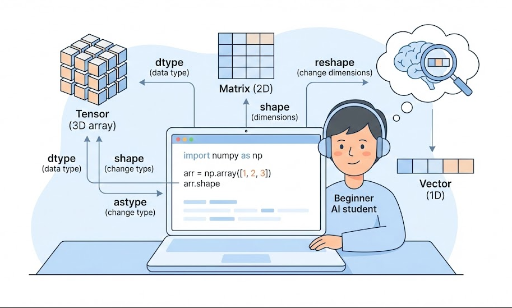
ndarray stands for N‑dimensional array—a concise way to refer to an array with N dimensions.
- 1‑D: vector
- 2‑D: matrix
- 3‑D and above: tensor (image batches, time series, video, etc.)
A quick example:
import numpy as np

x = np.array([1, 2, 3])            # 1‑D (vector)
M = np.array([[1, 2], [3, 4]])     # 2‑D (matrix)

print(type(x))          # <class 'numpy.ndarray'>
print(x.ndim, x.shape)  # number of dimensions, shape
print(M.ndim, M.shape)
ndim: how many dimensionsshape: the size of each dimension
3. How Similar Is a PyTorch Tensor?
A PyTorch tensor is ultimately just a multidimensional array.
import torch

x_np = np.array([[1, 2], [3, 4]])   # NumPy ndarray
x_torch = torch.tensor([[1, 2], [3, 4]])  # PyTorch Tensor

print(type(x_np))      # numpy.ndarray
print(type(x_torch))   # torch.Tensor

print(x_np.shape)      # (2, 2)
print(x_torch.shape)   # torch.Size([2, 2])
Commonalities:
- Both are multidimensional numeric arrays.
- Concepts like
shape,reshape, anddtypeare almost identical. - Operations (
+,*,@, etc.) behave similarly.
Differences that matter in deep learning:
- NumPy runs on the CPU and has no automatic differentiation.
- PyTorch tensors can use the GPU and support autograd.
Typical workflow:
- Concept practice / data manipulation → NumPy
- Actual model training → PyTorch
The more comfortable you are with ndarray, the more natural PyTorch tensor operations feel.
4. np.array: The Basic Way to Create an ndarray
The most fundamental constructor for an ndarray is np.array.
4.1 From Python Lists to ndarray
import numpy as np

# 1‑D array (vector)
x = np.array([1, 2, 3])
print(x)
print(x.ndim)   # 1
print(x.shape)  # (3,)

# 2‑D array (matrix)
M = np.array([[1, 2, 3],
              [4, 5, 6]])
print(M)
print(M.ndim)   # 2
print(M.shape)  # (2, 3)
- A Python list (or list of lists) becomes an
ndarraywhen passed tonp.array. - The familiar
batch_size x feature_dimmatrix in deep learning is just this structure.
4.2 Quickly Creating Initialized Arrays
For experiments or training examples, you often need arrays filled with zeros or random values.
zeros = np.zeros((2, 3))       # 2x3 matrix, all zeros
ones = np.ones((2, 3))         # 2x3 matrix, all ones
randn = np.random.randn(2, 3)  # Gaussian random numbers

print(zeros.shape)  # (2, 3)
The same pattern applies in PyTorch:
import torch

zeros_t = torch.zeros((2, 3))
ones_t = torch.ones((2, 3))
randn_t = torch.randn((2, 3))
5. dtype: Understanding the Data Type
dtype represents the data type of the numbers stored in the array.
Common values:
int32,int64: integersfloat32,float64: floating‑point numbers
Let’s check them:
x = np.array([1, 2, 3])
print(x.dtype)  # usually int64 or int32

y = np.array([1.0, 2.0, 3.0])
print(y.dtype)  # usually float64
5.1 Specifying dtype When Creating an Array
x = np.array([1, 2, 3], dtype=np.float32)
print(x.dtype)  # float32
In deep learning, float32 (PyTorch’s torch.float32) is the default because it balances GPU performance and memory usage.
6. shape: Reading the Data’s “Form"
shape is a tuple that describes the size of each dimension.
import numpy as np

x = np.array([1, 2, 3])
print(x.shape)  # (3,)

M = np.array([[1, 2, 3],
              [4, 5, 6]])
print(M.shape)  # (2, 3)
Typical shapes in deep learning:
- A single feature vector:
(feature_dim,)→ e.g.,(3,) - A batch of data:
(batch_size, feature_dim)→ e.g.,(32, 3) - An image batch (PyTorch default):
(batch_size, channels, height, width)→ e.g.,(32, 3, 224, 224)
Getting comfortable with these shapes in NumPy makes it easier to debug shape errors in PyTorch.
7. reshape: Changing the Form
reshape changes the shape of an array while keeping the total number of elements the same.
import numpy as np

x = np.array([1, 2, 3, 4, 5, 6])
print(x.shape)  # (6,)

M = x.reshape(2, 3)
print(M)
print(M.shape)  # (2, 3)
Key point:
- The total number of elements before and after
reshapemust match.
7.1 Using -1 for Automatic Inference
In batching or image processing, -1 is handy. It tells NumPy to infer that dimension.
x = np.array([[1, 2, 3],
              [4, 5, 6]])  # shape: (2, 3)

# Flatten to 1‑D
flat = x.reshape(-1)        # shape: (6,)
print(flat)

# Reshape back to 2 rows, columns inferred
M = flat.reshape(2, -1)     # shape: (2, 3)
print(M)
PyTorch behaves similarly:
import torch

x_t = torch.tensor([[1, 2, 3],
                    [4, 5, 6]])  # (2, 3)

flat_t = x_t.reshape(-1)        # (6,)
M_t = flat_t.reshape(2, -1)     # (2, 3)
Once you’re comfortable with reshape, you can:
- Flatten feature maps in CNNs
- Arrange RNN/LSTM inputs as
(batch, seq_len, feature) - Move batch dimensions around
8. astype: Changing the Data Type
astype converts an array’s data type.
import numpy as np

x = np.array([1, 2, 3])      # integer
print(x.dtype)               # int32 or int64

x_float = x.astype(np.float32)
print(x_float)
print(x_float.dtype)         # float32
Common deep‑learning scenarios:
- Convert integer labels to floats for loss calculation.
- Standardize data from
float64tofloat32. - Ensure type compatibility before passing to PyTorch.
Example:
import torch
import numpy as np

x = np.array([1, 2, 3], dtype=np.int32)
x = x.astype(np.float32)              # convert to float32
x_torch = torch.from_numpy(x)         # convert to tensor
print(x_torch.dtype)                  # torch.float32
Mismatched types can trigger errors like “Expected Float but got Double” in PyTorch.
9. Summary: The ndarray Basics Covered Today
What we’ve covered:
- What is an
ndarray? – The core data structure for all deep‑learning data. - Relationship to PyTorch
Tensor– Conceptually the same, but with GPU and autograd support. np.array– Create arrays from Python lists.dtype– Specify numeric types (int, float, 32/64‑bit).shape– Understand the dimensionality of your data.reshape– Re‑shape arrays while keeping element count constant.astype– Convert between numeric types.
Mastering these four concepts (array, dtype, shape, reshape, astype) equips you to:
- Handle tensor shape errors confidently.
- Bridge the gap between research papers and code.
- Follow PyTorch tutorials with ease.


There are no comments.