ORM, @property, and Celery Debugging:
“Why does .only() say a field that clearly exists is missing?”

When designing systems where security matters, it’s common to store API keys or secrets in a model in encrypted form and expose only the decrypted value via an @property when accessed.
For example, the typical pattern looks like this:
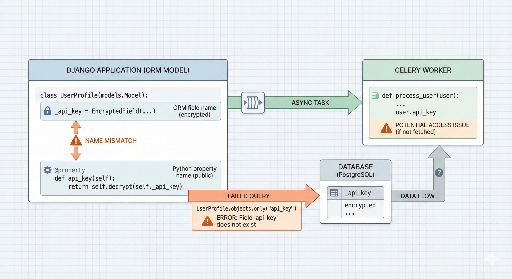
_api_key→ actual DB column (encrypted value stored)api_key→@propertythat decrypts and returns the valueapi_key.setter→ automatically encrypts the value when it’s set
This structure is clean in code and naturally secure. However, when used with an ORM (Django ORM in particular), there’s a subtle trap that can easily trip you up.
“I’ve been using
api_keyin the model all the time, but the ORM says the field doesn’t exist?”
This article explains how that trap arises, why debugging it is especially hard, and how to avoid it.
1. The Problem: “The value is there, but the ORM says it’s missing?”
While running a model that wraps an encrypted field in an @property, one day the ORM executed the following code:
Model.objects.only("api_key").first()
or:
Model.objects.values("api_key")
or:
Model.objects.filter(api_key__isnull=False)
The result was always the same:
FieldDoesNotExist: Model has no field named 'api_key'
A developer might think:
“No, it exists. I use
obj.api_keyevery day.”
The model actually looked like this (simplified):
class Model(models.Model):
    _api_key = models.CharField(db_column="api_key", max_length=255, null=True)

    @property
    def api_key(self):
        if not self._api_key:
            return None
        return decrypt(self._api_key)

    @api_key.setter
    def api_key(self, value):
        self._api_key = encrypt(value)
- Instance access works:
obj.api_key - Assignment works:
obj.api_key = "plain-text"
But at the ORM level it insists the field is missing. From the ORM’s perspective, this is perfectly reasonable.
2. Root Cause: The ORM’s “field name” is not the property name
The key point is simple:
The
api_keyproperty created with@propertyis not a real field.
Django ORM calls a field a subclass of models.Field. The list of such fields is stored in Model._meta.fields.
In the example above, the ORM only knows about:
_api_key = models.CharField(db_column="api_key", max_length=255, null=True)
Here:
- Model field name →
_api_key - DB column name →
"api_key" - @property api_key → the ORM knows nothing about it
So when you write:
Model.objects.only("api_key")
Model.objects.values("api_key")
Model.objects.filter(api_key__isnull=False)
the ORM sees no field called api_key and raises FieldDoesNotExist.
In short:
| Name used in code (obj.api_key) | Name the ORM knows (Model._meta) |
|---|---|
api_key (property) |
_api_key (field name) |
Thus the ORM only understands field names, not property names.
- ✅
only("_api_key") - ✅
values("_api_key") - ✅
filter(_api_key__isnull=False) - ❌
only("api_key") - ❌
filter(api_key=...)
The issue is simply a mix‑up between the property name used in Python code and the actual field name the ORM expects.
3. Why it’s even worse inside Celery
Up to this point, the error looks like a minor annoyance that can be fixed quickly. The real problem is that the code lived inside a Celery task, not a Django view.
Consider a typical pattern:
@shared_task(bind=True, max_retries=3)
def send_something(self, model_id):
    try:
        obj = Model.objects.only("api_key").get(id=model_id)
        call_external_api(obj.api_key)
    except SomeRecoverableError as exc:
        raise self.retry(exc=exc)
The real issue is:
only("api_key")raisesFieldDoesNotExist- That exception falls into a catch‑all or is treated as a recoverable error
- Celery interprets it as a transient failure and retries the task
So a code bug masquerades as a “network problem” that keeps retrying. The symptoms are:
- The Celery task keeps retrying
- No request ever reaches the external API
- Without a deep log inspection, you might suspect the external server is down
Debugging becomes unnecessarily hard because the exception is swallowed by Celery’s retry logic, turning a silent bug into a quiet one.
4. Fix: Always pass the real field name to the ORM
The solution is straightforward.
Use the actual field name when querying the ORM; use the property only on the instance.
# Wrong (FieldDoesNotExist)
obj = Model.objects.only("api_key").get(...)
# Correct
obj = Model.objects.only("_api_key").get(...)
real_key = obj.api_key  # now use the property
The same rule applies to filtering:
# Wrong
Model.objects.filter(api_key__isnull=False)
Model.objects.filter(api_key="plain-text")
# Correct
Model.objects.filter(_api_key__isnull=False)
Model.objects.filter(_api_key=encrypt("plain-text"))
If you want to be extra safe, you can establish a team rule that never uses property names in ORM queries:
- “Fields that start with
_are for ORM only.” - “Public property names should never appear in
.values(),.only(), or.filter().” - Review code to ensure no property names slip into ORM calls.
5. Extra Tip: Use a custom field to hide the encryption logic
In larger projects, you might consider creating a custom model field instead of an @property.
For example, an EncryptedCharField that handles encryption/decryption in to_python() / get_prep_value():
class EncryptedCharField(models.CharField):
    def get_prep_value(self, value):
        if value is None:
            return None
        return encrypt(value)

    def from_db_value(self, value, expression, connection):
        if value is None:
            return None
        return decrypt(value)

class Model(models.Model):
    api_key = EncryptedCharField(max_length=255, db_column="api_key", null=True)
With this approach:
- The ORM sees
api_keyas a real field. - Code can still use
obj.api_keyas if it were plain text. - All ORM operations (
only,values,filter) work normally.
Downsides include the cost of implementing and testing a custom field, and handling migrations or compatibility.
Choose between a simple @property + _api_key pattern with strict rules, or a fully encapsulated custom field based on your project’s needs.
6. Takeaway: It’s simple but easy to overlook
The lesson is straightforward:
- The ORM only knows about real field names.
@propertyis invisible to the ORM.- Mixing the two can lead to subtle bugs, especially in asynchronous contexts like Celery.
To avoid wasting time guessing network issues, remember:
- Use the real field name in ORM queries.
- Keep property names out of ORM calls.
- Review code for accidental property usage.
- In Celery, ensure exceptions are not silently retried.
7. Summary
1) The ORM only understands model field names.
Model._meta.fieldsis the source of truth.@propertyis not part of that list.
2) @property cannot be used in ORM queries.
.only("api_key"),.filter(api_key=…)are invalid.- Use the actual field name, e.g.,
_api_key.
3) Encryption patterns require extra caution.
- Similar names can cause confusion.
- Code reviews should catch accidental property usage.
4) Bugs inside Celery are especially dangerous.
- Exceptions can be swallowed by retry logic.
- They may masquerade as network failures.
- Check logs and exception handling carefully.
Secure field hiding is a good design, but be mindful of the traps it creates when combined with ORMs and asynchronous workers. By following these guidelines, you can avoid wasting a day chasing a silent bug.



There are no comments.