Don't Python developers sometimes find themselves dealing with JS or CSS in the frontend when they really don't want to? Honestly, doesn't it feel tedious and unexciting at times? Today, I'm going to introduce a very useful tool for those working in backend/full-stack development with SSR (Server Side Rendering) frameworks like Django.
Alpine.js is a “small, rugged JavaScript framework for composing behavior directly in your markup.” Its official site calls it “jQuery for the modern web”, and it allows you to create reactive UIs using just HTML attributes (x-data, x-on, x-show, etc.). (Check out the official Alpine.js website here!)
Unlike giant SPA frameworks like React or Vue, it is designed as a lightweight tool meant to sprinkle a bit of interaction on top of existing server-rendered or static pages.
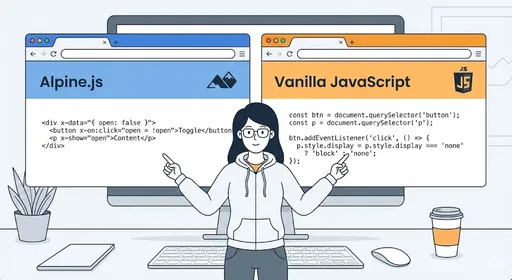
An Overview of Alpine.js

1) How to Use It?
Simply add one line of CDN in your <head> to start using it.
<head>
<script defer src="https://cdn.jsdelivr.net/npm/alpinejs@3.x.x/dist/cdn.min.js"></script>
</head>
Then, in your HTML, you use attributes like x-data, x-on, and x-show to declaratively write “state + action.”
<div x-data="{ open: false }">
  <button @click="open = !open">Toggle Menu</button>

  <ul x-show="open">
    <li>Menu Item 1</li>
    <li>Menu Item 2</li>
    <li>Menu Item 3</li>
  </ul>
</div>
-
x-data: Defines the state of this block -
@click(x-on:clickshorthand): Click event handler -
x-show: Shows/hides the DOM depending on the state
Alpine.js allows you to directly declare state and events inside your HTML templates, automatically updating the DOM when the state changes.
Commonalities and Differences with Vanilla JS
Commonalities
-
In the end, everything runs on JavaScript.
-
In terms of manipulating the DOM, attaching events, and managing state, they are the same.
-
Alpine.js also internally manipulates the DOM using Vanilla JS.
Differences
-
Vanilla JS:
-
Directly calls DOM APIs (
document.querySelector,addEventListener,classList, etc.) -
Manually manages state updates and DOM changes
-
-
Alpine.js:
-
Defines state and view declaratively using HTML attributes (
x-data,x-bind,x-on,x-model, etc.) -
Provides an automatic reactive pattern where the framework handles “state → DOM reflection”
-
In other words, it's better to think of Alpine.js as a “declarative layer” that sits lightly on top of Vanilla JS.
Comparative Examples: Simple Toggle UI
1) Vanilla JS
<div id="menu-wrap">
  <button id="toggle-btn">Toggle Menu</button>
  <ul id="menu" style="display:none;">
    <li>Menu Item 1</li>
    <li>Menu Item 2</li>
  </ul>
</div>

<script>
  const btn = document.getElementById('toggle-btn');
  const menu = document.getElementById('menu');
  let open = false;

  btn.addEventListener('click', () => {
    open = !open;
    menu.style.display = open ? 'block' : 'none';
  });
</script>
-
Directly managing the state variable
open -
Manually handling event registration, DOM selection, and style changes
2) Alpine.js
<div x-data="{ open: false }">
  <button @click="open = !open">Toggle Menu</button>

  <ul x-show="open">
    <li>Menu Item 1</li>
    <li>Menu Item 2</li>
  </ul>
</div>
-
Declaring the state (
open) and UI condition (x-show="open") within the same block -
Alpine.js handles DOM selection, show/hide logic, etc.
Despite having the same functionality, Vanilla JS requires you to write “how” to do it, whereas Alpine.js allows you to declare “what” it should be.
Advantages of Alpine.js (Compared to Vanilla JS)
1) Short and Declarative Code
-
By writing the relationship between state and DOM directly in HTML attributes, the business logic becomes clearer.
-
Reduces repetitive code for managing DOM selectors, binding events, and toggling classes significantly.
While it would still be feasible to implement these features in Vanilla, using Alpine.js eliminates a lot of “wiring work.”
2) Reactive Updates
Alpine.js offers reactive data binding in a style similar to Vue.
-
x-text="message",x-bind:class="isActive ? '...' : '...'",x-model="value", etc. -
When data changes, the DOM automatically updates
In Vanilla JS, you have to manually update innerText, classList, etc., whenever the value changes.
3) Component Unit Structuring
A single x-data block acts as a small component.
-
State, events, and rendering logic are cohesive within a single
div -
It's easy to mix multiple Alpine components on a single page
It is certainly possible to accomplish this in Vanilla JS as well, but you would need to impose structure and agree on patterns within the team.
4) Light and Fast
-
Alpine.js has a very small size ranging from a few to several dozen KB when minified/unminified, and its API is a minimal framework with about 15 properties, 6 attributes, and 2 methods.
-
It imposes much less loading burden compared to SPA frameworks like React/Vue.
This is well-suited for situations where “having a large development environment and running a build pipeline feels excessive, but jQuery seems a bit outdated.”
5) Use Right Away Without a Build (One CDN Line)
-
It can be used right away in an HTML file without tools like NPM, Webpack, or Vite.
-
It's ideal for gradually introducing into existing legacy projects or server-side rendered projects (Laravel, Rails, Django, etc.).
6) Synergy with Server-Side Frameworks
It pairs particularly well with tools like Laravel Livewire that render HTML on the server, functioning as a thin interaction layer in the frontend.
- You can entrust Alpine.js with “small interactions that do not require a page refresh,” such as opening/closing modals, switching tabs, and dropdowns.
Disadvantages/Considerations of Alpine.js (Compared to Vanilla JS)
1) An Additional Abstraction Layer
Vanilla JS uses the DOM API provided directly by the browser, making debugging flows simpler when issues arise.
In Alpine.js:
- Directive (
x-...) → Alpine Runtime → Actual DOM Manipulation
This process introduces an additional layer, making it more complex to track subtle bugs or performance issues.
This may not pose problems in small projects, but the more interactions there are, the more you need to understand this abstraction layer.
2) Clear Limitations for Large SPAs
Officially, Alpine.js states that it is not intended to replace full-stack SPA frameworks like React/Vue/Angular.
-
Complex requirements like page routing, global state management, and code splitting require separate tools
-
It is not suitable for applications with hundreds of components interacting in complex ways
In such situations, it may be better to either:
-
Directly assemble a combination of “Vanilla JS + router + state management library,” or
-
Use a proper framework like React / Vue.
3) Logic Mixed Within HTML
Alpine.js directly writes logic into HTML attributes, leading to the problem of templates becoming overloaded as the size increases.
<button
  @click="isOpen = !isOpen; activeTab = 'settings'; logClick()"
  :class="isOpen ? 'bg-blue-500 text-white' : 'bg-gray-100 text-gray-700'"
>
  Settings
</button>
-
Teams that prefer to separate “view in HTML and logic in JS files” might feel that the separation of concerns becomes blurred.
-
In Vanilla JS, it is relatively easier to keep templates clean while separating logic into JS modules.
Of course, even in Alpine.js, if you maintain **well-defined rules** by defining functions in external script files and just calling them concisely in the template, you can resolve this to some extent.
4) Complex DOM Manipulation or Performance Tuning
For situations where high performance is needed, such as animations, canvas, WebGL, or scroll-based heavy interactions, you will ultimately need to work with Vanilla JS or low-level libraries.
-
Alpine.js is optimized for “simple components” and does not provide APIs tailored for such complex scenarios.
-
This suggests that in these areas, it would be more natural to choose either Vanilla JS or specialized libraries instead of Alpine.js.
5) Learning Costs for the Team at Introduction
-
If team members are all accustomed to Vanilla JS, they will need to learn the directive syntax of Alpine.js (
x-data,x-bind,x-model, etc.). -
In very small projects, the cost of “adapting to the tool” may outweigh the benefits.
In such cases, it might be more sensible to stick with clean patterns (modularization, event delegation, etc.) in Vanilla JS.
When to Use Alpine.js, and When to Use Vanilla JS?
Situations Suitable for Alpine.js
-
When you want to quickly add small interactions like toggles/modals/tabs/search inputs to a server-side rendered (SSR) web app
-
When you need a “light, modern alternative” to replace jQuery
-
For small-to-medium projects where you don't want to set up large build tools
-
When you want to maintain an HTML-template-centered workflow but use somewhat more declarative frontend code
-
When you plan to quickly prototype and possibly move to React/Vue later if needed
Situations Where Vanilla JS is Better
-
When you want to minimize framework dependencies or need to teach/browser sample code for understanding basic browser behavior
-
Advanced scenarios where deep control over DOM APIs, event flows, and browser rendering processes is required
-
Legacy projects where a pattern of “Vanilla JS + custom utilities/helpers” is already well-established within the team
-
When there's no frontend build system in place and introducing a new library is a burden for the organization
Conclusion
-
Alpine.js is “a lightweight frontend framework that is slightly more declarative and convenient than Vanilla JS.”
-
It enables you to write things that can also be done in Vanilla JS in shorter and more structured ways, but:
-
It adds an additional abstraction layer,
-
has clear limitations for large SPAs, and
-
there are definite drawbacks in mixing HTML and logic.
-
-
In typical backend-centric web projects characterized by server-side rendering + a bit of interaction, Alpine.js can significantly enhance productivity,
-
Conversely, in situations requiring high performance, large-scale, or highly customized UIs, Vanilla JS (or a larger framework) is often still necessary.
In conclusion, instead of replacing Vanilla JS, Alpine.js is more like a small helper that sits on top, and it’s best to choose it based on the project's scale and the team's preferences.
And since it pairs very well with server-side rendering frameworks like Django, I highly recommend Django developers give it a try.

There are no comments.