django.utils.http is een essentiële module voor Django-ontwikkelaars, die nuttige en veelgebruikte functies biedt.
This module gathers key utility functions necessary for handling the HTTP protocol itself or safely manipulating URLs. It focuses on constructing URLs and query strings and securely transmitting data in an HTTP context, rather than sending HTTP requests (e.g., using the requests library).
In dit artikel verkennen we de kernfuncties van django.utils.http.
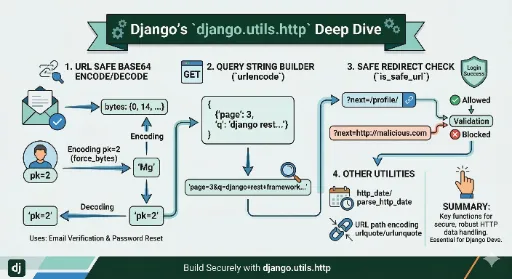
1. URL Safe Base64 Encoding: urlsafe_base64_encode / decode
Deze module komt het best tot zijn recht als het om deze functionaliteit gaat.
Standard Base64 encoding includes special characters like + and /. These characters carry special meanings in URLs (such as whitespace and path separators), which can cause issues when passing values through URLs.
urlsafe_base64_encode replaces these characters with - and _ to make them safe for URLs.
Hoofdtoepassingen:
- Email-based registration authentication tokens
- Coderen van gebruikers-ID (pk) voor wachtwoordherstellinks
Example: (Creating a password reset link)
from django.utils.http import urlsafe_base64_encode, urlsafe_base64_decode
from django.utils.encoding import force_bytes, force_str
from django.contrib.auth.models import User

# 1. When creating a token (Encoding)
user = User.objects.get(username='testuser')
# Belangrijk: Altijd naar bytes converteren vóór het coderen.
uid_bytes = force_bytes(user.pk)
uid_token = urlsafe_base64_encode(uid_bytes)

print(f"Encoded token: {uid_token}")
# Example: 'Mg' (assuming user.pk is 2)
# reset_url = f"/password-reset/{uid_token}/..."


# 2. When the user clicks the link (Decoding)
try:
    # Decode the token received from the URL back to bytes
    uid_bytes_decoded = urlsafe_base64_decode(uid_token)
    # Convert back to string (or integer)
    user_pk = force_str(uid_bytes_decoded)
    user = User.objects.get(pk=user_pk)
    print(f"Restored PK: {user.pk}")
except (TypeError, ValueError, OverflowError, User.DoesNotExist):
    user = None
Note:
force_bytesandforce_strare part of thedjango.utils.encodingmodule and are almost always used together with theurlsafe_base64functions.
2. Query String Builder: urlencode
This function easily transforms Python dictionary (dict) objects into query strings used in HTTP GET requests (e.g., ?key=value&key2=value2).
Example:
from django.utils.http import urlencode
params = {
'page': 3,
'q': 'django rest framework',
'region': 'ja'
}
# Codeert de sleutels en waarden van de dictionary in een querystring.
# The whitespace in 'django rest framework' is safely encoded as '+' or '%20'.
query_string = urlencode(params)
print(query_string)
# Result: 'page=3&q=django+rest+framework®ion=ja'
3. Safe Redirect Check: is_safe_url
Dit is een cruciale functie voor de beveiliging. It is used to prevent 'Open Redirect' vulnerabilities.
It's common to redirect users back to a page they were on before, using something like ?next=/profile/ after logging in. If an attacker inserts an external URL like ?next=http://malicious-site.com as the next value, the user could be redirected to the malicious site immediately after logging in.
is_safe_url controleert of de gegeven URL een 'veilige' URL is die behoort tot de host (domein) van de huidige applicatie, of dat het een relatief pad is.
Example: (Login view)
from django.utils.http import is_safe_url
from django.shortcuts import redirect, resolve_url

def login_success_redirect(request):
    # Get the 'next' value from the GET parameters.
    next_url = request.GET.get('next')

    # 1. Als de 'next'-waarde bestaat en
    # 2. alleen als deze de is_safe_url-controle doorstaat, leiden we door naar die URL.
    if next_url and is_safe_url(
        url=next_url,
        allowed_hosts={request.get_host()},  # Allow only the current request's host
        require_https=request.is_secure()   # If the current request is HTTPS, the redirect must be HTTPS
    ):
        return redirect(next_url)

    # Als de URL niet veilig is of als er geen 'next'-waarde is, leiden we door naar de standaardpagina.
    return redirect(resolve_url('main-dashboard'))
4. Other Useful Functions
urlquote(value)/urlunquote(value): Terwijlurlencodeeen querystring voor de hele dictionary maakt, codeerturlquotespeciale tekens (zoals spaties, CJK-tekens, enz.) in één enkele string als%XX(percent-encoding). Dit is nuttig bij het samenstellen van delen van een URL-pad.parse_http_date(date_str)/http_date(timestamp): Gebruikt om strings in standaard datumformaat (RFC 1123) te parsen of aan te maken, voor gebruik in HTTP-headers zoalsLast-ModifiedofExpires.
Summary
django.utils.http is een uitstekend voorbeeld van hoe grondig Django omgaat met HTTP-standaarden.
In het bijzonder zijn de veilige tokenoverdracht met behulp van urlsafe_base64_encode en de omleidingsbeveiliging via is_safe_url essentiële functionaliteiten die elke Django-ontwikkelaar zou moeten kennen. Door deze module goed te gebruiken, kan de afhandeling van HTTP-gegevens veel veiliger en robuuster worden.