What Does “1 zombie” Mean in top on Linux?
When you monitor a Linux system with the top command, you may occasionally notice an entry like 1 zombie in the Tasks line.
top - 16:03:19 up  7:09,  1 user,  load average: 2.24, 2.21, 2.29
Tasks: 392 total,   1 running, 390 sleeping,   0 stopped,   1 zombie
...
So what is this “zombie,” and how does it affect your system? This post explains what a zombie process is, why it can become a problem, and how to identify and resolve it.
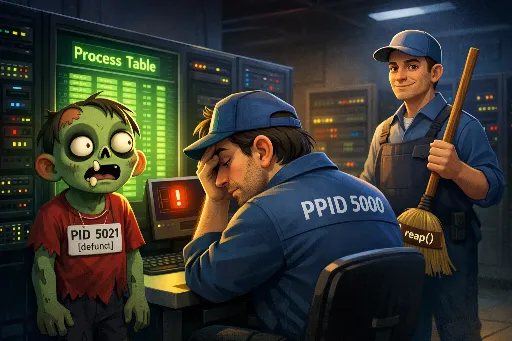
What Is a Zombie Process? 🧟
Let’s compare it to a simple process lifecycle.
- Birth (Fork): A parent process creates a child process using
fork(). - Run (Exec): The child process performs its work.
- Exit: The child finishes and terminates with
exit(). - Waiting to be collected (Wait): After the child exits, the kernel keeps a small record of it—its PID and exit status—in the process table, and sends the parent a
SIGCHLDsignal (meaning “your child has exited”). - The parent is expected to call
wait()(orwaitpid()) to retrieve (“reap”) the child’s exit status. Once that happens, the kernel can fully remove the child’s entry from the process table.
A zombie process is what you get between steps 4 and 5:
- The child process has already finished and exited,
- but the parent has not yet called
wait()to collect the exit status.
As the name suggests, the process is already dead (not running). That means it does not consume CPU or memory like a normal running process.
Why Can Zombie Processes Be a Problem?
A zombie process uses almost no resources, but it still occupies a slot in the process table—effectively consuming a PID entry.
If a bug or misbehavior in the parent process causes zombies to accumulate and never get reaped, the system can eventually hit the maximum number of PIDs. When that happens, new processes can’t be created, which can lead to serious failures.
Seeing 1–2 zombies in top is not unusual. The real warning sign is when the number keeps growing.
How to Find and Identify Zombie Processes
top only shows the count of zombies. To see which processes are zombies and who their parent is, use ps.
The quickest way is to look for processes whose STAT (state) column is Z.
# Show all processes in detail and filter ones in Z (zombie) state
ps -elf | grep ' Z '

# Or use aux format (the 8th column is STAT)
ps aux | awk '$8=="Z"'
Example output:
# ps -elf | grep ' Z '
F S   UID   PID  PPID  C PRI  NI ADDR SZ WCHAN  STIME TTY          TIME CMD
0 Z  user  5021  5000  0  80   0 -     0 exit   15:30 ?        00:00:00 [defunct]
Key fields to check:
- S (State):
Z(zombie) - PID:
5021(the zombie process ID) - PPID:
5000(the parent process ID that hasn’t reaped it) - CMD:
[defunct](terminated but not cleaned up)
How to Resolve Zombie Processes
The most important point:
You cannot “kill” a zombie process with kill.
For example:
kill -9 5021
This won’t fix it, because the zombie is already terminated. There’s nothing left to receive or handle a signal.
The only real fix is to make the parent process call wait() (i.e., to reap the child).
Step 1: Send a Signal to the Parent (Recommended)
The first thing to try is sending SIGCHLD to the parent (PPID) manually, prompting it to check for exited children.
# Send SIGCHLD to the parent PID (5000 in this example)
kill -s SIGCHLD 5000
Conceptually, this nudges the parent: “One of your children exited—go check.” If the parent is implemented correctly, it will handle the signal, call wait(), and the zombie will disappear.
Step 2: Terminate the Parent Process (Last Resort)
If step 1 doesn’t work, it often means the parent process is stuck, stopped, or has a serious bug in its child-reaping logic.
In that case, the remaining option is to terminate the parent process:
# Gracefully stop the parent process
kill 5000

# If it refuses to exit, force it
kill -9 5000
Why does killing the parent help?
On Linux, if a parent process dies, its children become orphaned and are automatically adopted by PID 1 (init or systemd). PID 1 is designed to reap exited child processes, including zombies, so it will clean them up quickly.
⚠️ Warning: Before terminating a parent process, always confirm it isn’t a critical service (e.g., a database or web server). Killing an important service can cause a bigger outage. Use:
ps -p 5000
Summary
- A zombie process is a child process that has exited, but whose parent hasn’t called
wait()to collect its exit status. - Zombies don’t use CPU or normal memory, but they consume a process table entry (PID slot).
- A few zombies are common, but a growing number can eventually prevent the system from creating new processes.
-
Use
psto find zombies and their parent: -
ps -elf | grep ' Z ' - Fixing a zombie targets the parent process, not the zombie itself:
kill -s SIGCHLD <parent_pid>(recommended)kill <parent_pid>(last resort)