python-magic: The Most Practical Way to Trust File Content Over Extensions
When you add an image upload feature to a server, you’ll eventually face these questions.
- “It says
.png, but is it really a PNG?” - “I need to decide whether the file is an image or a document first.”
- “Before pulling in an external parser (Pillow/OpenCV), I’d like to confirm the type.”
The strongest starting point is the file content, not the extension. The easiest tool to get that “content‑based detection” is python‑magic.
What Does python‑magic Do?

python‑magic is a thin wrapper that lets Python use the C library libmagic. libmagic examines a file’s header (the first few bytes) to identify its type, a feature also available via the Unix file command.
In short:
file(Linux command) = “terminal interface”libmagic= “core engine (detection logic)”python‑magic= “Python wrapper that calls libmagic”
This article focuses on python‑magic and explains, step by step, how the underlying engine determines file types.
How the Core Engine (libmagic) Works
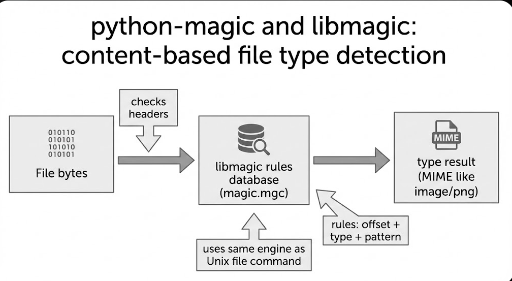
libmagic’s essence is simple.
It reads a database of file‑type detection rules, applies those rules to the file’s bytes, and returns the most plausible conclusion.
The database is the magic database (magic pattern DB) that ships with file/libmagic, usually compiled into magic.mgc on the system.
1) The “magic file” is a collection of rules
Each rule typically contains:
- Where to look (offset: which byte position)
- How to read (type: byte/string/integer, etc.)
- What to compare (expected value/pattern)
- What conclusion to draw (message/MIME, etc.)
The file manual describes these as “magic patterns.” Rules are tested line by line, and when a condition matches, the engine descends into more specific sub‑tests, forming a hierarchical structure.
For those interested in the details of the Linux file command, check out the link below.
Learn about the Linux file command
2) The rule DB has a “text source” and a “compiled result”
The magic DB can be a human‑readable text file, but for performance it’s often distributed as a compiled binary DB (.mgc).
3) The Bottom Line: “We look at file content, not extensions”
file has long been a philosophy of type inference based on content rather than extensions. python‑magic brings that philosophy into a single line of Python code.
How to Use python‑magic
There are two common usage patterns.
1) Get the MIME type (most practical)
Useful for upload handling, routing, and logging/metrics.
import magic

mime = magic.from_file("upload.bin", mime=True)
print(mime)  # e.g., image/png
python‑magic provides file‑type identification based on libmagic, mirroring the behavior of the file command.
2) Detect directly from bytes (good for upload streams)
Often you want to inspect only a portion of the uploaded data before writing it to disk.
import magic

with open("upload.bin", "rb") as f:
    head = f.read(4096)

mime = magic.from_buffer(head, mime=True)
print(mime)
Buffer‑based detection is especially handy as a “first‑pass filter” before persisting the file.
Where Is It Useful From a Developer’s Perspective?
1) First line of defense for upload validation
- Don’t rely solely on extensions.
- Quickly confirm whether a file can be treated as an image.
2) Branch point in the processing pipeline
- If it’s an image, route to the resize/thumbnail pipeline.
- If it’s a PDF/ZIP, hand it to a different worker.
- If the type is unknown, quarantine/deny or perform additional checks.
3) Reduce the cost of invoking “heavy decoders”
Decoders like Pillow are powerful but incur memory, CPU, and security surface costs. python‑magic helps decide whether it’s worth invoking such decoders.
Key practical note: libmagic is a heuristic/identification tool. For security‑critical scenarios (e.g., blocking malicious payloads), supplement with whitelists, size limits, sandbox decoding, etc.
Conclusion: python‑magic is the Lightest Way to Bring File‑Type Detection Into Code
python‑magic doesn’t process images; it tells you how to treat a file.
- Engine: libmagic (same as
file) - Detection: “rule DB + byte inspection”
- Practical use: upload validation, routing, cost reduction
Mastering it lets you build a robust “detect → branch → safeguard” flow even in environments lacking specialized libraries.
Teaser for the Next Post
We’ll break down Pillow’s open(), load(), and verify() methods—what each guarantees, when to use them, and how they work.
Related Posts
There are no comments.