Django/Security Image Uploads: Avoiding Server Crashes with Secure and Efficient Handling
Image uploads are a common feature in web services, but the upload endpoint is the most direct path for external data to enter your server. For attackers, it’s the cheapest way to cause the biggest damage—web shell uploads, image parser vulnerabilities, DoS, and more.
This article shows how to satisfy the seemingly contradictory goals of hyper‑vigilant security and resource efficiency. The core idea is simple:
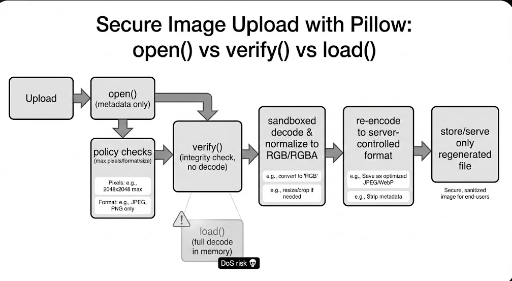
- During validation, read as little as possible (no decoding, only headers and metadata).
- During storage, regenerate the file (transcoding for sanitization).
The Essence of Upload Security: "Never Trust, Delay Trust"

Almost nothing in an upload can be trusted.
- Filename: user‑controlled.
- Extension: user‑controlled.
- Content‑Type: client‑supplied.
- File contents: attacker‑crafted.
Thus the strategy converges on two principles:
- Quick, cheap checks to filter out obvious threats.
- Server‑generated final artifact to guarantee safety.
Common Misconception: "You must read the whole file to be sure?"
A frequent mistake is to add code like this in the validation step:
img = Image.open(file)
img.verify()  # or img.load()
The problem is that this pre‑pays the attacker for server resources.
Why is it dangerous?
- Decompression bombs – a few megabytes on disk can decompress to tens of gigabytes, exhausting memory and CPU and causing a DoS.
- Unnecessary I/O –
verify()reads the entire file, incurring high I/O costs, and often requires aseek(0)or re‑open for subsequent processing.
Conclusion: Do not decode pixels during the upload validation phase. Header, metadata, and resolution limits are sufficient for first‑line defense.
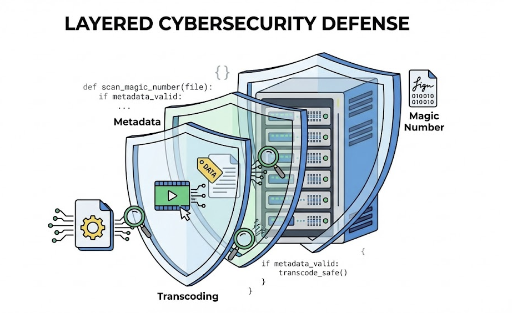
Defense in Depth: Three‑Layer Protection
Image uploads cannot be secured with a single if statement. A realistic balance requires layered defenses.
1️⃣ Extension is a lie — MIME detection via Magic Number
A filename like profile.png carries no meaning. You must read the file’s signature (magic number) to confirm its true type.
- Don’t read the entire file; the first 1–2 KB is enough.
- Example library:
python‑magic(libmagic based).
2️⃣ Pillow is safe only when opened lazily — limit resolution with lazy loading
Image.open() parses the header without loading pixel data. Use this to block files that exceed a pixel count before any decoding occurs.
- Check:
width * height <= MAX_PIXELS. - Point: Inspect
sizewithout callingload()orverify().
3️⃣ The best sanitization is “redraw” — Transcoding
The core principle:
Never store the original.
Images can hide malicious payloads in metadata (EXIF), color profiles, or parser tricks. By extracting only pixel data and re‑encoding on the server, most of these threats are naturally removed.
- Recommended: re‑encode to WebP (or AVIF/JPEG).
- Benefits: sanitization, size optimization, consistent format policy.
Practical Implementation: DRF Serializer (Security + Memory Efficiency)
The following code embodies the philosophy of minimal reading during validation and regeneration during storage.
f.sizeis metadata already known to Django.- Magic number uses only the first bytes.
- Pillow checks only resolution.
- Final storage uses WebP transcoding.
- Each step restores the file pointer with
seek(0).
from io import BytesIO

import magic
from PIL import Image, ImageOps, UnidentifiedImageError
from rest_framework import serializers

# Policy (adjust per service)
MAX_SIZE = 5 * 1024 * 1024          # 5 MB
MAX_PIXELS = 4_194_304              # 2048 × 2048 ≈ 4 MP
ALLOWED_MIME = {"image/png", "image/jpeg", "image/webp"}

class SecureImageUploadSerializer(serializers.Serializer):
    file = serializers.ImageField()

    def validate_file(self, f):
        # [1] Size limit – cheapest filter
        if f.size > MAX_SIZE:
            raise serializers.ValidationError("File size exceeds the limit.")

        # [2] MIME check via magic number – ignore extension/Content‑Type
        f.seek(0)
        head = f.read(2048)
        f.seek(0)

        mime = magic.from_buffer(head, mime=True)
        if mime not in ALLOWED_MIME:
            raise serializers.ValidationError("Unsupported file format.")

        # [3] Resolution limit – header‑only, no load/verify
        try:
            with Image.open(f) as img:
                w, h = img.size
                if (w * h) > MAX_PIXELS:
                    raise serializers.ValidationError("Image resolution is too high.")
        except UnidentifiedImageError:
            raise serializers.ValidationError("Invalid image.")
        except Exception:
            raise serializers.ValidationError("Error during image validation.")
        finally:
            f.seek(0)

        return f

    def create(self, validated_data):
        f = validated_data["file"]

        # Final storage – server‑generated artifact (sanitization)
        try:
            with Image.open(f) as img:
                # Correct EXIF rotation (important for mobile uploads)
                img = ImageOps.exif_transpose(img)

                # Normalize to a safe color space
                if img.mode not in ("RGB", "RGBA"):
                    img = img.convert("RGB")

                out = BytesIO()
                img.save(out, format="WEBP", quality=85, method=6)
                out.seek(0)

                safe_bytes = out.getvalue()

                # Store `safe_bytes` in your storage backend.
                # - Randomize filename (UUID)
                # - Directory sharding (e.g., ab/cd/uuid.webp)
                # - Persist only the server‑generated key in the DB
                return safe_bytes

        except Exception:
            raise serializers.ValidationError("Error processing image.")
Balancing "Hyper‑Vigilant Security" and "Resource Economy"
The key trade‑off is:
Don’t be greedy during validation
Validation is the most traffic‑heavy and attack‑prone stage. Performing expensive operations like load() lets attackers pay for server resources.
- ✅ Size limit / header‑based MIME / resolution limit
- ❌ Pixel decoding / full file read / multiple re‑opens
Real safety comes from the storage stage
Validation filters; storage standardizes. By generating a new byte stream, you simplify security and operations.
- Unified format → simpler caching and thumbnail pipelines
- Metadata cleanup → easier removal of sensitive data (EXIF GPS)
- Reduced risk of malicious payloads
Extra Measures for a Robust Setup
- Never trust filenames; generate them on the server (UUID recommended).
- Consider offloading uploads – for large services, let the app server receive a presigned URL to object storage and perform async checks/transforms.
- Limit processing time / isolate workers – image conversion is CPU‑heavy; keep the request/response cycle short and delegate to workers/queues.
- Log and monitor – aggregate rejection reasons (MIME mismatch, resolution excess, size excess) to spot attack patterns early.
Checklist Summary
- Do not load the entire file into memory. Read only the first few bytes; stream the rest.
- Ignore extension/Content‑Type; verify MIME via magic number.
- During validation, avoid
load()/verify(); check resolution only. - Never store the original; re‑encode via transcoding.
- Reset the file pointer (
seek(0)) after each step.
Upload security starts with a skeptical mindset, but performance hinges on understanding how the system works. Balancing both ensures a resilient upload pipeline.
Check out related posts


There are no comments.