Deploying Web Applications on Linux: Rethinking Docker in Favor of systemd.service
In recent years, the mantra “deployment = Docker + container orchestration (Kubernetes, ECS, etc.)” has become almost a default assumption. As a result, the classic approach of running a web application on a Linux server as a process + systemd service can feel outdated.
However, in practice:
- A single web application
- A small team or simple infrastructure
- On‑premises or highly regulated environments
…systemd service deployment often remains the simpler, more reliable, and more operator‑friendly choice.
This article explores the advantages of deploying with systemd.service over Docker, and outlines the scenarios where a systemd‑based approach is most beneficial.
1. A Quick Overview of systemd and Docker

Docker
- Packages an application into an image
- Runs that image as a container
- Strength: encapsulate the entire environment → run identically anywhere
systemd
- The default init system on modern Linux distributions
- Starts services at boot, restarts them if they die, and manages logs
- Defines and manages processes via
*.serviceunit files
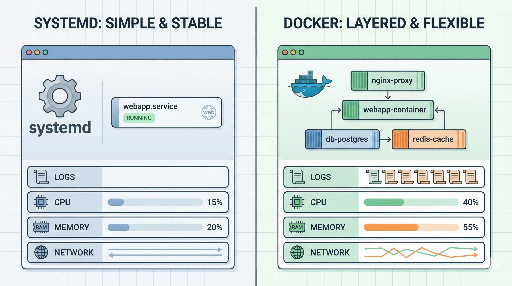
Docker is a tool for encapsulating application environments, while systemd is a tool for managing processes on Linux.
They are not competitors; they are often used together—either running systemd inside a Docker container or having systemd manage the Docker daemon itself. Here we focus on the case where we deploy a web application without Docker, using only systemd.
2. Advantages of systemd.service Deployment Over Docker
2‑1. Simplicity: One Less Layer
Using Docker adds several components to the stack:
- Docker daemon
- Image build pipeline
- Image registry
- Container runtime permissions
With systemd, the structure is relatively straightforward:
- Install the required runtime (Python/Node/Java, etc.) on the OS
- Deploy the application code
- Register and run it as a systemd service
For small projects or internal services, the “build → push → pull → redeploy” cycle can be a burden. A quick git pull followed by systemctl restart is often faster and more intuitive.
2‑2. Seamless Integration with Linux
systemd is the go‑to interface for Linux, tightly coupled with OS‑level features:
- Logging –
journalctl -u myapp.serviceshows service logs instantly - Boot‑time startup –
systemctl enable myapp.serviceensures the service starts on boot - Resource limits –
MemoryMax,CPUQuota, etc. provide simple cgroup controls - Dependency management –
After=network.targetorAfter=postgresql.serviceorchestrates service order
When running a container, you must juggle logs, resources, and networking inside and outside the container. With a single systemd service, the host‑level view is direct and easier to debug.
2‑3. Lower Resource Overhead
Docker’s overhead is modest, but additional layers can accumulate:
- Multiple image layers consume disk space
- Unused containers linger
- Separate log and volume management per container
A systemd deployment requires only the OS, runtime, and application code—ideal for disk‑ or memory‑constrained environments, such as small VMs or embedded/low‑spec servers.
2‑4. Intuitive Network Configuration
Containers introduce:
- Internal IPs and ports
- Host port mappings
- Bridge or overlay networks
systemd services bind directly to the host’s IP and port, and firewall rules are applied at the host level. This simplifies network debugging:
- Is the port open?
- Is the firewall blocking it?
- Does it conflict with another service on the same host?
Reducing one network layer makes troubleshooting more straightforward.
2‑5. Docker May Be Unavailable in Certain Environments
Common scenarios where Docker is prohibited or impractical:
- Highly regulated on‑premises environments (finance, public sector, healthcare)
- Policies that forbid container runtimes
- Networks with restricted external access, making registry pulls difficult
In such cases, the only viable path is OS + systemd. A solid understanding of systemd allows you to implement automatic restarts, log rotation, resource limits, and health checks without Docker.
3. Example: Deploying a Web Application with systemd.service
Assume a Django/Flask app served by Gunicorn.
3‑1. Unit File Example
Create /etc/systemd/system/myapp.service:
[Unit]
Description=My Web Application (Gunicorn)
After=network.target

[Service]
User=www-data
Group=www-data
WorkingDirectory=/srv/myapp
EnvironmentFile=/etc/myapp.env
ExecStart=/usr/bin/gunicorn \
    --workers 4 \
    --bind 0.0.0.0:8000 \
    config.wsgi:application

# Restart on failure
Restart=on-failure
RestartSec=5

# Optional resource limits
# MemoryMax=512M
# CPUQuota=50%

[Install]
WantedBy=multi-user.target
Store environment variables in /etc/myapp.env:
DJANGO_SETTINGS_MODULE=config.settings.prod
SECRET_KEY=super-secret-key
DATABASE_URL=postgres://...
3‑2. Managing the Service
# Register and enable at boot
sudo systemctl enable myapp.service

# Start / stop / restart
sudo systemctl start myapp.service
sudo systemctl restart myapp.service
sudo systemctl stop myapp.service

# Check status and logs
sudo systemctl status myapp.service
sudo journalctl -u myapp.service -f
For teams already comfortable with Linux, this workflow introduces minimal learning curve.
4. When is systemd Deployment Preferable to Docker?
In summary, consider a systemd‑only approach when:
4‑1. Single or Small‑Scale Service, No Complex Orchestration
- One or two web apps
- Managed DB via RDS or similar
- Few target servers (1–5)
The cost of adding Docker and orchestration may outweigh the benefits; a simple systemd + deployment script (Ansible, Fabric, etc.) often suffices.
4‑2. Teams Familiar with Linux Server Management
If the existing stack is largely systemd‑based and the ops team is proficient with systemctl, journalctl, rsyslog, and logrotate, adding Docker introduces new permission models, networking, and image management that may not be worth the effort.
4‑3. Regulated or Restricted Environments
Finance, public sector, defense, healthcare, closed networks, or places with stringent container security reviews—Docker may be a risk factor. A proven OS‑level deployment is the safer choice.
4‑4. Need for Tight Host‑Level Debugging
When you need to use tools like strace, perf, or inspect /proc directly, running the app as a host process eliminates the extra container layer, making performance tuning and debugging more straightforward.
5. Docker Still Makes Sense in Many Cases
While systemd has clear advantages in the scenarios above, Docker shines when:
- You need identical environments across local, staging, and production
- You want to reduce environment drift
- You integrate tightly with CI/CD pipelines
- You run multi‑service stacks (web, workers, cron, DB, etc.)
If you must deploy the same stack across many servers or environments, Docker’s reproducibility and portability can outweigh its overhead.
Ultimately, the decision hinges on:
What tool offers the simplest, most reliable, and easiest‑to‑operate solution for your service size, team, and infrastructure?
6. Takeaway: The Context Comes First
Deploying web applications on Linux isn’t a one‑size‑fits‑all problem. Neither is Docker a silver bullet, nor is systemd a guaranteed winner. The right choice depends on:
- The scale and complexity of your services
- Your team’s expertise
- Regulatory constraints
- Operational priorities (simplicity, reliability, performance)
If you’re already on Linux, pause and ask:
- Do I really need Docker for this service?
- Would a systemd deployment simplify things?
Tools are means to an end; simplicity and operational ease ultimately drive long‑term productivity.
There are no comments.