Why Is Cloudflare Free?
The CDN Concept and the Money‑Making Model

Even if you’re not a web developer, anyone who runs a blog seriously will hear this at least once:
"Using Cloudflare speeds up your site." "Add a CDN and see the difference."
The problem is that most people stop there. They think, "Just use it and it’ll be faster," without understanding how it works, why it’s free, or what’s happening behind the scenes.
But those two questions hide a surprisingly interesting story.
- What exactly does a CDN do? (We’ll explain with a pizza‑delivery analogy.)
- How does Cloudflare, the company behind the service, make money while offering it for free?
A little deeper look reveals that even a personal blog owner can see the real benefits of this structure.
1. CDN: Delivering Tokyo‑Made Pizza to New York in Ten Minutes
First, let’s break down what a CDN is.
CDN = Content Delivery Network – literally a network that delivers content. It sounds technical, but think of it as a pizza shop.
1) A World Without CDNs
Imagine you run a fantastic pizza place in Tokyo, but you only serve customers from the Tokyo branch.
- A New York customer orders a pizza.
- You have to ship it by plane from Tokyo to New York.
- Result:
- The pizza arrives cold (your site feels slow).
- Shipping costs (traffic costs) are high.
In the web world, it’s the same. Serving European or U.S. users from a Japanese server adds latency proportional to the physical distance, making the site feel sluggish.
2) A World With CDNs
Now picture you open pizza outlets worldwide.
- The Tokyo headquarters manages the recipe and the original pizza.
- Edge locations around the globe keep popular pizzas in their refrigerators (cache).
- When a New York customer orders:
- No need to go back to Tokyo.
- The nearest New York outlet pulls it out, warms it, and delivers it immediately.
That’s how a CDN works.
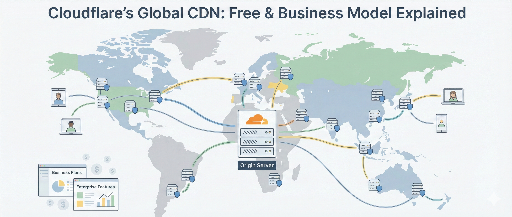
- Static assets (HTML, images, CSS, JS) are cached on edge nodes worldwide.
- When a user connects, the nearest server serves the page.
Result: 1. Speed improves dramatically – less distance, shorter network paths. 2. Origin server load drops – the CDN handles most requests, freeing up your server.
In one sentence: a CDN is a global cache/proxy network that delivers content from the nearest location to the user.
2. Cloudflare: The Delivery Driver and the Gatekeeper
So who is Cloudflare?
Officially, Cloudflare is a global CDN and security platform with over 330 data centers worldwide.
In short:
"A company that makes websites faster, safer, and more reliable."
They primarily offer two services:
1) Speed: CDN + Optimizations
- Edge caching reduces latency.
- Images, JavaScript, and CSS are optimized and compressed for faster loading.
From a developer’s view, you can think of it as "wrapping your origin server with a Cloudflare layer." All requests hit Cloudflare first, and only if needed are they forwarded to your server.
2) Security: DDoS Protection, WAF, HTTPS
Cloudflare isn’t just a delivery service; it’s also a security guard.
- DDoS Protection – Cloudflare’s massive network absorbs large traffic attacks.
- WAF (Web Application Firewall) – Blocks common attack patterns (SQLi, XSS, etc.) based on rules.
- Free HTTPS (SSL/TLS) – One click to add a lock icon, eliminating the hassle of setting up Let’s Encrypt.
In short, Cloudflare is a global cache network and a smart shield that filters traffic.
For a deeper dive, check out the full product lineup on the official site: https://www.cloudflare.com/
3. Why Offer It for Free?
Now the real question: why does Cloudflare give away so much for free?
The Free plan already includes:
- Global CDN caching
- Basic DDoS mitigation
- Free SSL/TLS
- Simple security/performance tweaks
For a personal blog or small service, that’s a huge win. And it’s perpetually free.
"Why would a company give this away? How do they survive?"
That’s where the business model comes in.
4. Cloudflare’s Revenue Engine: Grow Free, Upsell When Needed
Cloudflare’s strategy boils down to two steps:
- Get as many sites as possible on the free plan.
- When traffic grows or security needs rise, naturally upgrade to paid plans.
4‑1. More Traffic = Smarter Engine
Cloudflare watches massive amounts of traffic worldwide. The more free users, the better the data.
- Attack pattern detection – real‑time insights into DDoS, bots, and vulnerability scans.
- Performance optimization learning – data on bottlenecks by region, ISP, and effective caching strategies.
With this data, Cloudflare refines its WAF rules, smart routing, and sells advanced security/performance packages to enterprise customers.
Free users benefit now, but for Cloudflare they’re a live, large‑scale sample of internet traffic.
4‑2. Freemium Upsell
Initially, the free plan is enough for:
- Hobby blogs
- Startup landing pages
- Test side projects
But as a service grows:
- Daily visitors hit tens or hundreds of thousands.
- Payment, member data, or sensitive APIs come into play.
- Security, uptime, and speed demands rise.
At that point, Cloudflare offers:
- Pro – extra security/performance for high‑traffic sites (~$20/month).
- Business – for small businesses, e‑commerce, SaaS (~$200/month).
- Enterprise – 24/7 support, SLA, network priority for large enterprises.
Since the free plan already provides a taste, the cost of upgrading is often justified.
That’s the classic freemium model: help until you’re ready to pay.
5. What Cloudflare Actually Sells
Let’s look at the main revenue streams.
5‑1. Advanced Security: WAF, Bot Management, Zero Trust
- WAF – a firewall that analyzes HTTP patterns.
- Bot Management – filters unwanted scraping, crawling, credential stuffing.
- Zero Trust – replaces VPNs, allowing secure, identity‑based access from anywhere.
These are high‑value for companies with sales, brand, or customer data.
5‑2. Cloudflare Workers: Serverless at the Edge
Workers let you run JavaScript, TypeScript, or WebAssembly on Cloudflare’s edge network.
- No server or container management.
- Code runs close to the user.
Use cases: simple APIs, image resizing, authentication, or even full web apps.
Free tier exists, but heavy traffic services typically move to paid Worker plans.
→ https://developers.cloudflare.com/workers/
5‑3. R2: Object Storage Without Egress Fees
R2 is an S3‑compatible object store that doesn’t charge egress.
- Traditional cloud storage charges for outbound traffic.
- R2 offers predictable costs: pay for storage and API calls, but no egress.
This is attractive for high‑traffic services that need cost‑effective storage.
→ https://www.cloudflare.com/developer-platform/products/r2/
6. Applying It to Your App or Service
If you’re listening, you probably picture:
- "My blog has under 100 daily visitors…"
- "One day it might grow, and speed/security will matter for revenue…"
- "If I’m already on Cloudflare, I can just upgrade a level."
The Free plan is a great fit for individuals and small services:
- Speed – improves SEO and reduces bounce rates.
- Free HTTPS – builds trust without warnings.
- Basic DDoS protection – a safety net against accidental traffic spikes.
From Cloudflare’s perspective, the more your site grows, the higher the chance you’ll upgrade, creating a win‑win.
Conclusion: Behind the Free Pizza Is a Solid Business Model
In summary:
- A CDN is a global network that delivers content from the nearest location.
- Cloudflare is a massive CDN and security provider.
- The free plan gives you fast, secure web infrastructure while Cloudflare collects data and upsells when you need more.
- Paid plans and developer products (Workers, R2) provide enterprise‑grade infrastructure and a sustainable revenue stream.
For hobbyists, portfolios, or small services, the free plan is more than enough. When your project scales, the natural next step is to upgrade and keep the momentum.
Reference Links
- Cloudflare Official Site: https://www.cloudflare.com/
- Cloudflare CDN Overview: https://www.cloudflare.com/application-services/products/cdn/
- Cloudflare Plans: https://www.cloudflare.com/plans/
- Cloudflare Workers: https://developers.cloudflare.com/workers/
- Cloudflare R2 Object Storage: https://www.cloudflare.com/developer-platform/products/r2/
![thumbnail of [Python Standard Library – 0] What Is the Python Standard Library? A Beginner’s Guide](/media/editor_temp/6/b040f2a6-ecb0-483c-99fe-ebbf91beb182.png)
There are no comments.