Why VPNs Are Essential for Web Developers: It’s Not Just About Security
When you deploy a web application to the internet, you leave the cozy confines of localhost and step into an unpredictable wild. Many developers view VPNs (Virtual Private Networks) merely as a secure tunnel for server access or a privacy tool.
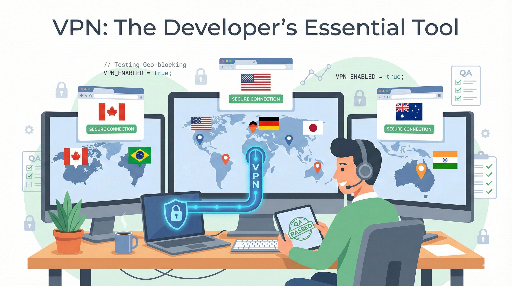
For web developers dealing with global traffic, a VPN is the most powerful and indispensable QA tool.
Even if you deploy a “fully identical environment” with Docker, the real users’ environment is never the same.
- User’s country / city / carrier
- User’s network policy (corporate / school / national firewall)
- CDN edge node the user connects to
- Applicable laws / regulations (GDPR, CCPA, etc.)
None of these are under a developer’s control. This article explains why web developers should subscribe to a paid VPN as a real work tool and how it improves service quality with concrete examples.
1. Regional Blocking of 3rd‑Party APIs and Payment Logic

The most lethal and hard‑to‑reproduce bugs usually arise from external service integration.
Suppose you attach a global payment module like PayPal or Stripe. A payment flow that works flawlessly in Korea or the U.S. may be completely blocked at the call stage or timeout in certain countries.
Typical scenarios:
- Service sign‑up restrictions
- Stripe account creation may be blocked from certain IPs
- Checkout Session API may return HTTP 4xx/5xx
- Financial regulation / partnership issues
- Card payments may be disabled in some countries
- PayPal/BNPL options may not appear
The problem is that this phenomenon doesn’t show up in a developer’s environment. When testing from Korean or U.S. IPs, you always see “normal operation.”
Without a VPN, a user’s complaint that “payment doesn’t work” remains a mystery bug that can’t be reproduced even after digging through logs.
With a VPN, you can directly target the country’s IP and observe the payment flow:
- At which step is the request blocked?
- What error code/response is returned?
- How to expose alternative payment methods?
This isn’t just about “reproducibility”; it shifts the entire perspective of how you design the service.
2. Testing GDPR and Privacy‑Protection Flows
EU’s GDPR and California’s CCPA impose vastly different requirements. For a global service, the user’s location determines:
- The terms / policy text that must be shown
- The form of the cookie consent banner
- Whether logging / tracking is allowed
For example, consider a web app that implements the following logic:
- EU IP
- Show a cookie consent modal on page entry
- Offer a “only essential cookies” option
- Other regions
- Show a simple terms banner
A naive GeoIP implementation might look like this:
def is_eu(ip_address: str) -> bool:
    country = geoip_lookup(ip_address)
    return country in EU_COUNTRY_CODES
To verify that this logic works in real traffic, you need to connect from an EU IP. Proxies or test requests can’t show which UI components actually render.
Using a VPN to switch to German, French, Spanish, etc., you can confirm:
- The cookie banner/modal appears correctly
- Tracking scripts don’t load before consent
- The “withdraw consent” flow works
Because this is a legal risk area, verifying region‑specific UI/behavior by eye is essential.
3. CDN and Static Asset Loading Issues
Many developers overlook this, yet it can cause significant outages in production.
Most resources are served via CDNs:
- Web fonts (Google Fonts, etc.)
- JS libraries (CDNJS, jsDelivr, UNPKG, etc.)
- Images/videos in object storage
- Third‑party SDKs (Analytics, Social Login, A/B Testing tools, etc.)
The problem: some countries/networks block certain CDN domains entirely.
- Country firewall issues – China, some Middle‑East countries block Google domains or social media/cloud domains.
- Corporate/school firewalls – may block all advertising/tracking/social domains.
Consequences:
- Fonts fail to load, causing layout breaks or FOUT/FOIT
app.jsnever loads, breaking the SPA- Social login buttons hang indefinitely
These issues never appear in a developer’s local environment because of fast Korean networks and unblocked CDNs.
With a VPN, you can test from multiple countries:
- Does JS/font loading hang in a specific region?
- Are images partially visible or layout broken?
- Does a third‑party SDK initialization fail?
You can inspect these in the browser DevTools network tab. The process naturally leads to improvements such as:
- Switching to self‑hosting for critical JS/fonts
- Choosing CDN domains that are accessible in target countries
- Designing graceful fallbacks for third‑party failures
4. SEO, Localization (L10n), and Redirect Flow Verification
If you’ve implemented i18n, simply checking that strings are translated isn’t enough. You must validate scenarios like:
- Automatic redirects – Does a German IP redirect to
/de? Does a Japanese IP withen-USbrowser language redirect to/jaor/en? - Currency / date formats – Are prices shown in KRW/JPY/EUR appropriately? Do dates follow
YYYY-MM-DD,MM/DD/YYYY, orDD.MM.YYYYper region? - Search results (SEO) – Does a UK Google search surface the
/en-gbpage? Does a German search surface the/depage?
These tests can’t be fully covered by theory or code review. The fastest and most accurate way is to connect with the target country’s IP and browser language.
A simple VPN‑based checklist:
- Connect to target country A via VPN
- Set browser language to the local language or English
- Directly visit the service domain * Verify correct language/currency/format
- Search the brand keyword on Google/Bing * Check which URLs/languages appear
This is the only reliable way to confirm that SEO, L10n, and redirect settings work for real users.
5. Practical VPN Usage Patterns: Test Routines
To avoid VPN being a “nice‑to‑have” tool, embed it entirely into your test routine. For example:
5‑1. Add a “Country‑Specific Smoke Test” to the pre‑deployment checklist
After a release, run at least the following:
- Pick 3–4 regions (Korea, U.S., Europe, Southeast Asia)
- For each region IP:
- Measure main page load time (subjective)
- Test login/registration flow
- Test payment/subscription flow (sandbox preferred)
- Check loading of key static resources (Console/Network errors)
5‑2. Reproducing Bugs
When a user reports “white screen everywhere” or “payment button missing in my country”:
- Identify the user’s country/city
- Choose a VPN server closest to that location
- Re‑run the same flow
If you can reproduce it, you’re dealing with a network/region‑dependent issue and can design appropriate workarounds.
6. Simple Criteria for Choosing a VPN
Which VPN to use depends on company policy, budget, and legal issues, so I won’t recommend a specific service. From a web‑developer’s perspective, consider:
- Wide geographic coverage – North America, Europe, Southeast Asia, Japan, Korea, South America, some Middle‑East
- Speed and reliability – Slow VPNs blur the line between “service issue” and “VPN issue”
- IP quality – Avoid blacklisted IPs that could trigger payment/registration failures
- Reasonable price – Many services offer good plans for around $2/month
Free VPNs are usually slow, blocked, and insecure, making them unsuitable for accurate testing. For production use, a low‑cost paid service is recommended.
7. Conclusion: “It Works in My Country” Is No Longer a Valid Excuse
VPNs remain useful for corporate network isolation and server security, but for web developers they’re more than that.
A VPN is a tool that lets you simulate the experience of users worldwide.
- Regional payment/registration restrictions
- GDPR/CCPA‑driven UI/consent flows
- CDN blocking/latency causing static asset issues
- SEO, localization, and redirect validation
All of these can be directly observed from the perspective of a user in a different environment. The days of “it works on my machine” are over. If you run a global service, “it works in my country” is no longer persuasive.
To deliver a consistent, robust experience everywhere, turn on your VPN and visit your site in the next release. You’ll uncover bugs and improvement points you never saw before.

There are no comments.