Understanding _ , __ , and . in Django ORM
A quick rundown of user_id, user.id, and user__id
You’ve probably seen these in Django code at least once.
Post.objects.filter(user_id=1)
Post.objects.filter(user__id=1)
post.user.id
post.user_id
With underscores, double underscores, and dots all mixed together, it’s easy to get confused. Mixing them up can lead to subtle behavioral differences and performance issues.
In this article we’ll cover:
- What each of
_,__, and.actually means in Django ORM - The meaning and performance differences between
user_id,user.id, anduser__id - Practical guidelines for when to use each
1. The Big Picture: Roles of the Three Symbols

A quick summary:
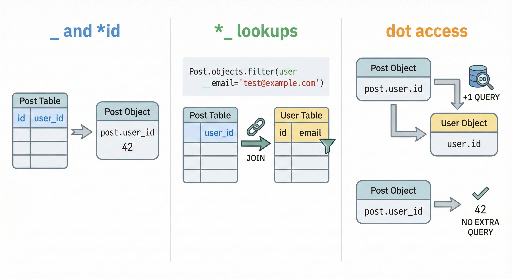
_(single underscore)- Just part of a name.
- Examples:
created_at,user_id. -
In Django, a
ForeignKeyautomatically creates a database column named<fieldname>_id. -
__(double underscore) - Django‑ORM‑only lookup separator.
- Only meaningful inside keyword argument names for methods like
filter(),exclude(),order_by(),values(). -
Examples:
age__gte=20(field + condition)user__email='a@b.com'(follow a relation to another field)created_at__date=...(transform then condition)
-
.(dot) - Python’s attribute‑access operator.
- Used for
obj.user,obj.user.id,qs.filter(...).order_by(...), etc. - In ORM terms, it simply accesses a Python object’s attribute; if the related object isn’t loaded yet, a lazy query may be issued.
Let’s dive deeper from a Django‑ORM perspective.
2. _ and _id: Meaning Around ForeignKey
2.1 Model Definition Example
from django.contrib.auth import get_user_model
from django.db import models

User = get_user_model()

class Post(models.Model):
    user = models.ForeignKey(User, on_delete=models.CASCADE)
    title = models.CharField(max_length=100)
This creates roughly the following columns in the database:
posttableid(PK)user_id(actual FK column)title
Django provides:
- A Python attribute
post.userthat returns aUserinstance. - A parallel attribute
post.user_idthat holds the integer PK value.
post.user    # -> User object (may trigger an extra query)
post.user_id # -> User’s PK value (already available)
2.2 Using _id in Queries
When querying a ForeignKey, you have several options:
# 1) Pass a User instance
Post.objects.filter(user=request.user)

# 2) Pass the PK value (equivalent)
Post.objects.filter(user=request.user.id)

# 3) Use the column name directly
Post.objects.filter(user_id=request.user.id)
All three compile to the same WHERE clause when the comparison is a simple PK check.
Bottom line:
_idis the actual column name in the database and the name you use when you want to refer to that column directly.
3. __ Double Underscore Chain: The ORM Lookup Separator
Now we’re into Django‑specific syntax.
The Django docs call __ the “ORM lookup separator.” It’s used to chain field names, traverse relationships, or attach lookups and transforms.
3.1 Basic Patterns
There are three common forms:
fieldname__lookup* Example:age__gte=20,name__icontains='kim'relationship__otherfield* Example:user__email='a@b.com',profile__company__name='...'field__transform__lookup* Example:created_at__date=date.today(),created_at__year__gte=2024
Examples:
# 1) Simple comparison
Post.objects.filter(title__icontains="django")

# 2) Follow a relation
Post.objects.filter(user__email__endswith="@example.com")

# 3) Compare only the year part of a date field
Post.objects.filter(created_at__year=2025)
When you traverse a relation like user__email, a JOIN is generated in the SQL.
Key takeaway: Whenever you see
__, the ORM is doing something more complex—JOINs, functions, or additional conditions.
4. The Dot Operator and user.id vs user_id
Let’s compare user.id and user_id side by side.
4.1 Difference in Django Instances
post = Post.objects.first()

post.user       # User object (may trigger a SELECT if not already loaded)
post.user.id    # PK of the loaded User instance
post.user_id    # FK value already present in the Post instance
Key points:
- Accessing
post.userfor the first time triggers a lazy query if the related User isn’t loaded. post.user_idis already available, so no extra query.- If you only need the PK,
user_idis lighter.
4.2 Performance Example: List View
# views.py
posts = Post.objects.all()   # no select_related

for post in posts:
    print(post.user.id)
- The initial query fetches all posts (1 query).
- Each time
post.useris accessed, a separate query to the User table runs. - 100 posts → up to 100 extra queries (classic N+1 problem).
Using user_id instead:
for post in posts:
    print(post.user_id)
- No additional queries; the FK value is already in the Post row.
If you use select_related("user"), you can safely use post.user.id without extra queries:
posts = Post.objects.select_related("user")
for post in posts:
    print(post.user.id)
5. Comparing user_id, user.id, and user__id Clearly
5.1 user_id – Direct DB Column
- Where?
- Instance:
post.user_id - Query:
filter(user_id=1),order_by("user_id") - Meaning
- The actual FK column in the
posttable. - Performance
- No extra query when reading from an instance.
- In a query, it results in a simple
WHERE "post"."user_id" = 1.
5.2 user.id – Accessing the Related Object’s PK
- Where?
- Only in Python code:
post.user.id - Meaning
- Load the
Userinstance (if not already loaded) and read itsid. - Performance
- Triggers an extra query if the User isn’t cached.
- Avoid if you only need the PK; use
user_idinstead. - With
select_related("user"), no extra query.
5.3 user__id – ORM Lookup Through a Relation
- Where?
- Only in query keyword arguments:
Post.objects.filter(user__id=1) - Meaning
- Follow the
userFK to theUsertable and apply a condition on itsid. - SQL
- Typically results in a JOIN:
JOIN user ON post.user_id = user.idandWHERE user.id = 1. - The ORM may optimize simple cases to
user_id = 1, but conceptually it’s a relational lookup.
6. Common Patterns That Can Confuse You
# 1) Direct FK column (_id)
Post.objects.filter(user_id=1)

# 2) Pass a User instance or PK value
Post.objects.filter(user=1)

# 3) Follow a relation with a lookup (__)
Post.objects.filter(user__id=1)
Post.objects.filter(user__email__icontains="@example.com")
Typical practice:
- For simple PK filtering:
user_id=...oruser=request.user. - For filtering on related fields:
user__email=...,user__is_active=True.
7. Practical Rules to Remember
-
Filter by FK value only
python
   Post.objects.filter(user=request.user)
   Post.objects.filter(user_id=request.user.id)
Both are fine; many teams prefer the object‑passing style for readability. -
Filter on a related model’s other field
python Post.objects.filter(user__is_active=True) Post.objects.filter(user__email__endswith="@example.com") -
Template or view when only the FK value is needed
django {{ post.user_id }} {# no extra query #} {{ post.user.id }} {# may trigger a query unless select_related #} -
When you’ll use multiple fields from the related model
python posts = Post.objects.select_related("user") for post in posts: print(post.user.username, post.user.email) -
Be mindful that
__chains can introduce JOINs * Over‑using them, especially with reverse FK lookups, can lead to duplicate rows or heavy queries.
8. TL;DR
_– just a name;<field>_idis the actual FK column.__– ORM‑only lookup separator for chaining fields, relations, transforms, and lookups..– Python attribute access;user.idloads the User instance first.user_id– the FK value stored in the Post table.user.id– the PK of the related User instance (may trigger a query).user__id– a query that follows the relation and applies a condition on User.id.
Knowing these distinctions helps you write clearer queries, avoid unnecessary JOINs or N+1 problems, and make code reviews smoother.


There are no comments.