If the first part was about ‘why it was made’,
the second part discusses ‘how it was made’.
Personally, when it comes to web application development, I feel much more comfortable handling backend systems like Django, PostgreSQL, Redis, and Docker.
However, this project was conducted almost entirely with pure vanilla JS + HTML5 Canvas.
Frontend technologies that I would normally not delve into became core elements of this game.
And surprisingly…
it was incredibly fun.
This was a technical factor that made me even more immersed.
Usually, I lean towards saying I "don’t like" frontend work rather than "I hate it"—but perhaps the power of love for 豆柴の大群 turned something I "dislike" into something I enjoyed.

1. HTML5 Canvas – A World Like “Paint + Animation”

The core of MAME RUN!! is HTML5 Canvas.
It acts like a ‘canvas’ created over the webpage, where the game is constructed by directly drawing pixels.
Typically, web development follows this flow:
-
Create buttons (HTML)
-
Add color (CSS)
-
Add some behavior (JS)
But with Canvas, it’s completely different.
The Canvas operates on a structure that continuously redraws at 30-60fps.
Every frame involves:
-
Clearing the background
-
Redrawing
-
Drawing the character
-
Drawing obstacles
-
Calculating collisions
-
Updating the score
-
Scheduling the next frame
This process repeats dozens of times every second.
Modern web browsers feel incredibly powerful, almost on par with game engines.
2. Jumping and Gravity: “The Magic Created by Just 3 Lines of Code”
The basic action of ‘jumping’ in the game is actually implemented with simple physics.
dino.vy += gravity * dt;  // Apply gravity
dino.y  += dino.vy * dt;  // Update position

if (dino.y >= ground) {
    dino.y = ground;
    dino.vy = 0;
}
With this simple logic,
Leona can jump, land, and fall smoothly, making it feel natural.
Without a game engine,
I felt a small sense of wonder realizing, "Ah... just with this basic physics, smooth movement can be achieved."
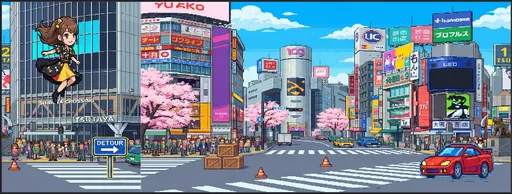
3. Sprite Animation – Life Comes Alive When Leona Runs
Leona's running motion is represented by a 6-frame sprite sheet as shown in the next image.
(※ Suggest inserting sprite images in the blog)
In JS, you can slice the sprite and draw it for each frame:
const frameWidth = sprite.width / 6;
ctx.drawImage(
  sprite,
  frameIndex * frameWidth, 0, frameWidth, sprite.height,
  dino.x, dino.y, dino.width, dino.height
);
By just changing the frame index continuously,
Leona can cutely run.
In that moment, it felt like the game gained ‘life’.
Animation is crucial in game development.
4. Random Obstacle Generation – “The Key to Removing Monotony”
There are several types of obstacles.
Orange cones
Red cones
Yellow cones
Motorcycles (2 colors)
Cars (2 types)
Signs (three kinds)
If only 1-2 types are repeated, it quickly becomes boring,
but by mixing various types at random intervals, the flow of the game truly comes alive.
const key = OBSTACLE_KEYS[Math.random() * length];
const interval = 0.8 + Math.random() * 1.2;
It’s a very simple randomness, but
the playing experience feels completely different.
5. Collision Detection – The Most Challenging Yet Fun Aspect
Collision detection is commonly done using what is called “AABB box collision”.
if (dino.x < ob.x + ob.width &&
    dino.x + dino.width > ob.x &&
    dino.y < ob.y + ob.height &&
    dino.y + dino.height > ob.y) {
    // Collision!
}
The important points here are
If the detection is too strict, the game becomes frustrating.
If it’s too lenient, the difficulty of the game drops.
Thus, both Leona and the obstacles have their hitboxes reduced by about 10-15% to create a “pleasant difficulty”.
This fine-tuning was quite enjoyable.
I began to understand why game developers put so much energy into balancing difficulty.
6. Distance-Based Stage System – Clear in 50 Seconds
Stage 1 was designed to be cleared in about 50 seconds.
So I assumed Leona would move at 16m per second.
Target distance: 800m
Speed: 16 m/s → About 50 seconds
This wasn’t determined by numbers alone; I actually played around 30-40 times to test
“Is this length enjoyable enough to play through and want to try again?”
It was a small but critical element that influenced the player experience.
7. Server Integration – Score Ranking and Record Storage
As a backend developer, it was natural to set up the server part using Django + DRF.
Submitting scores via POST
Validation in the serializer
Non-logged-in users are recorded with a guest_id
Best scores per user are managed in the UserScore table
TOP 5 is returned as an HTML snippet for JS to replace
Thus, right at game over, the TOP 5 ranking is updated in real-time.
Interestingly, even within the Canvas game,
the stability of the backend and the structured flow of data provide immense support.
The backend systematically organizes character images and dialogue data and sends them combined to the browser.
8. Mobile Compatibility – Far More Challenging Than Expected
The most unexpected difficulty in creating a web game was the mobile environment.
Resolution handling
Touch actions
Canvas ratios
Rendering performance
Background scroll speed adjustments
While it runs very smoothly on desktops,
on mobile, there were issues like minor frame drops, touch responsiveness, and canvas size calculations.
Although resolved eventually,
I found myself naturally saying, “I respect frontend developers...”
9. Concluding the Technical Edition
As someone who enjoys backend work and primarily develops APIs, this was my first time making a design-centric game in JS on the web. Although I had no choice but to handle frontend tasks occasionally, especially I had never used HTML5 Canvas this deeply before.
However, through this project, I learned that:
The web is surprisingly powerful
The JavaScript I once disliked for being messy is quite an interesting language
Game development is about ‘a combination of small techniques’
What began as a project fueled by fandom also provided substantial learning and growth as a developer.
Upcoming Part (Part 3: Story Edition)
In the next post,
I plan to cover the behind-the-scenes of worldbuilding and storytelling, including “Why does it start in Shibuya?”, “Why Tokyo Dome?”, “How were character setups determined for each member?”




There are no comments.