These days, the term “vibe coding” has emerged,
which means when you ask an AI agent, web service code is generated quickly.
However, one thing remains unchanged.
-
How to divide the servers
-
Where to deploy
-
How to rollback and manage the service
This is still the responsibility of humans.
While AI can write code effectively, it doesn't replace the “operational phase issues”.
In this article, I will particularly explore the importance of staging and summarize what to check during staging.
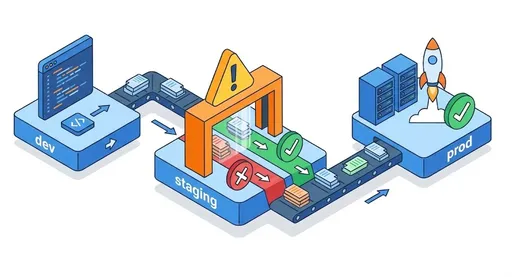
1. Even if AI writes the code, deployment remains

If you say to an AI agent:
“Create a simple TODO web app with Next.js”
“Connect this API to PostgreSQL”
The code comes out quickly.
However, AI does not typically mention the following:
“Now let’s deploy it to the staging server instead of the dev server,
and check the DB/cache/environment variable configurations are the same as production.”
This is because if the person asking the questions and giving the instructions is unaware of this experience,
AI won’t think in that direction either.
As a result, many beginner developers:
-
Only check things that run well on the dev server
-
Immediately deploy to the prod server
-
Then face explosions 💣 due to issues with DB/cache/environment variable/domain settings
Only then do they realize, “Ah... so this is what staging is.”
2. The risks of going straight from dev to prod
“Isn’t the code bundled in a Docker image the same everywhere?”
It may seem right at first glance, but in actual operation, the following is different.
-
What database is being referenced
-
dev:
dev-db, prod:prod-db -
The connection strings, security settings, account permissions, and data volumes differ
-
-
Cache/Message Queue
- Addresses, authentication, and sizes differ for Redis, RabbitMQ, Kafka, etc.
-
Environment Variables
-
NODE_ENV,API_BASE_URL,PAYMENT_PROVIDER_KEY… -
In dev, they may be empty or dummy values, but in prod, actual keys are used
-
-
External Integrations
-
Payments, SMS, Email, SSO, External APIs, etc.
-
Dev is sandbox, prod is real environment
-
Having the same Docker image doesn’t mean the “environment” is the same.
Even if you say you completed the web application,
deployment and operation are entirely different realms.
Thus, deploying straight from dev to prod is akin to saying,
“Since testing was completed locally, let’s have beta testing with actual customers right away.”
3. Why is staging essential?
Staging can simply be described as:
“A rehearsal stage configured as closely as possible to the production environment”
It consists of:
-
Applications with the same version as prod
-
Infrastructure configurations almost identical to prod
-
Only using test data, domain, and accounts
If there is no staging:
-
Code that runs well in dev crashes in prod
-
When searching for causes, “environment differences” are mostly to blame
-
Resulting in a bad loop of emergency patches → immediate prod redeployments → more issues…
On the other hand, using staging effectively allows you to:
-
“See how this change would appear in the actual production environment”
in advance -
Conduct rehearsals of infrastructure setup, security settings, and data migrations as if in real life
-
Allow QA, planners, designers, and business personnel to
preview screens and functionalities before actual operation
Especially for beginner developers:
-
It’s crucial to develop the perspective of “observing the entire operational environment”,
-
And that training takes place in staging.
4. Must-Check Items in Staging
So, what should you look for in the staging environment?
Let’s summarize by item.
4.1 Environment Variables and Settings
-
DATABASE_URL -
REDIS_URL/CACHE_URL -
API_BASE_URL -
SECRET_KEY,JWT_SECRET_KEY -
External API keys, webhook URLs, etc.
Document “how dev and prod settings differ” and check that staging follows the same pattern as prod.
Checkpoints
-
Ensure the structure of the staging env file or settings
is the same as prod -
Confirm sensitive information is well hidden in environment variables/secret management tools
-
Make sure settings are not hardcoded
4.2 DB and Data Migration
-
Ensure migration scripts (
prisma migrate,django migrate,migration.sql, etc.) work properly in a data schema similar to prod -
Check if there are errors due to indexes, unique constraints, foreign key constraints, etc.
-
Ensure dummy data doesn’t cause issues with the actual user interface and workflow
Checkpoints
-
Verify that the staging DB has an appropriate amount of test data
(Testing only on an empty DB is not meaningful.) -
It’s also a good idea to practice rollback strategies in staging.
4.3 Authentication, Authorization, and Session
-
Login/Signup flows
-
OAuth/SSO integration (Google, Kakao, etc.)
-
Different screens/API behaviors based on roles
Checkpoints
-
Ensure you can login in staging the same way as in production
(Check that there is no temporary dev-only bypass logic.) -
Ensure that different accounts with different permissions (admin, regular user, etc.)
have menus/buttons/actions functioning correctly
4.4 External Integrations: Payments, SMS, Emails, Notifications, etc.
-
Payments (gateway) → sandbox/test mode
-
SMS/Kakao alarm messages → test channel
-
Email sending → test emails, ensure they don’t go to actual customers
Checkpoints
-
Verify that the staging environment uses actual external integration paths,
but with test accounts rather than real customer accounts -
Also check how errors are handled (payment failures, timeouts, etc.)
4.5 Frontend + Backend Integration
Even if the frontend and backend run well locally,
other issues may arise when staging (actual domains/reverse proxy/SSL) come into play.
-
CORS settings
-
Mixing HTTPS/HTTP
-
Cookie domain/secure settings
-
Path routing issues with reverse proxies (Nginx, Traefik, etc.)
Checkpoints
-
Ensure all pages are operational based on the staging URL
(Check if there are any local-only URLs lurking around) -
Check the browser developer tools’ Network tab for
no CORS, 301/302, 4xx/5xx errors
4.6 Performance and Resource Usage
Initially, performance issues may not be apparent,
yet running even a slight load test in staging can reveal potential problems in advance.
-
API response times
-
Number of DB queries and whether there are N+1 queries
-
Performance on cache misses
-
Memory/CPU usage
You don’t need an elaborate load testing tool.
-
Simply using staging with several user roles concurrently and checking logs
for any slow parts can already qualify as a meaningful “mini-load test”.
5. How to Start Setting Up a Staging Environment?
You don’t need to be perfect from the start.
For small scale services, here’s a way to get started.
5.1 Example of Minimal Setup
-
dev
- Local development environment (Docker compose, local DB, etc.)
-
staging
-
Deployed on the same cloud/platform as prod
-
Domain:
staging.example.com -
Separate DB/cache/storage
-
-
prod
- Operational environment used by actual customers
Deployment pipelines can also be simple:
-
Merge to
main→ automatically deploy to staging -
QA/self-check in staging
-
Push a specific tag (
v1.0.0) → deploy to prod
Even just this is sufficient to:
-
Thwart “dev → directly to prod” altogether
-
Instill a habit of always going through staging.
6. Beginners Should Use Staging “Excessively”
Most beginner developers underestimate staging.
-
“It works fine in dev…”
-
“I don’t know what to check in staging…”
However, the actual difference in skill lies more in how stably one handles operation and deployment than in code quality.
-
It’s important that the features work well, and
-
not stopping the service is even more important.
Staging serves as a safety device connecting the two
and is the best practice ground for developers to learn the “service operation perspective.”
Next time you create a new web service, try this:
-
From the design phase, sketch both prod and staging together
-
Automate deployments in the staging → prod order
-
Ensure critical features are extensively tested in staging
“just like in real production” before deploying to prod
In an age where AI writes code for you,
the ability to design and take responsibility for deployment and operation will become an even greater differentiator.
Staging is the most practical tool to develop that ability.



There are no comments.