When it comes to HTTP versions, people often think:
“Isn’t everything on the web HTTP anyway? What’s so different between 1.1 and 2?”
“Can’t we just use the new version, HTTP/2?”
In summary:
-
HTTP/1.1 vs HTTP/2 is more about the difference in how to send the same HTTP semantics (methods/headers/status codes, etc.) more efficiently rather than being “completely different protocols.”
-
In real services, it’s not about “choosing one of the two,” but rather, the server supports both and the client chooses whichever is possible.
Let’s summarize the key points from a developer's perspective below.
1. Quick Overview of HTTP/1.1

1) Text-based Protocol
HTTP/1.1 is the request/response format that we commonly see.
GET /index.html HTTP/1.1
Host: example.com
Connection: keep-alive

HTTP/1.1 200 OK
Content-Type: text/html
Content-Length: 1234

<html>...</html>
-
It’s text-based, so it’s easy to debug,
-
You can grasp the structure using tools like
curl,telnet,ncwithout much effort.
2) Persistent Connection + Pipelining
A significant issue with HTTP/1.0 was that it opened a new TCP connection for each request, whereas,
HTTP/1.1 made persistent connection (keep-alive) the default,
allowing multiple requests to be sent sequentially over a single connection.
Additionally, there was a feature called HTTP pipelining:
-
It sent requests in succession without waiting for responses.
-
And received responses in order.
However, it’s rarely used in actual browsers,
as it still has a “structure that needs to be processed sequentially,” which leads to performance issues.
3) HOL (Head-of-Line) Blocking Problem
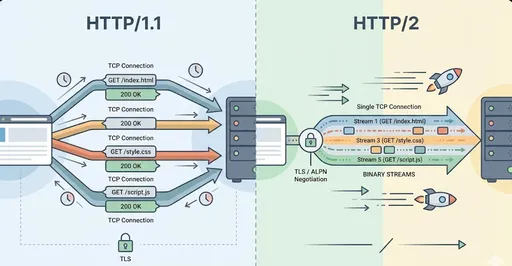
A typical bottleneck of HTTP/1.1 is the HOL (Head-of-Line) Blocking.
-
Requests must be handled sequentially over a single connection.
-
If the first request slows down, all subsequent requests have to wait as well.
-
Therefore, browsers have opened multiple TCP connections per domain (for example, a maximum of 6) to alleviate this issue.
In summary:
HTTP/1.1 is about “creating multiple pipes to reduce bottlenecks.”
(Several TCP connections)
2. What’s Different About HTTP/2?
The goals of HTTP/2 are clear.
-
Reduce latency
-
Utilize network resources more efficiently
To extract the key points:
-
Binary Framing
-
Stream-based Multiplexing
-
Header Compression (HPACK)
-
(Originally) Server Push – effectively dead in browsers
2-1. Text → Binary Framing
HTTP/1.1 relies on line-based text parsing, but HTTP/2 breaks everything into frames, which are binary chunks.
-
Headers are sent as HEADERS frames.
-
The body is sent as DATA frames.
-
These frames belong to a specific stream ID.
Developers rarely need to deal directly with frames,
but this enables features like multiplexing, header compression, and prioritization.
2-2. Multiplexing
This is where the most noticeable difference occurs.
-
HTTP/1.1: Processes request-response sequences sequentially over a single TCP connection
-
HTTP/2: Can send multiple streams simultaneously over a single TCP connection.
In other words:
“Instead of needing to open multiple TCP connections,
I can send requests and responses simultaneously over one connection.”
This allows:
-
Even if a single HTML page requests dozens or hundreds of resources,
-
It can retrieve them simultaneously while keeping only one connection open,
-
Which is particularly beneficial in mobile environments or high RTT conditions.
However, HOL Blocking still exists at the TCP level, so this area has seen further improvement in HTTP/3 (QUIC).
2-3. Header Compression (HPACK)
HTTP request/response headers often contain a lot of duplication.
-
Cookie,User-Agent,Accept-*etc. -
Headers might add hundreds of kilobytes of data with every request.
HTTP/2 employs a header compression method called HPACK to reduce duplication among these headers.
-
Frequently used headers are registered in a table and sent with short indexes.
-
Only the parts that differ from previous requests are efficiently encoded.
This greatly benefits especially single-page applications (SPA) with numerous requests or resource-heavy pages.
2-4. Server Push is Effectively Dead
Initially, the Server Push feature in HTTP/2, which allowed the server to push CSS/JS before the client requested it, was considered a significant advantage. However, in practice:
-
It’s challenging to implement,
-
There are problems with caching/duplicate resources,
-
And real performance improvements have been negligible, or even worse in some cases.
As a result, Chrome/Chromium has disabled it by default since 2022 (Chrome for Developers)
Firefox is also expected to remove support in 2024, making this feature effectively dead in the browser ecosystem.
Thus, when discussing HTTP/2 today, Server Push can be seen as a “historical feature.”
3. HTTPS, ALPN, and “Choosing h2 vs http/1.1”
In real service scenarios, whether to use “HTTP/1.1 or HTTP/2” is determined automatically during the TLS Handshake process between client and server.
This is managed by a TLS extension called ALPN (Application-Layer Protocol Negotiation).
-
Client: “I can handle both
h2andhttp/1.1.” -
Server: “Then let’s go with
h2.” (Or “I can only dohttp/1.1.”)
Example configuration for Apache:
Protocols h2 http/1.1
With this configuration:
-
Modern browsers that support HTTP/2 will automatically use HTTP/2 (h2)
-
Older clients will automatically communicate using HTTP/1.1
Most major browsers already support HTTP/2 well,
and many websites are enabling HTTP/2.
4. “In what cases do I separate them?” – Summary from a Development Perspective
Let’s look at the various cases regarding the core of this question.
4-1. General Web Services (for Browsers)
A near-optimal strategy would be:
“Turn on HTTPS + HTTP/2 by default, and keep HTTP/1.1 as a fallback.”
-
Most web servers (Nginx, Apache, Envoy, etc.) and CDNs can automatically negotiate just by enabling the HTTP/2 support option.
-
It’s rare to need to explicitly decide “This request goes with 1.1, that one with 2” at the application level.
In short, if you are creating a new service, consider ‘HTTPS with HTTP/2 enabled’ as the default.
4-2. Internal API / Microservices Communication
Here, there are a bit more options.
-
If you’re already running well with REST + HTTP/1.1,
-
There might not be a need to rewrite it to HTTP/2.
-
However,
-
If you're exchanging very frequent short requests between identical services,
-
Or using HTTP/2-based protocols like gRPC,
-
Then it makes sense to use HTTP/2.
-
Thus,
-
“For existing legacy REST APIs” → Keep 1.1, with HTTP/2 termination at the proxy/load balancer if needed.
-
“Introducing new gRPC with high-frequency microservice calls” → Actively utilize HTTP/2.
4-3. Debugging, Logging, Legacy Environments
HTTP/1.1 remains useful in certain scenarios.
-
Being text-based makes it easy to view content in tcpdump, Wireshark
-
Some old proxies/firewalls/clients may not support HTTP/2.
-
For simple internal tools or test servers, it's often sufficient not to use HTTP/2.
In practice, in many environments:
-
External (Browser) ↔ Front Proxy (CDN/Load Balancer): HTTP/2
-
Proxy ↔ Backend Service: HTTP/1.1
Mixed structures are quite common.
5. A Realistic Response to “Can’t we just use HTTP/2?”
Theoretically:
“If it’s a new public web service, it’s reasonable to consider HTTP/2 as the default.”
This holds true.
However, practically:
-
It’s hard to eliminate HTTP/1.1 entirely.
-
Old clients or special environments may still only support 1.1.
-
In debugging/tools/internal systems, 1.1 is often easier to work with.
-
-
From a server perspective, ‘supporting both’ is common.
-
Web server settings often enable both
h2 http/1.1, -
Allowing clients to choose the highest supported protocol automatically.
-
-
We are entering an era considering HTTP/3 (QUIC).
-
Modern browsers/services already support HTTP/3.
-
But even this usually opens “HTTP/1.1 + HTTP/2 + HTTP/3” concurrently,
-
Allowing clients to negotiate.
-
Thus, the realistic conclusion is:
“Instead of insisting on HTTP/2 alone,
Having HTTP/2 enabled by default while keeping HTTP/1.1 as a natural fallback is the best approach.”
End of the argument.
6. Summary
Let’s summarize once more:
-
HTTP/1.1
-
Text-based
-
Persistent connection + (theoretical) pipelining
-
Due to the HOL Blocking issue, browsers use multiple TCP connections.
-
-
HTTP/2
-
Binary framing
-
Multiplexing that processes multiple streams simultaneously over a single TCP connection
-
HPACK header compression
-
Server Push is effectively dead in practice.
-
-
Usage Strategies
-
For external web (browser-focused): Use HTTPS + enable HTTP/2 and keep HTTP/1.1 as fallback.
-
For internal APIs: Maintaining existing REST frameworks on 1.1 is okay; use HTTP/2 actively with high-frequency/streaming/gRPC.
-
For debugging/legacy: HTTP/1.1 remains convenient and useful.
-
A good line for developers to remember:
“Don’t worry about choosing the version in app code,
enable HTTP/2 on the server and leave the rest to protocol negotiation (ALPN).”


There are no comments.