Grundlegendes zu NumPy ndarray für Deep-Learning-Anfänger: array, dtype, shape, reshape, astype
1. Warum mit ndarray beginnen?

Beim Deep Learning stößt man immer wieder auf solche Codezeilen.
- Die
shapeeines Eingabetensors prüfen - Für Batches
reshapeverwenden - Für GPU-Berechnungen in
float32umwandeln …
All diese Operationen bauen auf dem NumPy-ndarray auf.
- PyTorchs Tensor ist konzeptionell sehr nah am NumPy-ndarray.
- Eingaben, Gewichte und Ausgaben von Deep‑Learning-Modellen sind alles mehrdimensionale Arrays (Tensoren)
Daher gilt: ndarray zu verstehen heißt, die Grundsyntax von Tensor-Operationen zu beherrschen.
2. Was ist ein ndarray?
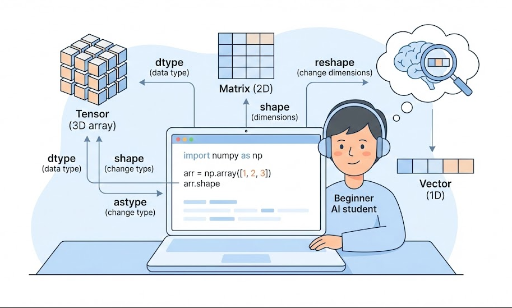
ndarray steht für n-dimensional array, also ein „n-dimensionales Array“.
- 1‑D: Vektor
- 2‑D: Matrix
- 3‑D und höher: Tensor (z. B. Bild‑Batches, Zeitreihen, Videos)
Ein einfaches Beispiel:
import numpy as np

x = np.array([1, 2, 3])            # 1‑D (Vektor)
M = np.array([[1, 2], [3, 4]])     # 2‑D (Matrix)

print(type(x))          # <class 'numpy.ndarray'>
print(x.ndim, x.shape)  # Dimensionen, Form
print(M.ndim, M.shape)
ndim: Anzahl der Dimensionenshape: Größe jeder Dimension
3. Wie ähnlich ist ein PyTorch Tensor?
Ein PyTorch‑Tensor ist ebenfalls ein mehrdimensionales Array.
import torch

x_np = np.array([[1, 2], [3, 4]])   # NumPy ndarray
x_torch = torch.tensor([[1, 2], [3, 4]])  # PyTorch Tensor

print(type(x_np))      # numpy.ndarray
print(type(x_torch))   # torch.Tensor

print(x_np.shape)      # (2, 2)
print(x_torch.shape)   # torch.Size([2, 2])
Gemeinsamkeiten:
- Beide sind mehrdimensionale Zahlenarrays
shape,reshape,dtypesind nahezu identisch- Operationen wie
+,*,@funktionieren ähnlich
Unterschiede (wichtig für Deep Learning):
- NumPy: CPU‑basiert, kein automatisches Differenzieren
- PyTorch‑Tensor: GPU‑unterstützt, automatische Differenzierung (Autograd)
Daher die übliche Praxis:
- Konzept‑Übung / Datenmanipulation → NumPy
- Modell‑Training → PyTorch
Je vertrauter man mit ndarray ist, desto natürlicher wirken PyTorch‑Tensor‑Operationen.
4. np.array: Grundlegende Erzeugung von ndarray
Die grundlegende Funktion zum Erstellen eines ndarray ist np.array.
4.1 Python‑Listen → ndarray
import numpy as np

# 1‑D Array (Vektor)
x = np.array([1, 2, 3])
print(x)
print(x.ndim)   # 1
print(x.shape)  # (3,)

# 2‑D Array (Matrix)
M = np.array([[1, 2, 3],
              [4, 5, 6]])
print(M)
print(M.ndim)   # 2
print(M.shape)  # (2, 3)
- Python‑Listen bzw. Listen‑von‑Listen werden zu
ndarray - Häufige
batch_size x feature_dim‑Matrixen sind genau dieser Form
4.2 Schnell initialisieren
Für Experimente oder Lernbeispiele erzeugt man oft Arrays mit Nullen oder Zufallswerten.
zeros = np.zeros((2, 3))       # 2x3 Matrix, alles 0
ones = np.ones((2, 3))         # 2x3 Matrix, alles 1
randn = np.random.randn(2, 3)  # Normalverteilte Zufallswerte

print(zeros.shape)  # (2, 3)
Das Muster gilt auch in PyTorch:
import torch

zeros_t = torch.zeros((2, 3))
ones_t = torch.ones((2, 3))
randn_t = torch.randn((2, 3))
5. dtype: Datentypen verstehen
dtype steht für data type und gibt an, welche Art von Zahlen im Array gespeichert sind.
Typische Werte:
int32,int64: Ganzzahlenfloat32,float64: Fließkommazahlen
Beispiel:
x = np.array([1, 2, 3])
print(x.dtype)  # meist int64 oder int32

y = np.array([1.0, 2.0, 3.0])
print(y.dtype)  # meist float64
5.1 dtype beim Erstellen festlegen
x = np.array([1, 2, 3], dtype=np.float32)
print(x.dtype)  # float32
Im Deep Learning wird häufig float32 (PyTorch‑torch.float32) verwendet, weil es GPU‑freundlich ist und Speicher spart.
6. shape: Die Form des Arrays
shape ist ein Tupel, das die Größe jeder Dimension angibt.
import numpy as np

x = np.array([1, 2, 3])
print(x.shape)  # (3,)

M = np.array([[1, 2, 3],
              [4, 5, 6]])
print(M.shape)  # (2, 3)
Typische shape‑Beispiele im Deep Learning:
- Einzelner Feature‑Vektor:
(feature_dim,)→ z. B.(3,) - Batch‑Daten:
(batch_size, feature_dim)→ z. B.(32, 3) - Bild‑Batch (PyTorch‑Standard):
(batch_size, channels, height, width)→ z. B.(32, 3, 224, 224)
Wenn man sich mit solchen shape‑Strukturen in NumPy vertraut macht, wird das Debuggen von Tensor‑Shape‑Fehlern in PyTorch viel einfacher.
7. reshape: Die Form ändern
reshape ändert die Form eines Arrays, ohne die Anzahl der Elemente zu verändern.
import numpy as np

x = np.array([1, 2, 3, 4, 5, 6])
print(x.shape)  # (6,)

M = x.reshape(2, 3)
print(M)
print(M.shape)  # (2, 3)
Wichtig:
- Die Gesamtzahl der Elemente muss gleich bleiben.
7.1 -1 für automatische Berechnung
In Batches oder Bildverarbeitung nutzt man häufig -1.
-1 bedeutet: „Berechne diese Dimension automatisch“.
x = np.array([[1, 2, 3],
              [4, 5, 6]])  # shape: (2, 3)

# Flach machen (flatten)
flat = x.reshape(-1)        # shape: (6,)
print(flat)

# Wieder zu 2 Zeilen, Spalten automatisch bestimmen
M = flat.reshape(2, -1)     # shape: (2, 3)
print(M)
PyTorch verhält sich analog:
import torch

x_t = torch.tensor([[1, 2, 3],
                    [4, 5, 6]])  # (2, 3)

flat_t = x_t.reshape(-1)        # (6,)
M_t = flat_t.reshape(2, -1)     # (2, 3)
Wenn man reshape beherrscht, lassen sich Aufgaben wie:
- CNN‑Feature‑Maps flatten
- RNN/LSTM‑Input in
(batch, seq_len, feature)bringen - Batch‑Dimension verschieben
einfach und intuitiv erledigen.
8. astype: Den Datentyp ändern
astype wandelt den Datentyp eines Arrays um.
import numpy as np

x = np.array([1, 2, 3])      # int
print(x.dtype)               # int32 oder int64

x_float = x.astype(np.float32)
print(x_float)
print(x_float.dtype)         # float32
Typische Deep‑Learning‑Anwendungen:
- Integer‑Labels in Float umwandeln für Loss‑Berechnung
- Daten, die als
float64eingelesen wurden, zufloat32normalisieren - Vor dem Übergang zu PyTorch den Typ anpassen
Beispiel:
import torch
import numpy as np

x = np.array([1, 2, 3], dtype=np.int32)
x = x.astype(np.float32)              # zu float32
x_torch = torch.from_numpy(x)         # Tensor
print(x_torch.dtype)                  # torch.float32
Unterschiedliche Datentypen führen in PyTorch zu Meldungen wie Expected Float but got Double.
9. Zusammenfassung: Die wichtigsten ndarray‑Konzepte
In diesem Beitrag haben wir folgende Punkte behandelt:
- Was ist ein
ndarray? – Grundlegende Datenstruktur für Deep Learning - Beziehung zu PyTorch‑Tensor – Konzeptuell fast identisch
np.array– Erzeugung aus Python‑Listendtype– Datentypen (int, float, 32/64‑bit)shape– Form des Arrays, häufigste Formen im Deep Learningreshape– Form ändern,-1für automatische Berechnungastype– Datentyp umwandeln
Wenn man diese sieben Konzepte beherrscht, kann man:
- Tensor‑Shape‑Fehler ohne Panik debuggen
- Code‑ und Formel‑Übersetzungen zwischen NumPy und PyTorch erleichtern
- PyTorch‑Tutorials und Beispiele mühelos nachverfolgen




Es sind keine Kommentare vorhanden.