適合深度學習初學者的 NumPy ndarray 基礎:array、dtype、shape、reshape、astype
1. 為什麼從 ndarray 開始?

在深度學習的實踐中,你會經常看到以下程式碼片段。
- 檢查輸入張量的
shape - 為批次處理使用
reshape - 為 GPU 計算將資料轉成
float32…
這一切的「根源」就是 NumPy 的 ndarray。
- PyTorch 的
Tensor幾乎完全仿照 NumPyndarray的結構 - 深度學習模型的輸入、權重、輸出皆為 多維陣列(即張量)
因此,深入理解 ndarray 就等於掌握張量運算的基礎語法。
2. ndarray 是什麼?
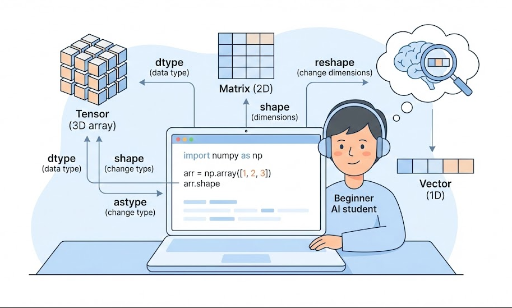
ndarray 是 N‑dimensional array 的縮寫,意即「N 維陣列」。
- 1 維:向量
- 2 維:矩陣
- 3 維以上:張量(如圖像批次、時序資料、影片等)
簡單範例:
import numpy as np

x = np.array([1, 2, 3])            # 1 維(向量)
M = np.array([[1, 2], [3, 4]])     # 2 維(矩陣)

print(type(x))          # <class 'numpy.ndarray'>
print(x.ndim, x.shape)  # 维度数,形状
print(M.ndim, M.shape)
ndim:維度數shape:各維度的大小
3. PyTorch Tensor 與 ndarray 的相似度
PyTorch 的張量最終也是「多維陣列」。
import torch

x_np = np.array([[1, 2], [3, 4]])   # NumPy ndarray
x_torch = torch.tensor([[1, 2], [3, 4]])  # PyTorch Tensor

print(type(x_np))      # numpy.ndarray
print(type(x_torch))   # torch.Tensor

print(x_np.shape)      # (2, 2)
print(x_torch.shape)   # torch.Size([2, 2])
共同點:
- 都是「多維數字陣列」
shape、reshape、dtype概念幾乎相同- 運算方式也相似(
+、*、@等)
差異(深度學習中重要):
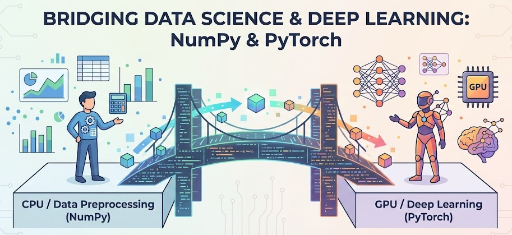
- NumPy:CPU、無自動微分
- PyTorch Tensor:可使用 GPU、支援自動微分
因此常見的使用方式:
- 概念練習 / 公式實驗 / 資料處理 → NumPy
- 實際模型訓練 → PyTorch
熟悉 ndarray 後,PyTorch 張量運算會更自然。
4. np.array:建立 ndarray 的基本方法
ndarray 最基本的建構函式是 np.array。
4.1 Python 列表 → ndarray
import numpy as np

# 1 維陣列(向量)
x = np.array([1, 2, 3])
print(x)
print(x.ndim)   # 1
print(x.shape)  # (3,)

# 2 維陣列(矩陣)
M = np.array([[1, 2, 3],
              [4, 5, 6]])
print(M)
print(M.ndim)   # 2
print(M.shape)  # (2, 3)
- 把 Python 的 列表 / 列表的列表 傳給
np.array就得到ndarray。 - 深度學習中常見的
batch_size x feature_dim矩陣也屬於此類。
4.2 快速產生初始值
在實驗或範例中,常需要 隨機或全 0/1 的陣列。
zeros = np.zeros((2, 3))       # 2x3 行列,全部 0
ones = np.ones((2, 3))         # 2x3 行列,全部 1
randn = np.random.randn(2, 3)  # 正態分布隨機數

print(zeros.shape)  # (2, 3)
這個模式在 PyTorch 也幾乎相同。
import torch

zeros_t = torch.zeros((2, 3))
ones_t = torch.ones((2, 3))
randn_t = torch.randn((2, 3))
5. dtype:理解數字的「資料型別」
dtype 表示「陣列中數字的型別」。
常見型別:
int32、int64:整數float32、float64:浮點數
範例:
x = np.array([1, 2, 3])
print(x.dtype)  # 通常 int64 或 int32

y = np.array([1.0, 2.0, 3.0])
print(y.dtype)  # 通常 float64
5.1 指定 dtype 建立
x = np.array([1, 2, 3], dtype=np.float32)
print(x.dtype)  # float32
深度學習中常用 float32(PyTorch 的 torch.float32),因為 GPU 計算適合且記憶體使用合理。
6. shape:讀取資料的「形狀」
shape 是一個元組,表示陣列各維度的大小。
import numpy as np

x = np.array([1, 2, 3])
print(x.shape)  # (3,)

M = np.array([[1, 2, 3],
              [4, 5, 6]])
print(M.shape)  # (2, 3)
深度學習中常見的 shape 範例:
- 單一特徵向量:
(feature_dim,)→ 例如(3,) - 批次資料:
(batch_size, feature_dim)→ 例如(32, 3) - 圖像批次(PyTorch 預設):
(batch_size, channels, height, width)→ 例如(32, 3, 224, 224)
熟悉 NumPy 的 shape 後,遇到 PyTorch 張量的 shape 錯誤時也能更快定位問題。
7. reshape:改變形狀
reshape 會在保持「元素總數不變」的前提下,改變陣列的形狀。
import numpy as np

x = np.array([1, 2, 3, 4, 5, 6])
print(x.shape)  # (6,)

M = x.reshape(2, 3)
print(M)
print(M.shape)  # (2, 3)
重點:
reshape前後的 總元素數必須相同。- 例子中 6 個元素 → (2 x 3) = 6 → 合法
7.1 使用 -1 自動計算
在批次或圖像處理中常用 -1。
-1 代表「自動計算這個維度」。
x = np.array([[1, 2, 3],
              [4, 5, 6]])  # shape: (2, 3)

# 轉成 1 維(flatten)
flat = x.reshape(-1)        # shape: (6,)
print(flat)

# 再轉成 2 行,列自動計算
M = flat.reshape(2, -1)     # shape: (2, 3)
print(M)
PyTorch 也類似:
import torch

x_t = torch.tensor([[1, 2, 3],
                    [4, 5, 6]])  # (2, 3)

flat_t = x_t.reshape(-1)        # (6,)
M_t = flat_t.reshape(2, -1)     # (2, 3)
熟悉 reshape 後,以下工作會更直觀:
- CNN 中的 feature map flatten
- RNN/LSTM 輸入整理成 (batch, seq_len, feature)
- 批次維度的前後調整
8. astype:改變 dtype
astype 用於 改變陣列的資料型別。
import numpy as np

x = np.array([1, 2, 3])      # int 型
print(x.dtype)               # int32 或 int64

x_float = x.astype(np.float32)
print(x_float)
print(x_float.dtype)         # float32
深度學習中常見情境:
- 把整數標籤轉成 浮點數 以計算 loss
- 把
float64資料統一成float32 - 在送入 PyTorch 前 對齊型別
範例:
import torch
import numpy as np

x = np.array([1, 2, 3], dtype=np.int32)
x = x.astype(np.float32)              # 轉成 float32
x_torch = torch.from_numpy(x)         # 轉成張量
print(x_torch.dtype)                  # torch.float32
若不對齊型別,PyTorch 會在運算時拋出類似「Expected Float but got Double」的錯誤。
9. 總結:今天學到的 ndarray 基本語法
本篇涵蓋:
ndarray是什麼? * 深度學習中所有資料結構的基礎——多維陣列- 與 PyTorch
Tensor的關係 * 概念上相同,深度學習版的ndarray np.array* 從 Python 列表產生ndarraydtype* 數字型別(整數/浮點,32/64 位)shape* 資料的形狀,深度學習中最常見的屬性reshape* 保持元素數不變,改變形狀(-1常用)astype* 資料型別轉換(int→float32等)
只要熟練掌握這七個概念(array、dtype、shape、reshape、astype),
- 在遇到張量形狀錯誤時不會慌張
- 能在論文公式與程式碼之間自如切換
- 更輕鬆跟隨 PyTorch 教學範例

目前沒有評論。