## Simplifying Dynamic Web Development with [[Django]] and HTMX: Utilizing Forms and Serializers {#sec-b233da7ff7c9}
In the previous post, we explored **how [[HTMX]] transmits data to the server**.
**Read the previous post** : [Simplifying Dynamic Web Development with Django and HTMX (Part 4): Payload Transmission Methods](/ko/whitedec/2025/1/27/django-htmx-csrf-token-integration/)
While traditional JavaScript's `fetch()` often involves constructing and sending JSON payloads directly, we confirmed that **HTMX operates more like collecting values from the DOM and sending them as form-data**.
This naturally leads to a question:
**"What is the most natural way to validate this HTMX-received data within Django?"**
Initially, many might think of **DRF Serializer**. Indeed, Serializers are powerful validation tools and can be used even without JSON. However, when used with HTMX, it can sometimes feel a bit forced.
Why is that?
The reason is simple:
**HTMX's fundamental flow aligns more closely with the world of HTML forms, and Django already has `Form` specifically designed for that very purpose.**
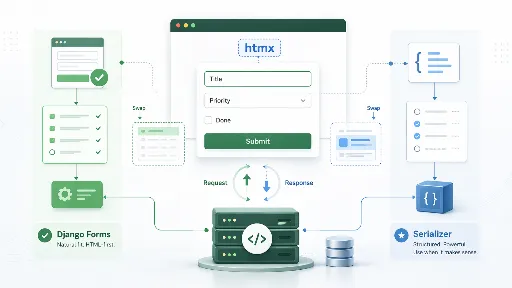
In this post, we will outline **how `Django Form` and `DRF Serializer` can each be utilized in handling HTMX requests**, and **which approach offers a more natural and practical choice**.
---
## The Data Sent by [[HTMX]] is Fundamentally "Form Data" {#sec-8c911eee119a}
As we explored in the previous part, HTMX primarily collects values from HTML elements and transmits them to the server. This involves sending input values within a `
```
This example is very simple, yet it effectively demonstrates the synergy between [[HTMX]] and Django Form.
* On failure, the entire form can be re-rendered
* User-entered values are preserved
* Error messages are naturally displayed next to their respective fields
With the traditional `fetch()` + JSON + manual DOM manipulation approach, implementing this flow would have required a considerable amount of JavaScript. However, the HTMX and Django Form combination allows for much simpler handling using only server-side code and templates.
---
## So, Are Serializers Unnecessary? {#sec-5f0d93fcd48a}
Saying **"Serializers are unnecessary"** might be an overstatement. Perhaps it's better to express it as: **"Serializers are not necessarily the default choice"**.
Indeed, [[DRF]] Serializers remain quite appealing in the following situations:
* If DRF is already extensively used throughout the project
* If you want to reuse the same validation logic for both APIs and server-rendered screens
* If the input validation logic is complex and already well-structured within a Serializer
* If there are plans to expose the same functionality to mobile apps or external APIs later on
In other words, the question isn't **"Can Serializers be used with HTMX?"**, but rather,
**"Is it truly advantageous for the overall architecture to bring in a Serializer here?"**
---
## Serializers Can Also Be Used {#sec-bfbe9c61b12c}
For example, let's say you already have a Serializer like the one below:
```python
from rest_framework import serializers
class TodoSerializer(serializers.Serializer):
title = serializers.CharField(max_length=100)
priority = serializers.IntegerField(min_value=1, max_value=5)
```
In this case, it can certainly be used with HTMX requests.
```python
from django.shortcuts import render
def todo_create_with_serializer(request):
if request.method == "POST":
serializer = TodoSerializer(data=request.POST)
if serializer.is_valid():
title = serializer.validated_data["title"]
priority = serializer.validated_data["priority"]
return render(request, "todos/partials/todo_item.html", {
"title": title,
"priority": priority,
})
return render(request, "todos/partials/todo_form_serializer.html", {
"errors": serializer.errors,
"data": request.POST,
}, status=400)
```
As you can see, **there are no technical issues whatsoever.**
This is because a Serializer is not a tool exclusively for receiving JSON.
However, a subtle difference emerges here.
When using a Form:
* Input value retention
* Field-by-field rendering
* Error binding
* Seamless connection with templates
These aspects flow naturally.
On the other hand, when using a Serializer:
* You have to manually unpack `serializer.errors` to fit the template structure
* Existing input values must be passed separately
* The developer needs to pay more attention to the connection with HTML form re-rendering
In other words, **while it can be used, it generally involves more manual work**.
This is precisely why Serializers might feel somewhat forced when used with [[HTMX]].
---
## Conclusion {#sec-37e5d418cdb7}
In the previous part, we examined how [[HTMX]] sends data. In this part, we summarized the most natural way to validate that data within Django.
* HTMX inherently pairs well with form-data
* Django Form is a tool specifically designed for this flow
* Therefore, in terms of compatibility with HTMX, Form is the most natural choice
* DRF Serializer can be used, but it's more akin to a strategic option
Personally, I believe that to effectively leverage HTMX, it's necessary to regain not only the **"sense of treating AJAX in an HTML-like manner"** but also the **"sense of utilizing Django Forms and form tags"**.
---
**Related Posts**
* [Simplifying Dynamic Web Development with Django and HTMX (Part 1)](/ko/whitedec/2025/1/27/django-htmx-dynamic-web-simplification/)
* [Simplifying Dynamic Web Development with Django and HTMX - Ajax (Part 2)](/ko/whitedec/2025/1/27/django-htmx-dynamic-web-simplification-2/)
* [Simplifying Dynamic Web Development with Django and HTMX (Part 3): Django Integration Methods](/ko/whitedec/2025/1/27/django-htmx-dynamic-web-simplification-3/)
* [Simplifying Dynamic Web Development with Django and HTMX (Part 4): How to Handle Payloads?](/ko/whitedec/2025/1/27/django-htmx-advanced-features/)